
Maintenance tracking software is any digital system used to record, monitor, and report on equipment maintenance work. At minimum, it needs to track work order assignments, due dates, and status, as well as provide basic reporting.
However, different teams have different requirements. Some also want to track asset history, labor, parts, costs, downtime, delays, and specific maintenance KPIs.
In this article, we’ll explore what equipment maintenance tracking typically covers. We will also look at different software options — from CMMS and specialized scheduling tools to simple Excel and Outlook setups — to help you decide what’s best for your team.
QUICK TAKEAWAYS
- Maintenance tracking focuses on monitoring work orders, maintenance schedules, and asset history to improve operational efficiency.
- Maintenance tracking software is not a standalone solution — it comes as a core functionality in CMMS, EAM, and other maintenance software.
- Choosing the right digital tool for maintenance tracking depends on your team’s size, budget, and maturity level.
- Integrating specialized scheduling add-ons with your existing maintenance software can fill workflow gaps by simplifying scheduling and tracking labor utilization.
What does maintenance tracking involve?
At its core, maintenance tracking is about following the progress of equipment maintenance work. This includes keeping tabs on preventive maintenance schedules and the execution of work orders to make sure everything gets done when it needs to. It’s about knowing what’s due, what’s overdue, what’s completed, and what’s left in the backlog.
But maintenance tracking can mean a lot more than just tracking WOs and PMs. In a broader sense, maintenance teams might want to track other types of information to improve efficiency and reduce costs, including:
- Maintenance history: Documenting past repairs and inspections to spot recurring problems or identify equipment trends.
- Parts inventory: Tracking spare parts and supplies to avoid stockouts and prolonged downtime.
- Maintenance costs: Monitoring expenses related to labor, parts, and downtime, helping to keep budgets under control.
- Asset performance: Tracking equipment performance and condition to spot potential issues early and prevent failures.
- Delay reasons: Marking down the root cause for each work order that has not been completed on time.
Here’s a more detailed breakdown of what mature maintenance teams usually track:
| Tracking category | Information to record | Why it matters |
|---|---|---|
| Asset information | Asset ID, location, class, criticality, manufacturer, model, meter readings | Connects work and costs to the correct equipment |
| Work-order details | Work-order ID, description, type, priority, status, requested date, due date | Shows what work is required and where it stands |
| Preventive maintenance | PM trigger, frequency, due date, completion date, missed or deferred status | Helps prevent overdue recurring maintenance |
| Work readiness | Job plan, estimated hours, parts, tools, skills, permits, equipment access | Separates executable work from unplanned backlog |
| Labor | Assigned technician, trade, shift, scheduled hours, actual hours, overtime | Supports workload planning and labor-cost analysis |
| Materials | Parts required, parts used, availability, stock level, purchasing status | Identifies material-related delays and shortages |
| Execution | Start time, completion time, work performed, technician notes | Provides an accurate maintenance history |
| Delays | Delay reason, comments, responsible department, revised date | Helps identify recurring scheduling obstacles |
| Failure information | Failure code, cause, remedy, downtime, production impact | Supports reliability analysis and recurring-failure detection |
| Costs | Labor, materials, contractors, downtime, total maintenance cost | Helps evaluate asset and maintenance-program costs |
| Performance | PM compliance, schedule compliance, backlog, utilization, MTTR, MTBF, etc. | Shows whether maintenance performance is improving |
Don’t confuse maintenance tracking with asset or condition tracking
Maintenance tracking software, asset tracking software, and equipment condition tracking all serve related but different purposes.
| Software category | What it primarily tracks |
|---|---|
| Maintenance tracking system | Work orders, preventive maintenance, repair history, labor, parts, costs, downtime, delays, and maintenance KPIs |
| Asset tracking system | Asset identity, ownership, assigned user, current location, movement, availability, and status |
| Condition-monitoring system | Equipment readings and operating conditions, such as vibration, temperature, pressure, runtime, and alarms |
Many CMMS, EAM, and FSM (Field Service Management) platforms combine these three functions, but they are not interchangeable.
The four stages of maintenance tracking maturity
Maintenance tracking software helps you organize, monitor, and manage your equipment maintenance schedules and work. Which one you should use depends on your goals and the maturity of your maintenance department.
These are the four stages of maintenance tracking maturity that many established organizations go through:
| Stage | Typical tools | Main characteristics | Next priority |
|---|---|---|---|
| 1. Informal | Paper, whiteboards, memory | Limited history, inconsistent tracking, reactive work | Create standard records |
| 2. Structured | Excel, shared folders, calendars | Basic visibility, manual updates, limited automation | Centralize maintenance data |
| 3. Centralized | CMMS or EAM | Work orders, PMs, assets, history, costs, and inventory in one system | Improve planning and scheduling execution |
| 4. Connected | CMMS/EAM plus scheduling, workforce, BI, and condition systems | Real-time labor and work visibility, automated reporting, connected workflows | Continuous optimization |
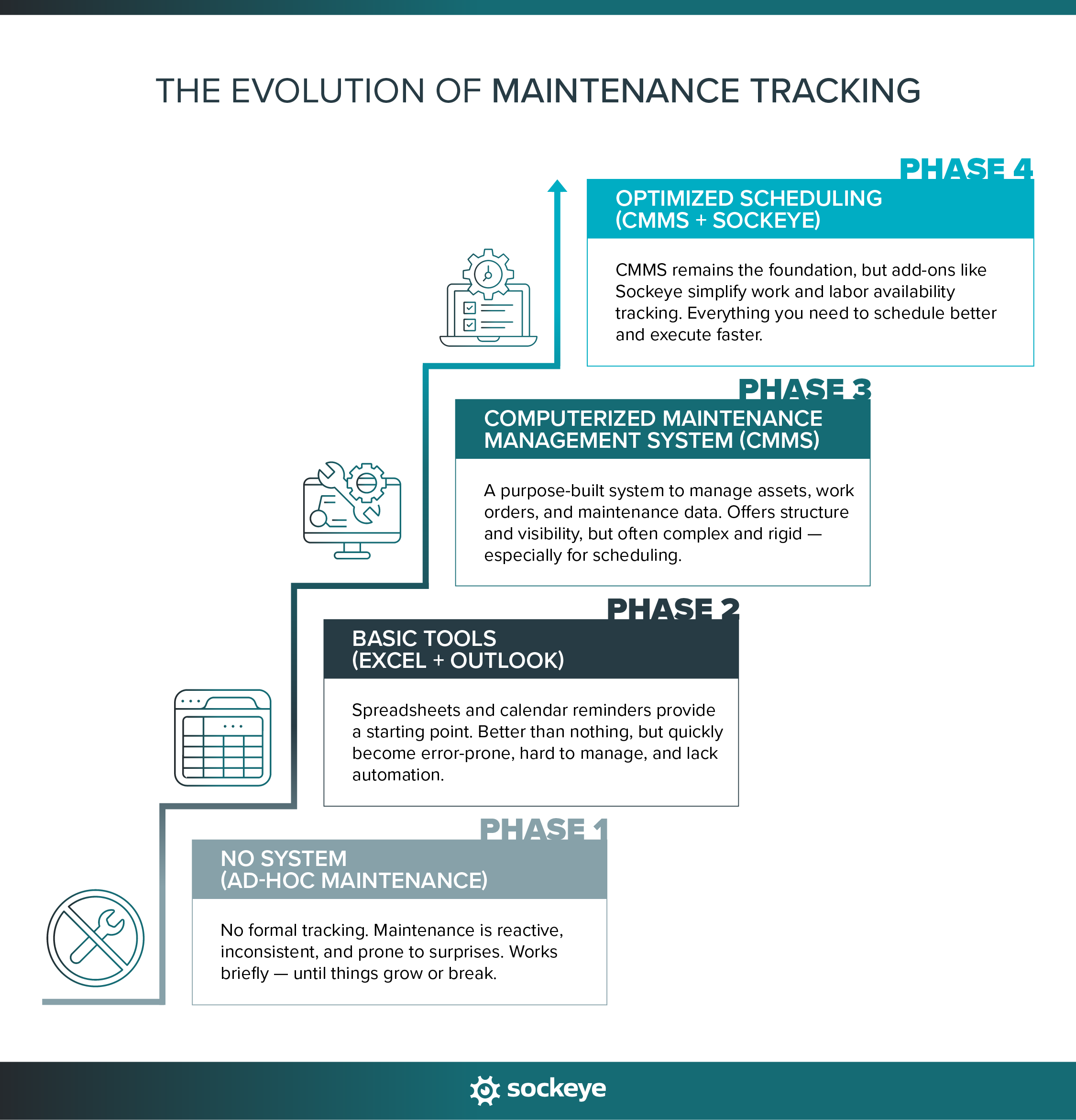
Most maintenance teams start by not tracking anything formally (or just the very basics). But that leads to inefficiencies and surprise breakdowns as soon as the team or the workload starts growing.
This helps them realize the value of systemic maintenance tracking. If they are cost-conscious, which most maintenance teams are, they will first test basic tools like Excel spreadsheets and Outlook calendars. While that is better than nothing, it’s not a long-term solution.
As their maintenance database grows or their operations continue to scale, data inaccuracies and inefficiencies become too big to ignore. So, they eventually upgrade to a CMMS, EAM, or FSM to streamline operations further. Learn more about this in our CMMS vs Excel debate.
Since there are hundreds of different CMMS providers, experiences will vary. Many teams find that their chosen CMMS is a good overall investment but has one major flaw — it makes work order scheduling and tracking way more complicated than it needs to be. They solve that problem by integrating a specialized scheduling add-on with their existing CMMS software.
Since there are hundreds of different maintenance platforms, experiences will vary. Many teams find that their chosen solution is a good overall investment but has one major flaw — it makes work order scheduling and tracking way more complicated than it needs to be. They solve that problem by integrating a specialized scheduling add-on and condition-monitoring tools with their existing software.
Common ways to track equipment maintenance
In the following subsections, we’ll explore different software options in more detail to help you understand their strengths and limitations. If you do not have the time to read it all, take a look at the following comparison table:
| Approach | Best suited for | What it tracks well | Main strengths | Main limitations |
|---|---|---|---|---|
| Excel and Outlook | Small teams with few assets and simple maintenance requirements | Basic asset lists, due dates, and simple schedules | Low cost, flexible, and familiar to most users | Manual updates, version-control problems, limited automation, and weak real-time visibility |
| CMMS software | Internal maintenance teams that need a centralized maintenance system of record | Assets, work orders, PMs, repair history, parts inventory, labor, and costs | Broad maintenance functionality, traceability, and workflow automation | Implementation effort varies, and advanced planning or scheduling may require additional configuration |
| EAM software | Large, asset-intensive organizations managing assets across multiple sites or throughout their lifecycle | Maintenance, asset lifecycle data, inventory, purchasing, contracts, projects, and financial information | Enterprise-wide asset control and integration with broader business processes | Cost, greater complexity, longer implementation, complex and slow scheduling and reporting |
| Maintenance scheduling add-on | Teams that already have a CMMS or EAM but struggle to build and maintain realistic schedules | Ready work, labor availability, crew assignments, utilization, delays, daily schedules, and weekly schedules | Improves scheduling speed, labor visibility, workload balancing, and rescheduling | Requires a CMMS, EAM, or another system to manage core asset and work-order records |
| FSM platform | Organizations that dispatch technicians to customer sites or geographically dispersed assets | Service requests, technician locations, dispatching, customer details, job status, and field documentation | Strong mobile capabilities, route planning, customer communication, and real-time field coordination | Often focuses more on service delivery and dispatch than asset lifecycle management, plant maintenance, or complex weekly scheduling |
Excel spreadsheets plus Outlook
The easiest way to start tracking equipment maintenance is to use simple tools you already have, such as Excel/Google Sheets and Outlook.
In this basic setup, Excel is usually used for recording backlogs, creating asset inventory lists, and leveraging templates to create and track maintenance schedules. Outlook calendars complement Excel by providing reminders and notifications about upcoming maintenance work or due dates.
However, relying exclusively on Excel and Outlook comes with several challenges:
- Limited scalability: As your maintenance workload grows, managing spreadsheets quickly becomes cumbersome and time-consuming.
- Prone to errors: Manual spreadsheet data entry increases the risk of mistakes, lost information, and outdated data.
- Poor visibility and collaboration: Spreadsheets are usually stored locally or in shared folders, making it hard for teams to collaborate, access the latest information, or get a clear picture of maintenance progress.
- No built-in tracking automation or reporting: You can use custom formulas and conditional formatting to highlight overdue tasks and have other basic tracking. However, it requires expertise and some trial and error to set everything up.
This approach can work for smaller maintenance teams managing a limited number of assets, where maintenance tasks are simple, infrequent, or easy to track manually.
Computerized Maintenance Management Systems (CMMS)
CMMS software is specifically designed to help maintenance teams track, manage, and optimize their maintenance operations.
It is a big promise — and some vendors are much better at fulfilling it than others. The more capable solutions will help you track things like:
- Work order management: Automate scheduling and reminders for routine inspections or services. Track the status of maintenance tasks, assignment to team members, and completion history.
- Asset details and maintenance history: Keep organized records of past inspections, repairs, and issues for each asset. Some solutions might even enable you to track asset performance and condition over time.
- Parts inventory: Know exactly what spare parts you have in stock and when it’s time to reorder.
- Maintenance costs: Monitor spending to keep your maintenance budget under control and identify areas for savings.
While these solutions promise powerful features and significant benefits, they have their challenges. Many CMMS and EAM platforms require extensive configuration or training. Plus, they can come with high upfront costs, including training and setup, before you start seeing value.
Scheduling can also be limited in these solutions. Creating schedules and assigning work often feels cumbersome or inefficient, requiring workarounds or additional scheduling tools.
Despite these obstacles, the benefits of using a CMMS outweigh the drawbacks — especially for teams looking to improve efficiency, reduce downtime, and make more informed maintenance decisions.
Sidenote: Most of what is said here can also be applied to EAM solutions and FSM platforms. The biggest difference being that an EAM tracks additional data points (asset lifecycle data, purchasing, etc.), while an FSM tracks information relevant for its specific use case (technician location, dispatching, customer information, etc.).
Scheduling add-ons like Sockeye
Sockeye imports ready-to-schedule work from a CMMS or EAM and combines it with real-time technician and contractor availability and utilization. Schedulers use that information to build and update daily or weekly schedules, monitor scheduled labor capacity, record delay reasons, and report on scheduling KPIs.
This enables you to quickly create effective schedules, level workload between teams, track execution, and update schedules on the fly when unexpected issues arise.
Here’s what Sockeye helps you track:
- Backlog that is ready to go: Sockeye integrates with your CMMS to display ready-to-schedule work orders.
- Labor availability: We can pull the latest available technician and contractor hours from your HR systems. Don’t use one? No problem! You can manually input technician availability and shift patterns.
- Daily and weekly schedules: Simply select the work you want to schedule, and our automation will assign available technicians and contractors to build your daily/weekly schedule. The whole team can monitor work in progress and what has been completed.
- Crew utilization and overtime: Track the available hours you scheduled and see if you are running overtime. Use this to increase the amount of scheduled work each week without going into overtime.
- Work delays: Write notes explaining why specific work orders had to be delayed. Keep an eye on delayed work and accompanying notes to identify trends, find root causes, and take corrective actions.
- KPIs and metrics: Sockeye automatically tracks and reports on SMRP metrics (like schedule compliance) and provides a live KPI dashboard. You can also define and track custom KPIs.
Keep in mind that scheduling bolt-ons are not replacements for systems that manage core asset, inventory, and work order records. But they are amazing at filling scheduling gaps and helping teams extract more value from the maintenance platforms they already use.
How to choose the right maintenance tracking software
The right maintenance tracking software depends on your use case: what you need to track, how complex your workflows are, and which systems you already use.
Start by defining your requirements. A small team may only need to track preventive maintenance dates, repairs, and basic asset history. Larger organizations may also need inventory, labor costs, compliance records, contractor work, multi-site reporting, and detailed maintenance KPIs.
You should also consider the role the software will play:
- Choose spreadsheets for simple, low-volume maintenance tracking.
- Choose a CMMS when you need a centralized system for assets, work orders, PMs, parts, labor, and costs.
- Choose an EAM when maintenance must connect with broader asset lifecycle, procurement, financial, and enterprise processes.
- Choose an FSM platform when technicians travel to customer sites or geographically dispersed assets.
- Choose a scheduling add-on when you already have a CMMS or EAM but still rely on spreadsheets to manage labor availability and weekly schedules.
Before making a decision, evaluate ease of use, mobile access, reporting, implementation requirements, and integrations with your existing maintenance, ERP, HR, inventory, and business intelligence systems. The best option is not necessarily the platform with the most features, but the one that fits your maintenance process and will be used consistently.
Equipment maintenance tracking tips and best practices
Maintenance tracking software only provides useful information when teams record data consistently and keep it up to date. Use these best practices to improve data quality, reporting, and day-to-day maintenance coordination:
- Standardize work order fields and PM templates: Specify which information must be entered before work can be approved, scheduled, completed, or closed, such as asset ID, priority, labor requirements, parts, completion notes, and failure details.
- Standardize work order statuses: Use clear definitions for statuses such as requested, approved, planned, waiting for parts, ready to schedule, scheduled, in progress, delayed, completed, and closed.
- Leverage automation: Use digital solutions to automate different aspects of your maintenance workflow. Automation reduces the risk of data loss and data entry errors.
- Use consistent reason codes: Create a set of codes for reporting equipment failures and work order delay reasons so recurring problems can be identified and compared accurately.
- Separate ready work from the general backlog: Only classify work as ready to schedule when the required labor, parts, tools, instructions, permits, approvals, and equipment access are confirmed.
- Assign responsibility for data quality: Define who is responsible for updating asset records, labor availability, parts status, work-order progress, delay reasons, and completion information.
- Regularly review maintenance metrics: Define and track maintenance KPIs that reflect your overall business goals. This helps you spot trends, identify problems early, and continuously improve your maintenance processes.
- Use visual scheduling tools: Visual weekly schedules make assigning and tracking work easier. Tools that show workloads, technician availability, and overdue tasks can help you respond proactively.
- Audit maintenance data regularly: Review missing fields, duplicate assets, overdue work, stale schedules, inconsistent codes, and completed jobs that remain open in the system.
- Train your team: Make sure everyone understands how to use your maintenance software and follows data entry standards — like naming conventions, categorization methods, and required data fields. This prevents errors and maintains data integrity.
- Simplify wherever possible: Choose software that’s easy for your team to learn and use. Avoid unnecessary fields, statuses, and approval steps that make the system harder to maintain without producing useful information.
Maintenance tracking example: Creating a single source of truth
AV Group used Maximo as its maintenance system of record but relied on separate spreadsheets to track labor, schedules, and maintenance performance. Because these files could be edited independently, teams struggled to verify schedule accuracy, compare results across departments, and trust KPIs such as preventive maintenance completion.
By integrating Maximo with Sockeye, AV Group created a shared scheduling environment with automatically synchronized work orders and labor data. This gave the team more consistent maintenance records, clearer visibility into crew utilization, and a reliable way to track preventive, corrective, and reactive work.
“Sockeye eliminated the ambiguity associated with previous spreadsheets and paper-based processes. Now a work order is either done or not. We’ve captured the consistency we sought by implementing Sockeye. Having evaluated other solutions prior to deployment, Sockeye is the best work order scheduling solution on the market today!”
Todd Hicks, Planning and Shutdown Superintendent AT AV GROUP
Read the full Maximo & Sockeye case study.
Simplify work order tracking with Sockeye
Tracking and reporting on equipment maintenance should simplify your job, not create hours of extra administrative work.
That’s why it’s crucial to choose solutions that are simple to learn, use, and navigate. The right maintenance tracking software enables technicians, schedulers, and supervisors to spend less time at the computer or phone and more time doing the actual work they are hired for.
Sockeye is designed precisely with this simplicity in mind.
Looking for a way to simplify maintenance scheduling and work order tracking? Schedule a demo of Sockeye today.
Frequently asked questions
Is maintenance tracking software the same as a CMMS?
A CMMS is one of the most common types of maintenance tracking software. It acts as a central system for assets, work orders, preventive maintenance, inventory, labor, costs, and maintenance history. Spreadsheets, EAM platforms, FSM software, and specialized scheduling tools can also perform parts of the maintenance tracking process.
Can you track equipment maintenance in Excel?
Yes. Excel can work for small teams with limited assets and simple maintenance requirements. It becomes harder to manage when several people update the same records, work volume increases, or the team needs automation, real-time visibility, detailed asset histories, and reliable reporting.
When should a company move from spreadsheets to a CMMS?
A company should consider moving to a CMMS when spreadsheets no longer provide reliable visibility or control. Common signs include missed PMs, duplicate records, incomplete asset histories, version-control problems, manual reporting, inconsistent work-order statuses, and difficulty coordinating maintenance across several technicians or locations.
Why would a company add scheduling software to its CMMS?
A company may add scheduling software when its CMMS stores the necessary work-order data but makes it difficult to build, track, and maintain realistic schedules. A specialized scheduling layer can combine ready work with technician availability, skills, shifts, and other constraints while the CMMS remains the central system of record.
How much does maintenance tracking software cost?
The cost varies based on the type of deployment (cloud-based or on-premise), number of users or assets, required features, and level of support. Spreadsheets may have little additional cost, while CMMS, EAM, FSM, and specialized scheduling platforms may charge per user, per site, per asset, or through a custom subscription. Implementation, integrations, data migration, training, and ongoing support may also affect the total cost.
How long does maintenance tracking software take to implement?
Implementation can take anywhere from a couple of weeks to several months. Lightweight CMMS or scheduling bolt-on can be deployed quickly, while a multi-site CMMS or EAM implementation involving data cleanup, integrations, workflow configuration, and user training will take longer.
