
Your maintenance schedule is only as reliable as the data used to build it.
Even experienced maintenance schedulers struggle to build realistic weekly schedules when labor availability is unclear, work order estimates are inaccurate, or information about parts and equipment access is outdated.
The good news is that you probably have much of the maintenance scheduling data you need. The challenge is bringing that information together in one place and keeping it current.
This guide explains which data matters most, where to find it, how to ensure its integrity, and finally, how to turn it into better scheduling decisions and measurable performance improvements.
QUICK TAKEAWAYS
- Effective maintenance scheduling depends on accurate, up-to-date data about work orders, labor availability, equipment, resources, and operational constraints.
- Maintenance scheduling inputs often come from multiple systems, making data integration, consistency, and accessibility essential to building reliable schedules.
- Protecting data integrity through standardized processes, access controls, and regular updates helps prevent scheduling errors and disruptions.
- Dedicated maintenance scheduling software like Sockeye helps teams consolidate existing data, balance workloads, and make better scheduling decisions without replacing their CMMS or EAM.
What counts as maintenance scheduling data?
Maintenance scheduling data is the information maintenance teams use to prioritize, assign, coordinate, and monitor maintenance work. It includes everything from work order details and labor availability to spare parts requirements, equipment access, and historical maintenance performance.
Maintenance scheduling data can be divided into two main categories:
- Scheduling inputs: Information used to build realistic maintenance schedules. Think work order priorities, estimated labor hours, technician availability, required skills, spare parts, and equipment maintenance windows.
- Scheduling performance data: Information collected during and after work execution. It includes actual labor hours, schedule compliance, reasons for delays, and similar.
Both types of data are essential for effective maintenance scheduling.
Input data helps you create schedules that match available resources and operational constraints. Performance data helps you understand what went according to plan, identify recurring problems, and make better scheduling decisions (and job plans).
What data do you need for effective work scheduling?
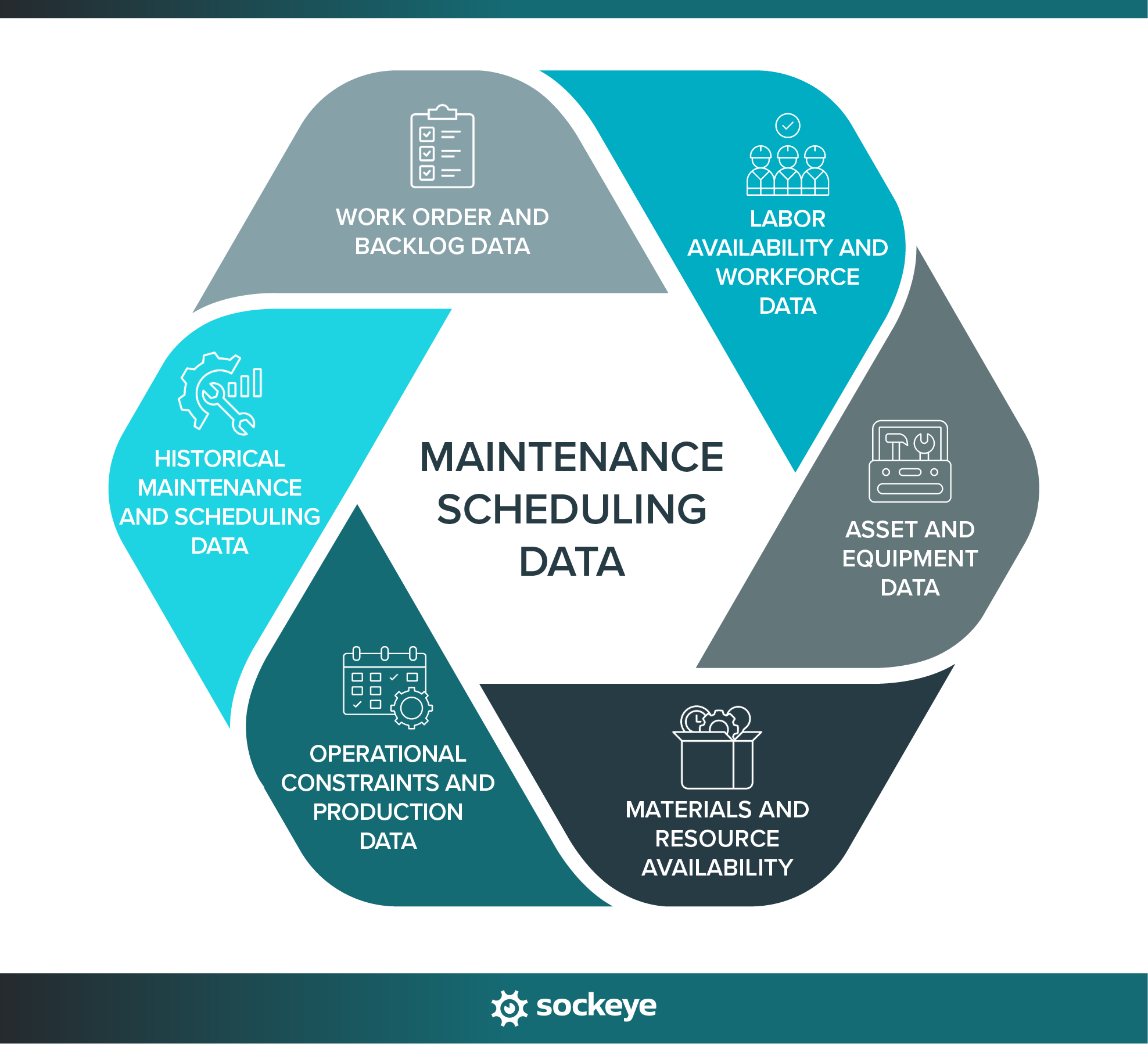
Creating optimized maintenance schedules requires combining several types of data to determine what work needs to be done, when it can be done, and who should perform the work.
The table below outlines the six main categories of maintenance scheduling data, the information you should collect, and how each category supports better scheduling decisions.
| Data category | Key information to collect | How it helps with scheduling |
|---|---|---|
| Work order and backlog data | Work order ID, description, status, priority, due date, estimated labor hours, required skills, dependencies, and work readiness | Helps you identify which jobs are ready to schedule, prioritize outstanding work, estimate workloads, and avoid scheduling jobs that are missing prerequisites. |
| Labor availability and workforce data | Technician and contractor availability, shifts, skills, certifications, and existing assignments | Shows your actual available labor capacity by crew, shift, and skill, allowing you to assign work without overbooking technicians or creating scheduling conflicts. |
| Asset and equipment data | Asset criticality, equipment location, maintenance history, operating schedules, and available maintenance windows | Helps you prioritize work on critical assets, coordinate equipment downtime, and schedule maintenance when the equipment is accessible. |
| Materials and resource availability | Spare parts inventory, material delivery dates, required tools and specialized equipment, permits and safety requirements | Helps ensure work orders are scheduled only when the necessary materials, equipment, personnel, and approvals are available. |
| Operational constraints and production data | Production schedules, planned shutdowns, equipment access restrictions, operational commitments, and seasonal constraints | Helps you coordinate maintenance with production and operations teams, minimize disruptions, and take advantage of planned downtime. |
| Historical maintenance and scheduling data | Estimated vs. actual labor hours, schedule compliance, reasons for delays, and other relevant scheduling KPIs and metrics | Helps you improve labor estimates, anticipate scheduling disruptions, identify recurring problems, and build more reliable schedules over time. |
One important caveat: Being able to review data in a spreadsheet or export it from a tool doesn’t necessarily mean it’s accurate or ready to use.
For instance, your CMMS might show 40 hours of available labor for a technician for the 3rd week of November, but the data might be outdated if it does not sync with your HR software or is not manually updated. Similarly, a high-priority work order might be marked as “Ready” for scheduling even though the required replacement parts haven’t arrived.
Before adding work to the schedule, the scheduler should have a straightforward way to double-check actual resource availability, work order readiness, and operational constraints.
Where does maintenance scheduling data come from?
While your CMMS or EAM may serve as the primary source of maintenance information, other systems often contain equally important details about workforce and equipment availability, inventory, and production schedules.
Here are the most common sources of maintenance scheduling data:
| Data source | Typical scheduling information it saves |
|---|---|
| CMMS/EAM software | Work orders, maintenance backlog, asset information, work order priorities, estimated labor hours, preventive maintenance plans, and maintenance history. |
| ERP and inventory management systems | Spare parts availability, inventory levels, purchase orders, procurement status, and expected material delivery dates. |
| HR and workforce management systems | Employee availability, shift schedules, qualifications, certifications, and overtime commitments. |
| MES, OEE and other production systems | Production schedules, planned equipment downtime, maintenance windows, equipment availability, and operational constraints. |
| Spreadsheets and manual records | Additional info not recorded in other systems. In the worst-case scenario, used to safekeep all of the information that is usually found in your CMMS software. |
| Dedicated maintenance scheduling software (i.e., Sockeye) | Consolidated scheduling information, technician assignments, labor capacity, weekly schedules, schedule changes, delay reasons, and scheduling performance metrics. |
This creates a situation where scheduling information is spread across multiple systems, and keeping everything accurate and up to date becomes increasingly difficult.
For example, your CMMS might show that a work order is ready to schedule, but the ERP indicates that the necessary spare parts are still on order. Meanwhile, your HR system might show that two technicians with the required qualifications are unavailable that week.
Without reliable data flows between these systems, schedulers are forced to manually cross-reference information, update spreadsheets, and get other departments on the phone.
You need two ingredients to resolve this issue. First, ensure your EAM or CMMS has the right integrations with your existing systems. It’s the only way it can become a reliable system of record for ALL maintenance data.
For organizations that struggle to schedule work within their CMMS or EAM, the second key ingredient is a dedicated scheduling bolt-on like Sockeye. Sockeye simplifies and automates your scheduling process, integrates with virtually all CMMS, EAM, and HR software, and can serve as your source of truth for maintenance scheduling data.
“We have a company-wide focus on reliability. Right now, that is our key metric. What’s generated out of Sockeye is the bible.”
Todd Hicks, Planning and Shutdown Superintendent AT THE AV GROUP
Ways to protect your scheduling data and ensure its integrity
Maintenance scheduling data needs to be accurate, reliable, and accessible to the people who use it — regardless of the way (manual, spreadsheets, software) you create maintenance schedules.
Below are a few best practices for protecting your maintenance scheduling data and maintaining its integrity:
- Establish clear data ownership: Define who is responsible for maintaining different types of scheduling information. For example, planners might own labor estimates and work order readiness, supervisors might manage technician availability, and operations teams might confirm equipment access and maintenance windows.
- Implement role-based access controls (RBAC): Give employees access based on their responsibilities. Schedulers may need permission to create and modify schedules, while technicians may only need to view assignments and update work order progress. Limit administrative privileges to authorized personnel.
- Standardize data entry: Use consistent work order statuses, priority levels, asset identifiers, and delay reason codes across teams and facilities. Where possible, use predefined dropdown lists, required fields, and validation rules to reduce errors and inconsistent reporting.
- Maintain accurate and up-to-date records: Establish clear rules for when scheduling information must be updated. For example, supervisors should report changes in technician availability before schedules are finalized, while technicians should record actual labor hours and completion details as work is performed.
- Track changes with audit logs: Use systems that record who modified scheduling information, what changed, and when. Audit trails help you investigate unexpected schedule changes, identify data quality issues, and establish accountability.
- Protect data transfers between systems: When integrating your CMMS, ERP, workforce management, and scheduling software, use secure connections and appropriate authentication methods. Monitor integrations for failed transfers, synchronization delays, and data mismatches that could compromise scheduling accuracy.
- Back up critical maintenance data: Most CMMS vendors offer hourly/daily backups, so if you are using one, you should be good to go in this regard.
- Review data quality regularly: Check for duplicate work orders, missing labor estimates, outdated employee availability, inconsistent asset identifiers, and other common data problems. Address recurring issues at their source rather than repeatedly correcting them during scheduling.
Keep in mind that even the most sophisticated, AI-supported scheduling software cannot consistently produce reliable schedules when the underlying data is inaccurate, incomplete, or poorly managed.
This really needs to be a priority for all maintenance teams.
Key maintenance scheduling metrics and KPIs to track
Tracking maintenance scheduling performance helps you understand how well your schedules are working, where execution falls short, and what needs to improve.
While scheduling input data helps you build realistic schedules, scheduling KPIs show whether those schedules are being executed as planned and whether you’re making effective use of available resources.
Here are some maintenance scheduling metrics worth tracking for most teams:
| Metric | What it measures | Why it matters |
|---|---|---|
| Schedule compliance | Percentage of scheduled work completed within the committed scheduling period. | Shows how reliably your team executes the planned schedule and helps identify recurring disruptions. |
| Labor utilization | Percentage of available labor capacity allocated to productive maintenance work. | Helps identify overloaded or underutilized crews and opportunities to improve resource allocation. |
| Planned vs. reactive maintenance | Proportion of maintenance work that is planned versus work performed in response to unexpected failures. | Shows how much of your maintenance workload is predictable and how frequently reactive work disrupts schedules. |
| Schedule break-in rate | Percentage of work added to the schedule after it has been finalized. | Helps quantify unexpected work and assess how well your team protects its committed schedule. |
| Maintenance backlog | Amount of outstanding maintenance work, typically expressed in estimated labor hours or weeks of available labor capacity. | Helps assess workload, identify growing maintenance demands, and determine whether staffing capacity matches outstanding work. |
| Preventive maintenance (PM) compliance | Percentage of scheduled preventive maintenance tasks completed within their required timeframes. | Shows whether critical preventive maintenance activities are being completed on time. |
| Estimated vs. actual labor hours | Difference between planned labor estimates and the actual hours required to complete maintenance tasks. | Helps improve future labor estimates and prevent overloading schedules with more work than technicians can complete. |
| Schedule delay reasons | Reasons why scheduled work orders are postponed, interrupted, or left incomplete. | Helps identify recurring bottlenecks, such as missing spare parts, unavailable equipment, insufficient labor, or emergency work. |
For better or worse, no single maintenance KPI or metric tells the whole story.
For example, high schedule compliance might indicate effective planning and execution. However, if labor utilization is consistently low, it means your team is capable of completing more work than you are currently scheduling.
Similarly, declining schedule compliance doesn’t necessarily mean your schedulers are doing a poor job. An increase in emergency work, unexpected equipment failures, or material shortages could be responsible.
The goal is to identify relationships between different metrics, understand what’s driving performance, and use those insights to improve future schedules.
Tracking these KPIs consistently over time also makes it easier to measure whether changes to your scheduling processes are producing meaningful improvements.
How to use maintenance scheduling data to build better schedules
Below are six practical ways to use maintenance scheduling data to build more realistic schedules, reduce scheduling conflicts, and improve labor efficiency.
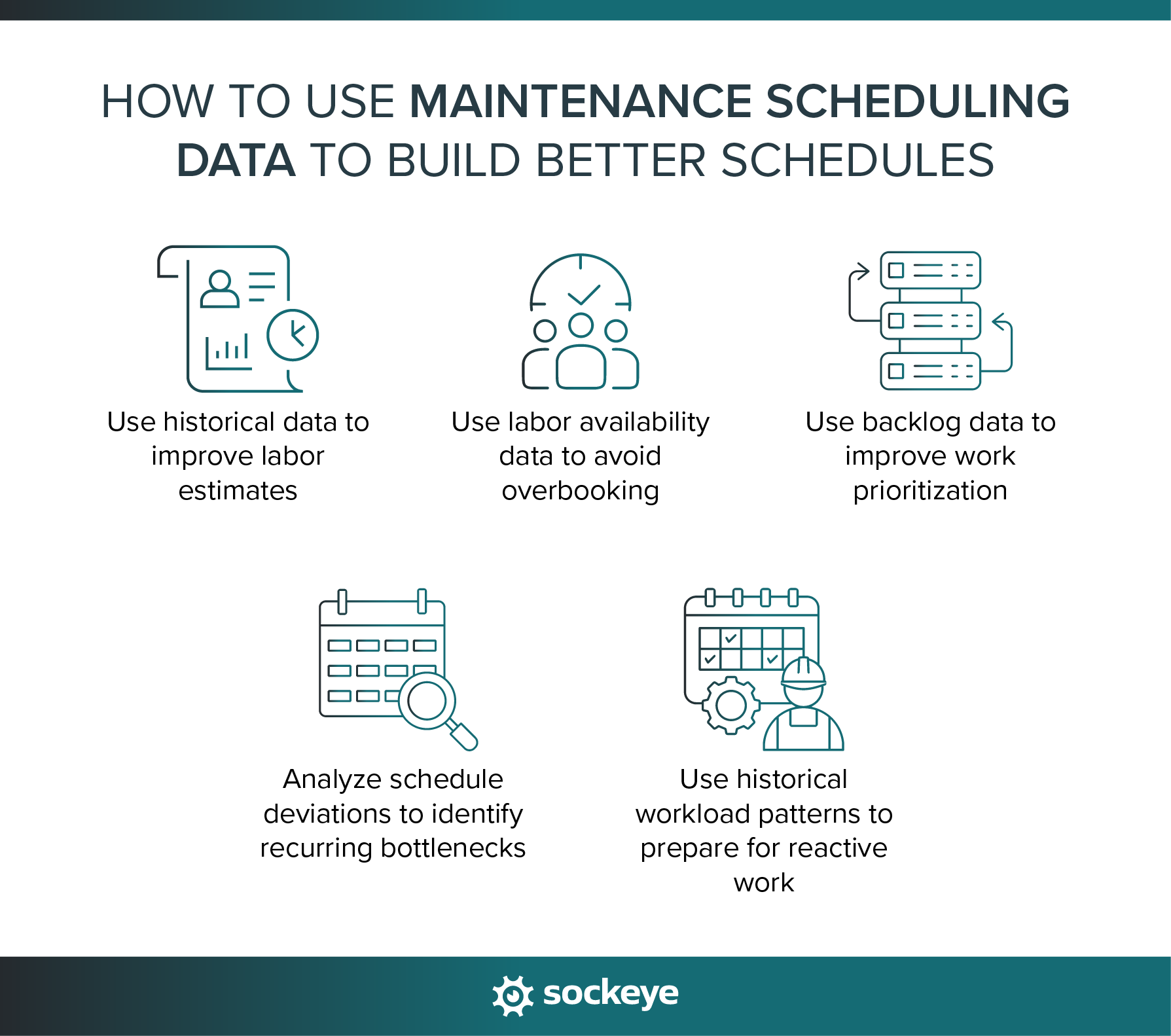
1. Use historical data to improve labor estimates
Accurate labor estimates are essential for building realistic maintenance schedules. If your estimates are consistently too low, you’ll overload technicians and create schedules that are impossible to execute.
Start by comparing estimated labor hours against actual hours recorded on completed work orders. Look for recurring maintenance tasks that consistently take more or less time than expected.
For example, suppose a recurring preventive maintenance task is estimated to take two hours, but your maintenance history shows that it typically takes 3.5 hours. Updating the estimate to reflect actual execution times will help you allocate sufficient labor capacity and avoid overbooking.
For the best results, compare similar jobs performed under similar conditions, and periodically review estimates as equipment conditions, technician experience, and maintenance procedures change.
2. Use labor availability data to avoid overbooking
Knowing how many technicians are on your team isn’t the same as knowing how many labor hours you have available for scheduling.
Actual labor capacity has to reflect vacations, sick leave, training, existing assignments, and other commitments. On top of that, you can make schedulers’ day easier by providing real-time utilization breakdown by crew (and possibly even by shift).
If your maintenance software does not feature this data, the easiest way to get it is to connect it to Sockeye. Our scheduling bolt-on only has a few screens, but one of them is a Labor Availability Dashboard, and the other one is a Weekly Scheduling screen that shows current labor utilization by crew — and the utilization % automatically changes as you add/remove work from the schedule. You can see this in action in the 2-minute video featured below.
Sockeye customers use this functionality to balance workloads across technicians and crews, identify unused capacity, and adjust assignments before finalizing the weekly schedule.
3. Use backlog data to improve work prioritization
Your maintenance backlog contains valuable information about outstanding work, but not every work order deserves equal priority.
Analyze your backlog based on work order priority, asset criticality, backlog age, estimated labor hours, and job readiness. This helps you identify important tasks that have been waiting too long and determine which jobs should be scheduled first.
It’s also important to separate schedule-ready work from jobs waiting for spare parts, approvals, equipment access, or other prerequisites. This prevents your team from filling the weekly schedule with work that technicians cannot actually execute.
Regularly reviewing backlog trends can also reveal whether certain types of work, assets, or facilities are consistently being neglected, facilitating smarter prioritization and resource allocation.
4. Analyze schedule deviations to identify recurring bottlenecks
Tracking why scheduled work gets delayed, rescheduled, or left incomplete can help you identify recurring problems that prevent your team from executing maintenance schedules as planned.
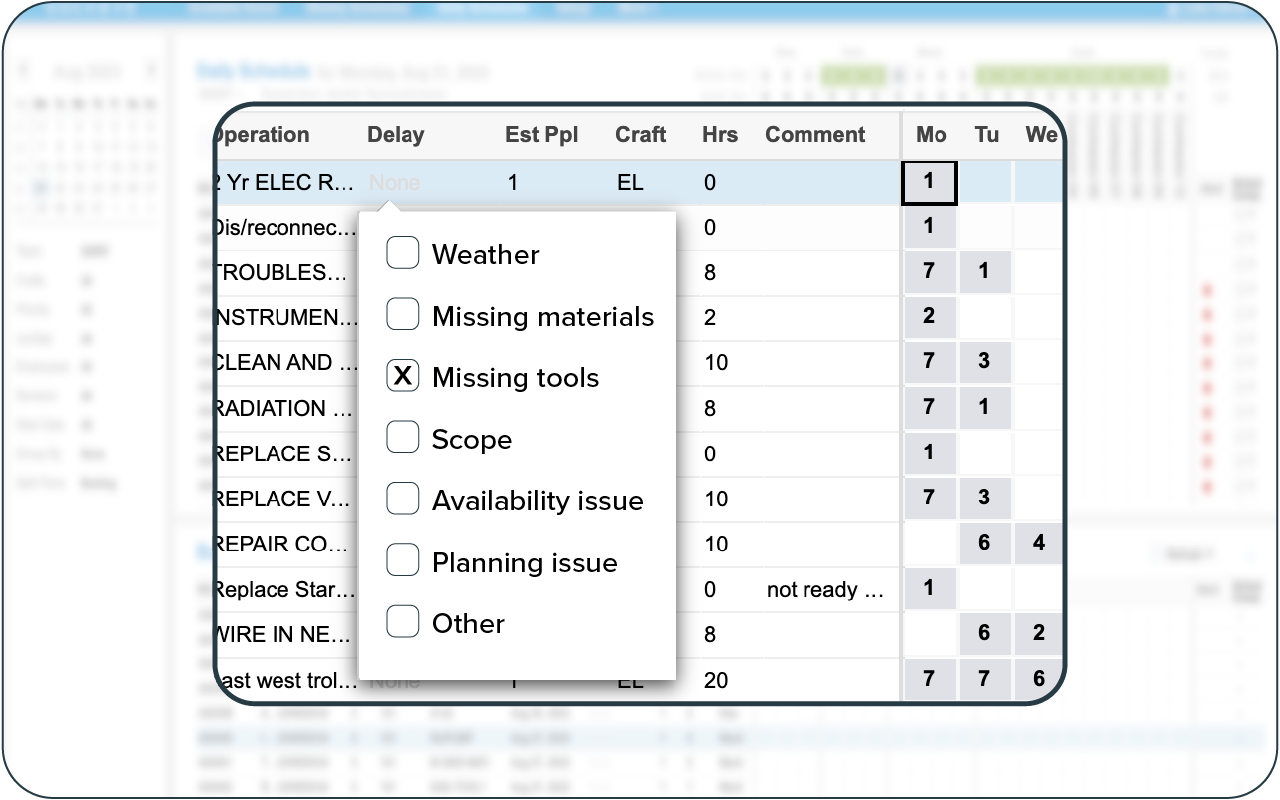
Start by recording standardized delay reasons whenever scheduled work cannot be completed. Common examples include missing spare parts, unavailable equipment, emergency work, insufficient labor, and inaccurate time estimates.
Whenever a WO is delayed, make sure the reason is written down somewhere. Sockeye, for example, lets you create a customizable dropdown (see the image below) so supervisors can just select a reason from a predefined list.
Review this information regularly to identify patterns across crews, assets, and facilities.
For instance, if 30% of deferred work orders are delayed because equipment is unavailable, the underlying problem might be poor coordination with production rather than insufficient maintenance labor. Addressing equipment access and maintenance windows could have a greater impact than adding more technicians.
Use these kinds of insights to address the root causes of scheduling disruptions rather than repeatedly adjusting schedules to accommodate the same problems.
5. Use historical workload patterns to prepare for reactive work
Your CMMS or scheduling software should tell you how much labor capacity is consumed by reactive work. Drill down into that data and look for patterns across different crews, facilities, equipment types, and seasons to understand when and where disruptions are most likely to occur.
For example, if emergency repairs consistently consume 20% of a crew’s weekly labor capacity, committing 100% of available hours to planned work will likely result in missed deadlines and frequent rescheduling.
You can use historical trends to determine how much scheduling flexibility you need. What complicates the calculation is the fact that reactive work is not bound to happen — it might be likely based on historical data, but you can’t know for sure.
You can approach this problem from two different angles:
- Schedule work up to 100% capacity. This is what we usually recommend, as it is backed up by Parkinson’s Law and promoted by industry veterans like Doc Palmer. If you do this, it is also a good idea to have some lower-priority tasks on the schedule that can be easily postponed when emergencies arise.
- Schedule work up to 80% (or whatever % works for you) capacity. In this scenario, make sure you have a solid amount of work planned and ready to go — which you can quickly throw onto the schedule if there are no emergencies or planned work is completed faster than expected.
Either way, the goal isn’t to permanently accommodate high levels of reactive maintenance.
Continue analyzing the causes of unexpected failures and use those insights to reduce emergency work and gradually increase the capacity available for planned maintenance.
How dedicated maintenance scheduling software helps you get more value from your data
Even organizations with established CMMS or EAM platforms can struggle to turn their maintenance data into realistic, executable schedules.
That’s because these are robust solutions that try to do many different things at once and account for every contingency and use case. Inevitably, you end up with a powerful platform with a whole bunch of features, fields, and options you will never use. Simple tasks like rescheduling a work order end up taking hours of cumbersome cross-referencing across 5+ different screens and spreadsheets.
Dedicated maintenance scheduling software like Sockeye helps bridge that gap by making it easier to turn existing maintenance data into actionable scheduling decisions.
Here’s how:
- Connect your existing systems: Sockeye integrates with enterprise CMMS and EAM platforms such as SAP PM, IBM Maximo, JD Edwards, and Maintenance Connection, allowing you to use existing maintenance information without replacing your current system.
- Improve labor availability visibility: View and maintain available labor hours across crews and contractors, accounting for absences, existing assignments, and other commitments. This helps you understand how much work your team can realistically take on.
- Automate scheduling process: Let Sockeye match work orders with technicians based on their availability and required skills, reducing the manual effort involved in assigning and coordinating maintenance work.
- Build balanced weekly schedules: Use labor utilization tracking to identify overloaded or underutilized crews, redistribute assignments, and build schedules that make better use of available labor capacity.
- Track scheduling performance: Generate automated reports on schedule compliance, labor utilization, planned maintenance percentage, delay reasons, and many other scheduling KPIs. You can even define and track custom KPIs.
- Support continuous improvement: Compare scheduling plans against actual execution data, identify recurring bottlenecks, and use historical performance to improve future labor estimates and resource allocation.
Most importantly, Sockeye allows you to improve maintenance scheduling without overhauling your existing maintenance management infrastructure. You can continue using your CMMS or EAM as your primary maintenance system while giving schedulers a dedicated tool for managing labor capacity, coordinating work, and tracking performance.
Turn your maintenance data into better schedules with Sockeye
You already have valuable maintenance data. Sockeye helps you put it to work by simplifying scheduling, improving resource visibility, and giving your team the information needed to make better scheduling decisions.
Request a Sockeye demo to see how you can build more realistic maintenance schedules, reduce administrative work, and make better use of your available labor.
