
Your team might be handling hundreds of work orders weekly, across multiple sites, with a mix of reactive fixes, inspections, equipment installations, and preventive work.
Early on, while work requests rarely went into double digits, spreadsheets, email, and whiteboards felt manageable. You could easily track everything. After all, you knew the assets and recognized the names of people working on them.
But as team, assets, and work request volume grow, cracks start to show — duplicate and lost work orders, no insight into current status, technicians prioritizing work based on memory (or whoever interrupted them last).
At the same time, the stakes rise. Audits, safety requirements, and compliance expectations demand proof that work is tracked, prioritized, and completed consistently.
That’s where many teams realize: we need a better way to organize work orders at scale.
Let’s see how to do that, beyond just implementing a CMMS or EAM software.
The maturity of your work order system
As the maintenance teams grow, their work order system goes through these three stages:
- Manual and visual: This includes whiteboards, paper forms, verbal requests, and hallway conversations. These systems work when volume is low and teams are small. Once work increases, nothing is consistently captured, and work disappears as soon as someone is off shift.
- Semi-digital: At this stage, teams rely on email, spreadsheets, and shared drives. Work is documented, but visibility is fragmented. Priorities live in someone’s inbox, ownership is unclear, and reporting is time-consuming and unreliable.
- Fully digital: Your team is using a CMMS or EAM platform. Often with mobile access; sometimes integrated with a dedicated WO scheduling bolt-on. These systems bring structure, visibility, and accountability — if successfully implemented and adopted, which is not always the case.
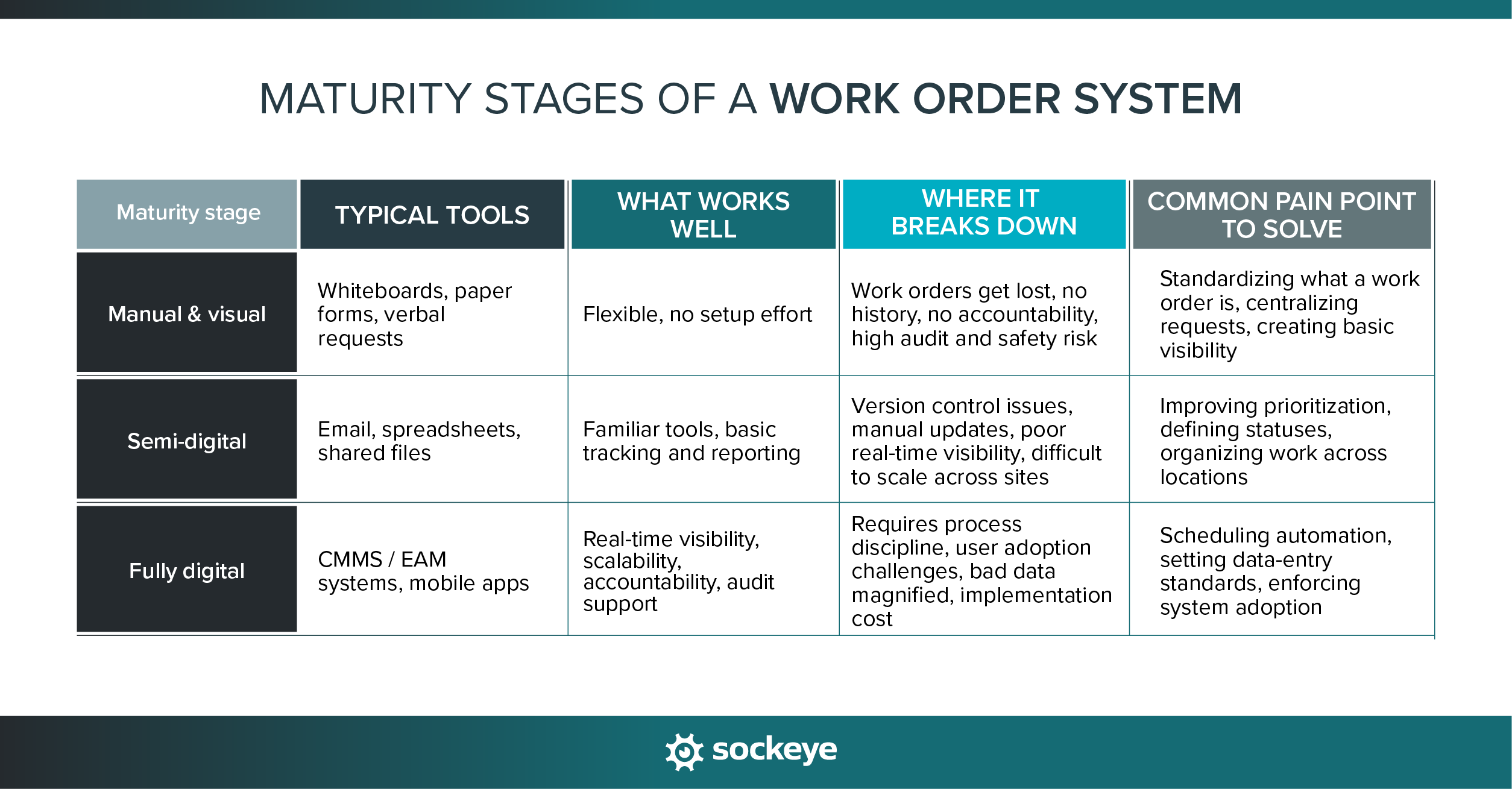
Use your current maturity to guide where you invest effort:
- Stage 1 → Focus on structure and intake: Make sure every request is captured the same way and that maintenance work is actually documented.
- Stage 2 → Focus on visibility, prioritization, and consistency: Ensure you can see status, ownership, and urgency across all work. Work on standardizing work order management processes and recurring tasks.
- Stage 3 → Focus on scheduling and adoption: Use available tools to automate scheduling and balance workloads, build templates, set clear data entry standards to ensure data integrity, and train and push teams to use the digital tools at their disposal.
Many companies will be in transition between some of these stages. In the following paragraphs, we’ll discuss work order organization tips and strategies that (almost) anyone can use.
How to organize work orders
There are many digital tools that can help you track and organize work orders — from simple spreadsheets to complex maintenance software. But tools alone don’t solve the problem.What really makes the difference is how you set up your processes. The goal is to build systems that still work when work order volume, sites, and complexity increase.
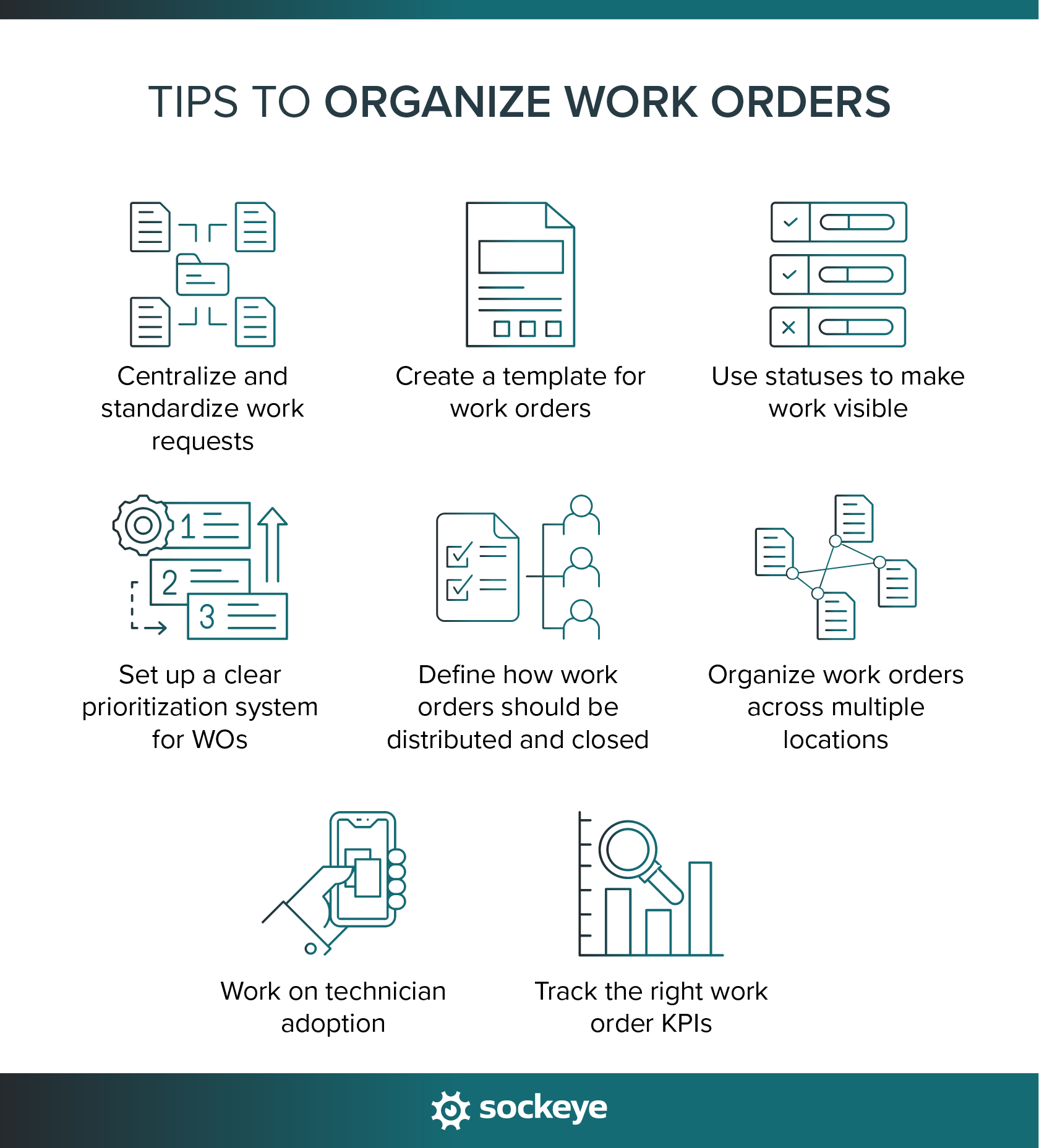
1. Centralize and standardize work requests
When work requests come in through emails, phone calls, texts, and walk-ups, tracking is going to be a mess. Technicians end up chasing information, missing requests, or duplicating work without realizing it.
So, the first step is to centralize how work enters the system. Every service request should land in the same place. Where that is depends on the tools you’re working with. It can be:
- A shared maintenance inbox.
- A digital form that adds a new row into spreadsheet when submitted.
- A CMMS or EAM request portal.
Setting this up is straightforward. The challenge is often in getting everybody to use the system. If possible, prioritize work requests that come through the system to facilitate adoption.
If you’re managing multiple teams across multiple locations, you’ll also want to:
- Use a standardized work request form. To minimize follow-ups, include the fields that will capture the common info your techs need to fix and troubleshoot issues.
- Some CMMS solutions allow you to build multiple work request forms with different required fields. This can be used if you want to standardize forms for different use cases (i.e. one for “office staff”, one for machine operators, etc.).
- Set up automated routing for work requests, which can be tied to a specific location, team, or even person (depending on the configurability of your CMMS/EAM). This can vastly speed up the approval process.
Centralized intake creates a single source of truth — and that’s the foundation for everything that follows.
2. Create a template for work orders
If your work requests capture useful information, that info should be included on the work order as well. This again leads us to the need for standardization.
Define a clear work order template form that includes fields like:
- Asset name and ID
- Location
- Type of the work order
- Problem description
- Contact info of the person who submitted the work request (if applicable)
- Who the work is assigned to (usually shift, team, or specific person)
- Priority and due date
- Current status of the work order
- Completion notes
These fields support scheduling, execution, and reporting — regardless of which system you use.
Depending on the industry and reporting requirements, you can also consider including SOPs and checklists, required resources (PPE, tools, parts, and materials), fields for tracking reasons for delays, or estimated labor.
A common mistake to avoid: allowing each site or supervisor to define work orders differently. That might feel flexible, but it makes cross-site visibility and reporting nearly impossible.
3. Use statuses to make work visible
If you can’t quickly tell where a work order stands, you don’t really have control over it. Statuses turn a long list of requests into something you can actually manage.
There is no need to reinvent the wheel. This simple status flow works for most teams:
- Received: The request has been submitted but not yet reviewed.
- Approved/Declined: The work has been validated and is ready to be planned. Or, the work has been declined (duplicated request, sent to the wrong team, the problem has already been solved, etc.).
- Assigned: A technician or crew has ownership and a due date.
- In progress: The work has started.
- Completed: The task is finished, pending review.
- Closed: The work is verified, and the work order is officially closed.
If you are using a spreadsheet, the work requester could get a view-only access to track updates. On the other hand, modern CMMS solutions often let the requester track the status through the work order portal they used to report the issue.
This can significantly reduce the “Where is this at?” phone calls and emails that eat up time and break focus.
4. Set up a clear prioritization system for WOs
Emergencies aside, “first come, first served” works when volume and risk are low. At scale, it guarantees the wrong work gets done first.
We have a whole separate article on work order prioritization if you want a deeper dive. Broadly speaking, when deciding priority, focus on a few practical factors:
- Safety risk: Could this cause injury or create an unsafe condition?
- Operational impact: Will this stop production or slow operations?
- Regulatory exposure: Does this affect compliance or inspections?
- Asset criticality: Is this a high-risk or high-value asset?
Simple priority tiers work best, such as emergency, high, medium, and low.
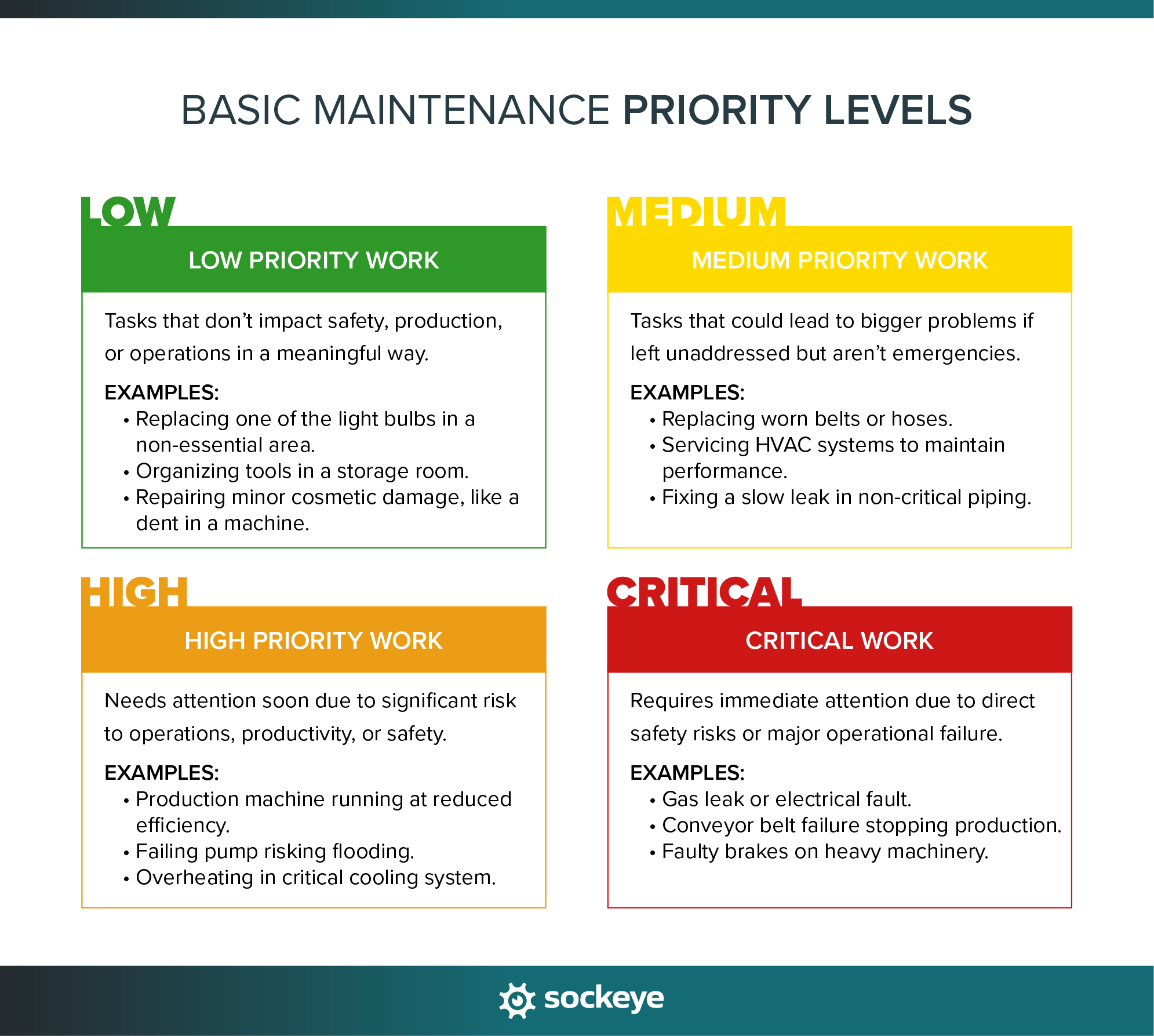
What matters most is that everyone understands what each tier means — and that planners/schedulers apply it consistently.
5. Define how work orders should be distributed and closed
When assignment rules are unclear, work stalls. Supervisors will get overloaded, and technicians will waste time waiting for direction. When deadlines slip, there will be a whole lot of finger-pointing.
Now, there are various ways to distribute work orders. The most common way is to have supervisors approve work requests, planners plan them, and schedulers schedule them.
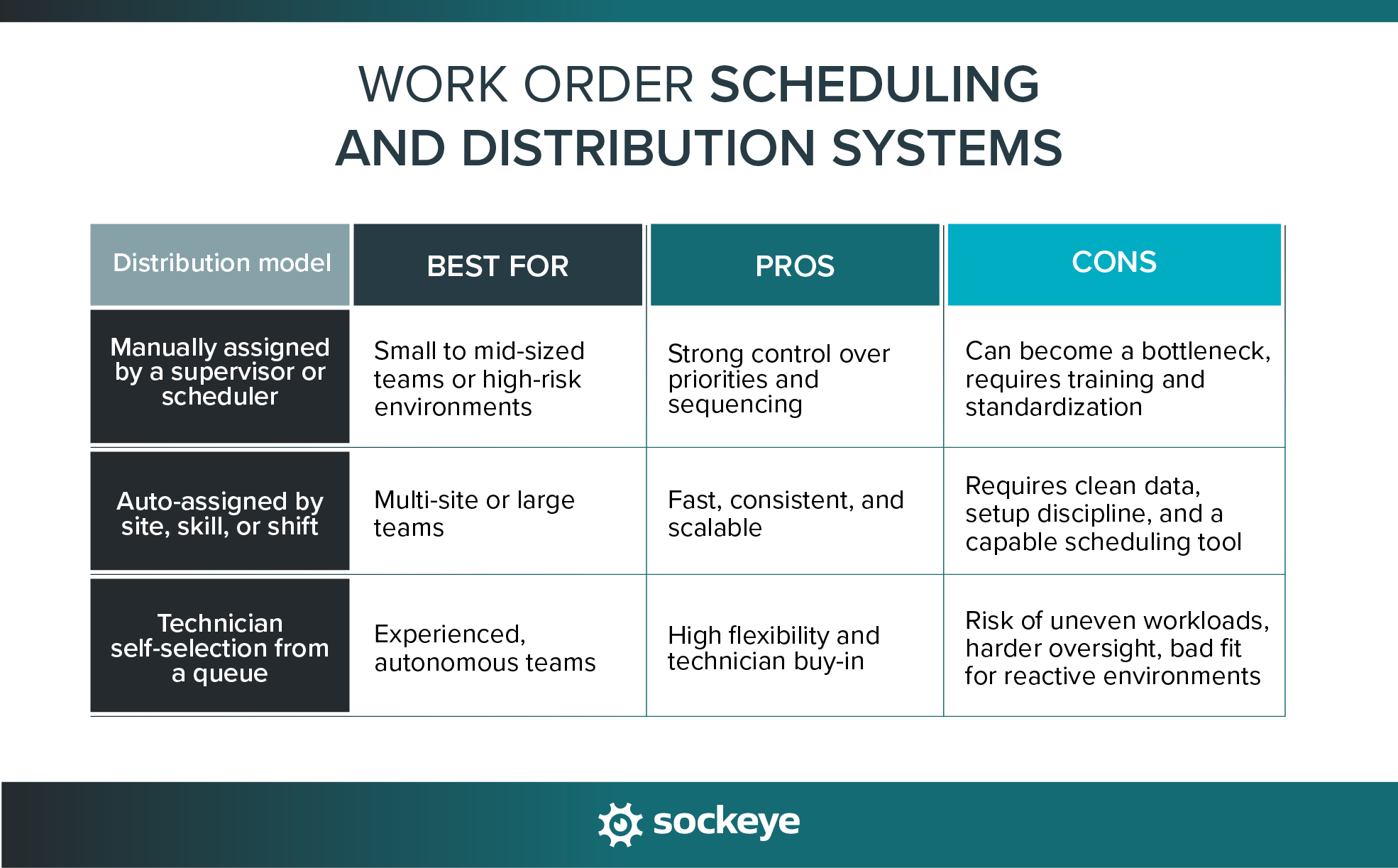
For comprehensiveness, let us quickly outline common work order distribution models:
- Supervisor- or scheduler-assigned: A supervisor or maintenance planner manually reviews incoming work/backlog and assigns it to a specific technician or team.
- Auto-assigned by site, skill/team, or shift: Work orders are automatically routed based on predefined rules like location, trade, or schedule. In most cases, you’ll still want someone reviewing and approving the work order schedules and assignments.
- Technician self-selection from a queue: Technicians pull work from a prioritized list instead of being individually assigned.
As the volume increases, proper work order closure becomes as important as scheduling. You do not want tech marking something as “done” if it‘s only partially done, or forgetting to leave a completion note about the required follow-up work.
To sidestep these issues, define clear criteria for closing work orders:
- What must be completed before a work order can be closed?
- Who, if anyone, verifies completion?
- What are the must-have fields on the work order form that need to be filled out before closing the work order?
- Are any follow-up actions required? If so, where should technicians write that down? Do they need to notify someone directly, or do you have a system for that?
This will improve the accuracy of your internal data and inform future work order planning and scheduling.
6. Organize work orders across multiple locations
Multi-site operations tend to magnify small process issues. A workaround that is manageable at one plant quickly turns into confusion when you’re coordinating work across several locations.
Plus, if sites operate differently, prioritizing work and benchmarking performance becomes nearly impossible.
Here are some practical tips for managing work orders across multiple sites:
- Standardize site, asset, parts, and location naming: Use the same naming conventions everywhere so work orders can be created, filtered, routed, and reported consistently.
- Require site selection at intake: Every work request should include a required site and asset ID/location.
- Use a shared asset hierarchy: If your CMMS allows it, structure assets the same way across locations (i.e. Plant → Area → Line → Asset). This simplifies reporting and makes assets easier to find. Here is an example.
- Separate site-level and global priorities: Define which priorities are set locally (account for production bottlenecks, local staffing constraints, or seasonal demand) and which are standardized across the organization (safety hazards, environmental risks, regulatory-related work).
- Assign clear site ownership: Each site should have a designated supervisor or planner responsible for triage and execution.
- Review work orders by site, not just as a single list: A global backlog can hide struggling locations and complicate scheduling. Dashboards and queues should allow you to separate backlogs or filter by location.
- Audit multi-site data regularly: Periodically review asset names, priorities, and statuses to catch drift before it becomes unmanageable.
A well-organized multi-site organization enables you to scale maintenance operations without losing control or overwhelming your team.
7. Work on technician adoption
Techs, especially older ones, can be set in their ways. The best way to minimize resistance to change is to eliminate friction.
If the new way to track or close work feels slow or pointless, people will work around it. That’s why it’s so crucial that the tools you implement are easy to use.
What actually increases adoption:
- Fewer clicks: Long forms, unnecessary fields, and the need to navigate through five screens to complete a simple task are a surefire way to kill compliance.
- Clear benefits: Less rework, fewer interruptions, and clearer priorities.
- Mobile access in the field: No walking back to a terminal to update work order status. Get clarifications on the go. Check parts availability before going to the storeroom.
While not needed for every environment, mobile-friendly systems can make a big difference, especially when paired with QR codes on assets. Scanning a code to submit a work request or open the right work order or asset record removes guesswork and saves a ton of time.
A common mistake to avoid: rolling out new tools or processes without any technician input. When technicians help shape workflows or test tools, adoption rises — and work order data gets more reliable.
8. Track the right work order KPIs
The right KPIs help you understand where work is flowing, where it’s getting stuck, and why. When you know all that, organizing work orders becomes much easier.
Work order KPIs that matter for high-volume maintenance teams:
- Work order backlog: Total open work, broken down by priority
- Aging work orders: How long work sits before being completed.
- On-time completion (schedule compliance): Whether work is finished when planned.
- Reactive vs preventive work mix: How much work you do is planned versus unplanned. This can be tracked as the number of reactive vs preventive work orders, or as hours spent doing reactive vs preventive work.
- Reopened work orders: A signal of quality issues or unclear scope.
These KPIs should inform your decision-making. A growing backlog may point to staffing gaps. Aging work orders often reveal prioritization or approval delays. High reactive work crowds out preventive maintenance and increases risk.
There’s also a compliance angle. Clear KPIs demonstrate control during audits and inspections by showing that work is tracked, prioritized, and completed consistently.
Common work order management mistakes at scale
As work order volume grows, small shortcuts can easily turn into systemic problems. Here are some common mistakes to avoid.
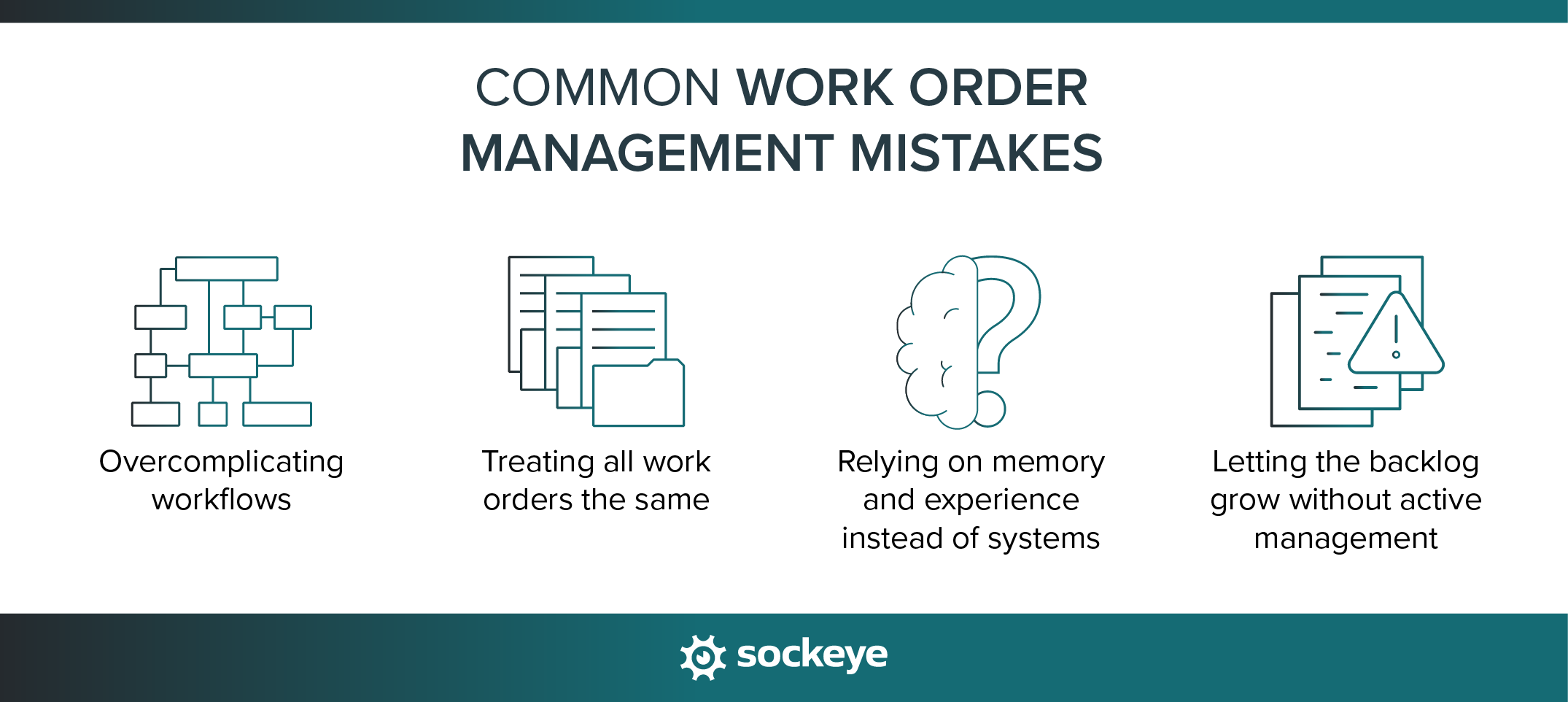
Overcomplicating workflows
It’s tempting to design the “perfect” workflow with lots of statuses, rules, and required fields. On paper, it looks thorough. In practice, it just slows everything down.
When workflows are too complex, people skip steps, enter data partially, or stop using the system altogether.
How to avoid it:
- Start with the simplest workflow that still provides visibility.
- Limit required fields to what’s truly necessary.
- Add complexity only when there’s a clear operational benefit.
If you are using maintenance software, leverage role-based access (user/scheduler/admin…) so different stakeholders (technicians, planners, supervisors, maintenance managers…) can see or edit only the information they need to do their job.
Treating all work orders the same
When preventive tasks, safety issues, and production-stopping failures all go through the same workflow — regardless of urgency or risk — critical tasks get delayed.
How to fix it:
- Separate reactive, preventive, and compliance-related work. While you are at it, clearly define WO types/categories (so you don’t end up with overlapping types like “repair,” “fix,” “maintenance,” and “urgent”).
- Use different priority rules or response times by work type.
- Make sure urgent work is clearly flagged and visible.
Relying on memory and experience instead of systems
Experienced supervisors and technicians often “just know” what needs to be done next. That works — until someone is out, volume spikes, or multiple sites are involved. When workflows live in people’s heads, visibility disappears and continuity breaks.
One way to sidestep these issues is to write maintenance SOPs and checklists. Use it to document best practices and capture knowledge from experienced technicians before they leave or retire.
Letting the backlog grow without active management
Maintenance backlog isn’t inherently bad. Unmanaged backlog is.
When work orders sit without review, teams lose visibility into risk, priorities drift, and urgent work gets buried.
How to fix it:
- Review backlog regularly by priority and age.
- Actively defer, rescope, or cancel low-value work.
- Set clear expectations for how long work can remain open.
If it gets too large, consider developing a deferred maintenance plan to start clearing out the backlog.
Streamline your work order scheduling process with Sockeye
Strong work order management depends on a clear, standardized process. Work order software is here to support (and automate, to a degree) that process.
Many mid-sized and large maintenance teams already have a CMMS, but they still feel disorganized. In our experience, the core problem lies in scheduling.
In an effort to offer robust options, big CMMS and EAM platforms tend to overcomplicate the scheduling process. People have to navigate through dozens of different screens to check availability, see open WOs, and put them on the schedule. Plus, the users are locked in a very specific workflow, with little to no flexibility.
We’ve seen many cases where businesses invested heavily in JDE, SAP, Maximo, Infor, and similar solutions, only to have their maintenance teams revert to spreadsheets to manage work order schedules.
That’s where Sockeye fits in.
Sockeye doesn’t replace your existing maintenance software. It’s a bolt-on that sits on top of it and helps teams schedule and track work orders more effectively at scale.
How Sockeye helps high-volume maintenance teams:
- Brings structure, visibility, and simplicity to work order scheduling.
- Includes powerful automation that can speed up the scheduling process by up to 90%.
- Offers a two-way integration with your CMMS. No data is duplicated, and work order statuses are always synced and up to date, whether you’re looking at them in Sockeye or in your CMMS.
- Helps supervisors balance workloads across technicians and shifts by providing easily editable labor availability data and real-time labor utilization insights.
Helps you consistently track and generate automatic reports for SMRP and custom KPIs tied to work order scheduling.
If your team feels busy but still behind despite running expensive maintenance software, Sockeye is the solution you’re looking for.
Schedule a demo and see teams use Sockeye to track and organize their work orders.
