
As operations grow, scheduling maintenance work becomes increasingly difficult to manage manually.
What once worked with a spreadsheet and email quickly breaks down when you’re coordinating dozens of technicians, hundreds of assets, and a constant flow of preventive and reactive work.
Schedulers and supervisors spend hours trying to keep the schedule up to date while figuring out which version of the Excel schedule is the most recent one.
There is a better way, and it comes in the form of work order scheduling software. These tools help maintenance teams plan, assign, and track work more efficiently by providing visibility into technician availability, upcoming work orders, and overall workload.
In this guide, we’ll explain the different types of work order scheduling solutions available, the functionality you should look for, and the framework you can follow when evaluating vendors.
Understanding the different types of work order scheduling solutions
Work order scheduling software helps maintenance teams assign and track maintenance work. The goal is very simple: take a list of approved work orders, match them with available labor, and place them on a realistic, balanced schedule.
In practice, however, scheduling depends on much more than just a calendar. Teams need visibility into technician availability, job priorities, required skills, parts availability, and ongoing work.
That’s why it’s so hard to find standalone work order scheduling solutions.
Instead, scheduling capabilities are typically built into larger maintenance management platforms such as CMMS (Computerized Maintenance Management Systems), EAM (Enterprise Asset Management) software, and FSM (Field Service Management) platforms.
In addition, some organizations use a specialized scheduling bolt-on that integrates directly with their existing CMMS or EAM system to improve the scheduling workflow.
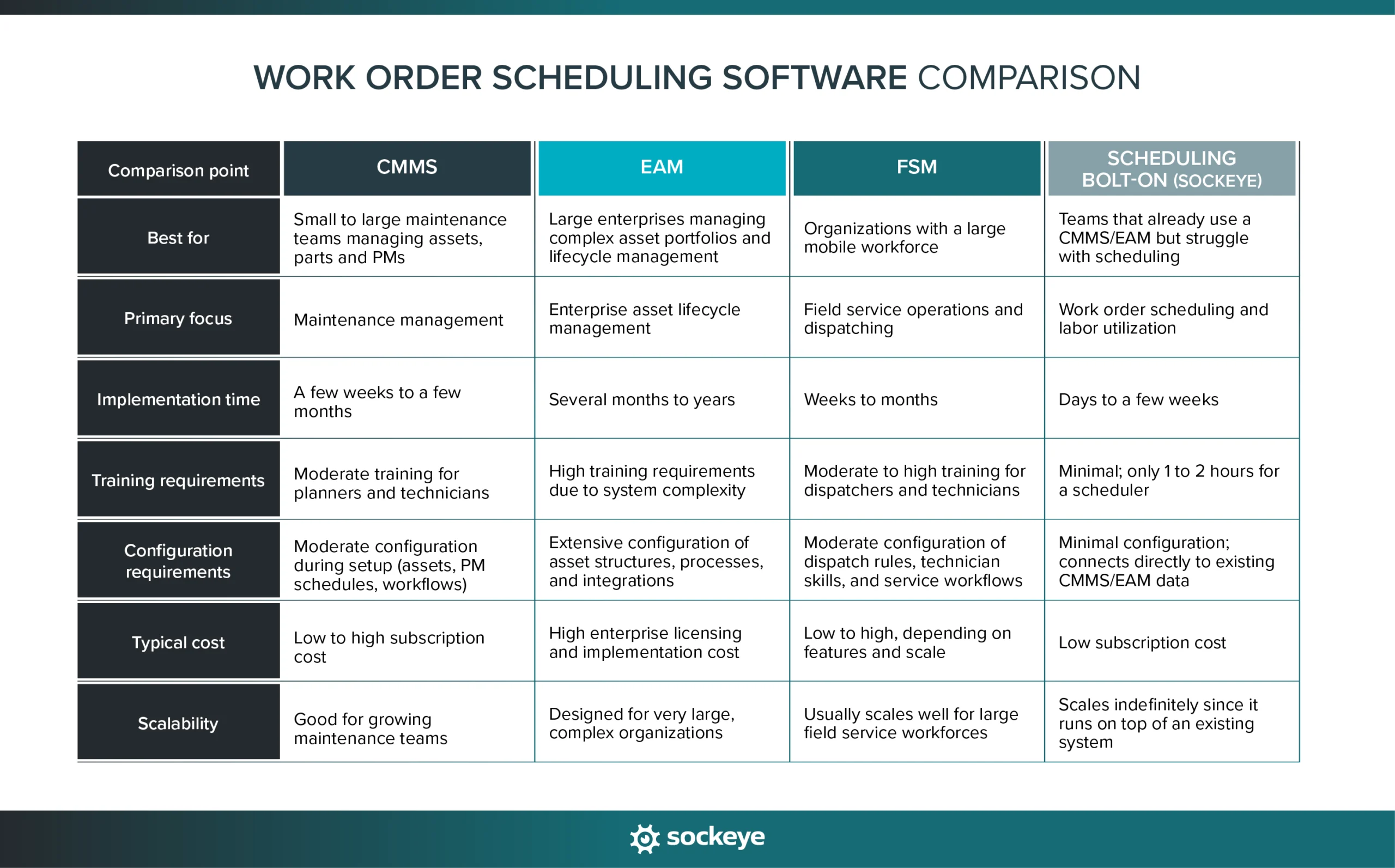
The sections below explain how work order scheduling works on these platforms and how they differ in complexity and typical use cases.
WO scheduling inside a CMMS
A CMMS is used to manage basic maintenance operations — work orders, preventive maintenance programs, asset records, spare parts inventory, and maintenance history. It is the most common type of maintenance platform used by teams in manufacturing plants, facilities management, and other asset-heavy industries.
Some well-known CMMS providers include Fiix, UpKeep, Limble, MaintainX, eMaint, and Maintenance Connection.
Within a CMMS, work order scheduling is typically built into the work order management module. Maintenance planners or supervisors review open work orders, assign technicians, and set start/due dates based on priority and availability. The schedule is usually managed through a calendar or list view where users manually assign work to individuals or teams.
How intuitive, deep, and practical the CMMS scheduling functionality is varies widely across providers. We highly recommend hands-on testing during software evaluation.
WO scheduling inside an EAM software
EAM software is designed to help large organizations manage the full lifecycle of their physical assets — from procurement and installation to ongoing maintenance and eventual replacement. In addition to maintenance management, EAM platforms often include capabilities for asset performance tracking, inventory management, procurement, compliance, and financial reporting.
Well-known EAM providers include IBM Maximo, SAP EAM, Oracle eAM, Infor EAM, HxGN EAM, and IFS Cloud.
Within EAM systems, work order scheduling is typically part of a broader maintenance planning and asset management workflow. Schedulers work with detailed asset hierarchies and maintenance strategies that support complex environments such as large manufacturing plants, utilities, transportation networks, and energy operations.
Because EAM systems manage a large amount of operational and financial data, scheduling often becomes a time-consuming process with lots of screens and clicking required.
WO scheduling inside an FSM platform
FSM software is designed to manage service teams that perform work outside of a central facility. These platforms help organizations coordinate technicians who travel to customer sites to install, repair, or maintain equipment.
Common FSM providers include ServiceNow Field Service Management, Salesforce Field Service, Oracle Field Service, ServiceTitan, and FieldAware.
Within FSM platforms, work order scheduling focuses heavily on dispatching and route optimization. The system assigns jobs to technicians based on location, availability, required skills, and service-level agreements (SLAs). Many FSM tools use automated scheduling engines to optimize daily schedules and reduce travel time between service calls.
This makes FSM scheduling particularly useful for organizations with mobile workforces such as utilities, telecommunications providers, HVAC contractors, and equipment service companies.
Work order scheduling bolt-on (Sockeye)
We have talked with several companies that were ready to switch to a different vendor just to fix their scheduling problems. They bought a CMMS/EAM solution and spent weeks on training. A few months later, techs still reverted to using Excel to track and organize work orders.
To avoid that, you can use a specialized scheduling bolt-on like Sockeye, whose main goal is to simplify and automate most of your weekly and daily (re)scheduling process.
“It shows the available work. It shows the available labor. It’s just a matter of clicking and dropping. It’s fantastic.”
Cade Schoonover, Assistant VP of Maintenance & Reliability AT cargill
There is no similar solution on the market. Learn more about how Sockeye works in this short video:
Key features and capabilities to look for in work order scheduling software
Some platforms offer only basic scheduling functionality, while others provide advanced automation, labor tracking, and reporting capabilities.
When evaluating solutions, it’s important to focus on features that actually make scheduling faster and easier. The right system should help planners or schedulers quickly build and update schedules, and offer an easy way to share them with the rest of the team.
Below are the key features and capabilities maintenance teams should look for when evaluating maintenance scheduling software.
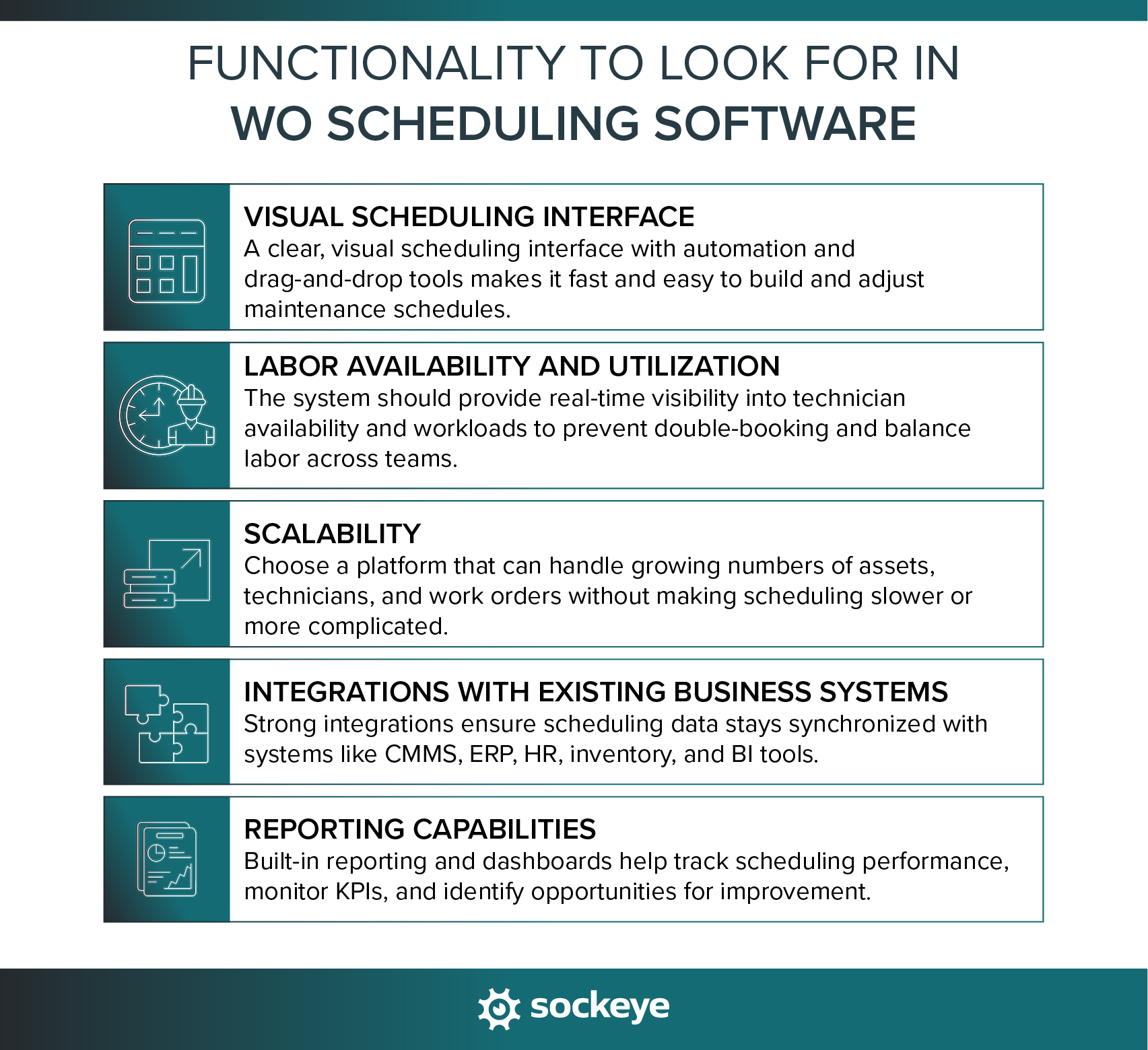
Visual scheduling interface
The scheduling interface is where planners and supervisors will spend most of their time, so it needs to be intuitive and efficient. If building or adjusting a schedule requires navigating through multiple screens or filling out long forms, the scheduling process quickly becomes slow and frustrating.
Look for a system that offers:
- Scheduling automation that can automatically place work orders on the schedule based on technician availability, job duration, or other rules.
- Drag-and-drop rescheduling allows planners to quickly reassign work orders to another technician, team, or time slot.
- Calendar or Gantt-style schedule views that clearly show technician workloads and scheduled work.
The key thing to evaluate during demos and free trials is how quickly schedules can be created and modified. A good system should allow schedulers to move work around in seconds, not minutes.
Labor availability and utilization
A good scheduling system makes it easy to understand who is available to do the work.
Without clear visibility into labor availability and utilization, planners have to rely on guesswork or external spreadsheets. This leads to over- or underbooking, both of which result in unnecessary overtime.
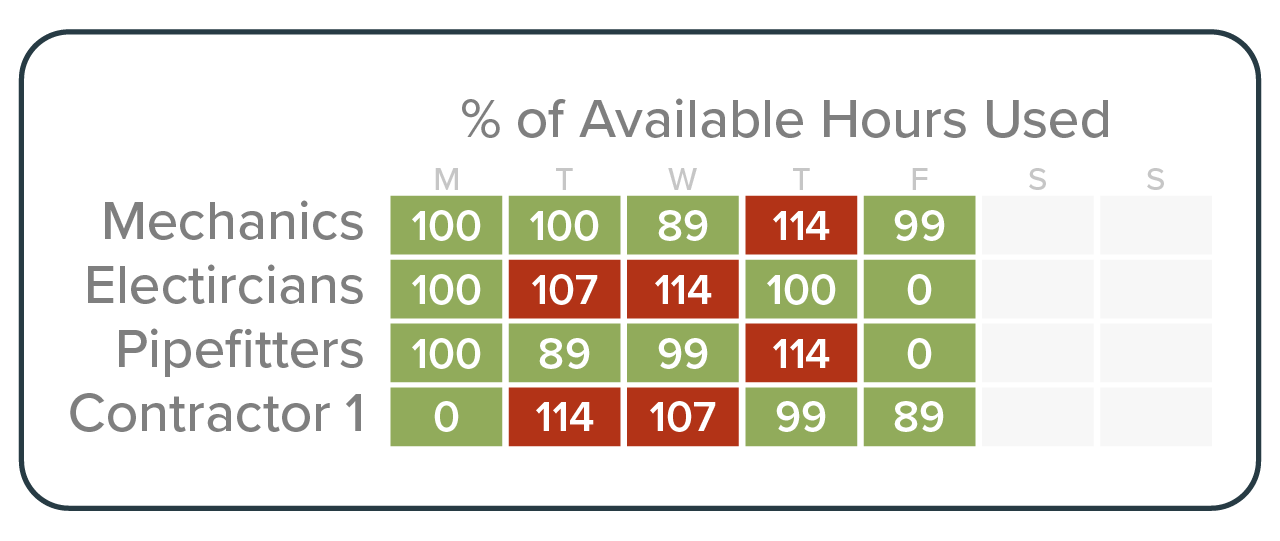
The system should allow schedulers to:
- View and update labor availability easily, including planned time off, shift changes, or contractor availability.
- Assign work by technician, contractor, or team, including grouping by shift, craft, or skill set.
- Have a visual indicator that shows team and technician utilization percentages, as well as a warning if someone is overbooked. It is the only way to create balanced workloads.
- Avoid double-booking to ensure technicians are not scheduled for overlapping jobs.
Having accurate availability and utilization data helps your team build more realistic schedules, prevent bottlenecks, and make better use of the available workforce.
Scalability
More assets, more technicians, and more work orders mean the system needs to handle higher volumes of data without slowing down the scheduling process.
When evaluating scalability, look for features that help the system remain easy to use as your maintenance program expands:
- Scheduling automation: There is no better way to speed up work than by automating it. Ideally, the scheduling automation will be based on up-to-date backlog, priority, availability, and utilization data.
- PM and WO templates: The ability to create reusable templates for common maintenance tasks helps planners standardize work and reduce the time needed to create new work orders.
- Ability to attach procedures and documentation: Planners should be able to attach checklists, manuals, safety procedures, and instructions directly to work orders.
- Delay tracking: When you’re scheduling dozens or hundreds of WOs per day, some work will not be finished on time. On that scale, it’s extremely helpful to have a simple way to track the reasons for work order delays.
- Strong search and filtering capabilities: As the number of work orders grows, users should be able to quickly find specific jobs, assets, or technicians.
- Flexibility to adapt workflows: The system should allow you to make configuration changes as your processes evolve (like adjusting approval steps or adding new data fields to WOs), rather than locking you into rigid workflows.
- Deployment time and effort: If it takes months to deploy the solution at one facility, things are not going to get much cheaper or faster when you try to do the same at other locations. One advantage of lightweight scheduling bolt-ons is that they never turn into a big IT project — for example, Sockeye can be up and running in a couple of weeks.
During evaluation, watch for early warning signs of scalability problems. These can include slow performance when handling even small numbers of work orders, overly complex workflows for simple scheduling tasks, mobile app syncing issues, or systems that require heavy IT involvement to make small configuration changes.
If your scheduling tool has issues today, they will only worsen as you scale.
Integrations with existing business systems
Maintenance teams rely on data from multiple systems, and the scheduling tool needs to integrate with those systems to keep information accurate and up to date.
You do not want to end up manually transferring data between systems or exporting information to spreadsheets. This will only get you delays and increase the risk of errors.
When evaluating scheduling software, check whether it can integrate with the other systems your organization already uses. Common integrations include:
- ERP systems: To connect maintenance scheduling with purchasing, inventory management, and financial tracking.
- IoT sensors: To automatically trigger work orders based on real-time equipment condition data.
- HR or workforce management systems: To sync employee availability, shift schedules, and contractor information.
- Business intelligence (BI) tools: To export maintenance and scheduling data for deeper analysis and reporting.
Strong integrations help eliminate duplicate data entry and ensure that everyone — from planners to technicians to management — is working with the same information.
Reporting capabilities
Reporting helps maintenance teams understand how effective their scheduling process and schedules themselves are. Without good reporting, it’s difficult to track performance, identify bottlenecks, or measure whether the team is keeping up with planned maintenance.
When evaluating reporting capabilities, look for systems that offer:
- Custom dashboards that give supervisors and managers a quick, visual overview of scheduling performance.
- A strong set of built-in reports and KPIs, such as schedule compliance, wrench time, backlog size, planned vs reactive hours scheduled, and work order completion rates.
- The ability to define custom KPIs, allowing organizations to track metrics that matter most to their operation.
- Easy search/access: Some tools make it hard to find/filter the right data and build a report. Be sure to test this during evaluation.
- Automated report generation, so reports can be scheduled and delivered regularly without manual effort.
- Location-level reporting, which is especially important for organizations managing multiple plants or facilities.
Steps for evaluating work order software vendors
It’s important to approach the evaluation process in a structured way.
Ideally, one person — typically a maintenance manager, planner, or reliability leader — should own the project and coordinate the evaluation. This person can gather input from technicians, supervisors, and IT while keeping the selection process organized and focused.
The goal is to clearly define what your team needs, compare vendors against those requirements, and test the most promising solutions before making a final decisoni.
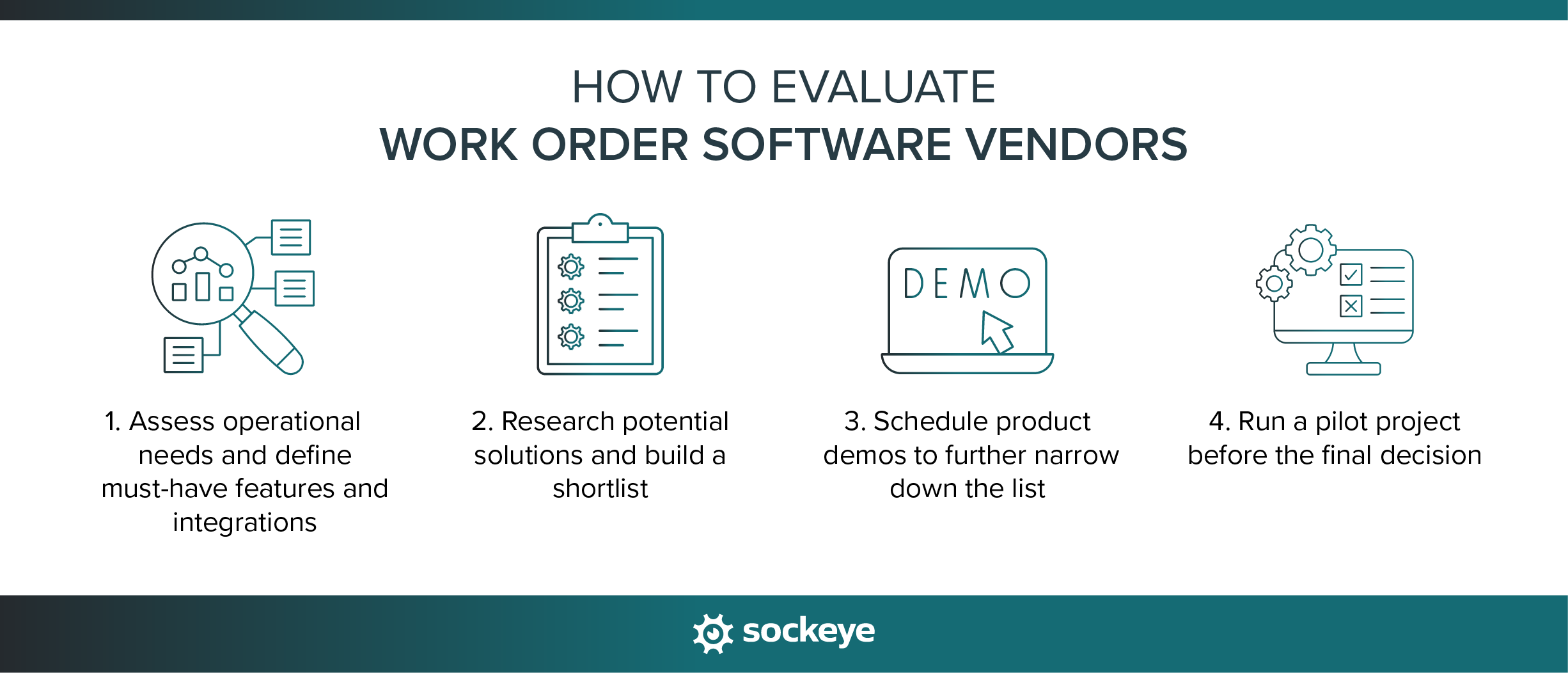
1. Assess and define what you need
Before researching vendors, take the time to define what problems you want the software to solve.
Start by reviewing your current scheduling process and identifying the biggest pain points. These could include spending too much time building schedules, poor visibility into technician availability, frequent schedule conflicts, or difficulty tracking maintenance KPIs.
From there, translate those problems into a list of must-have features and required integrations.
Examples of how needs can influence the type of solution you prioritize include:
- Manufacturing plants with large preventive and condition-based programs → Prioritize cloud–based CMMS with IoT integration capabilities and scheduling automation.
- Large enterprises managing thousands of assets across multiple locations → Look for robust EAM platforms with advanced planning capabilities.
- Service organizations dispatching technicians to customer sites → Prioritize FSM platforms with route optimization and mobile tools.
- Maintenance teams that already have a CMMS but struggle with scheduling → Consider implementing Sockeye.
- Teams with limited IT resources → Prioritize solutions with fast implementation and minimal configuration requirements.
2. Research potential solutions and build a shortlist
A good place to begin is with software review platforms such as G2 and Capterra, where you can compare different tools and read feedback from real users. Industry forums and communities like Reddit, Quora, and LinkedIn groups can also be helpful for getting honest opinions about specific tools.
In many cases, the best insights come from colleagues and industry peers who have already implemented similar solutions. Though this is not always easy to get.
As you start identifying potential options, compare each solution against the list of requirements you defined earlier. Use that to narrow the field to a shortlist of three to five vendors that appear to be a good fit.
Creating a simple comparison spreadsheet can make this process easier. It also helps you share the evaluation progress with other stakeholders involved in the decision.
3. Request product demos
Most maintenance software vendors promote the same things on their websites. They are all “cloud-based”, “easy-to-use”, and “customizable”. To make things worse, they list all of the same features.
The real difference lies in how easy those features are to use and how well the built-in scheduling workflow fits your needs.
When attending product demos, try to steer them toward practical scheduling scenarios that reflect your day-to-day operations. Do the following:
- Ask the vendor to walk through a realistic scheduling scenario, such as building a weekly maintenance schedule for a team of technicians.
- Ask them to show how to reschedule a work order, especially when a technician becomes unavailable, or a higher-priority job appears.
- Pay attention to how many clicks and screens are required to complete simple scheduling tasks.
- Check how technician availability is displayed and updated within the scheduling interface.
- Ask how the system prevents double-booking or scheduling conflicts.
- Ask to see how to create custom dashboards, KPIs, and reports.
- Clarify integration capabilities with your existing CMMS, ERP, or other business systems.
Taking detailed notes during demos will make it much easier to compare vendors later and identify which solutions truly simplify scheduling.
4. Run a pilot project and make a decision
By this stage, you should have narrowed your options down to two or three promising solutions. While demos provide a good overview, nothing replaces hands-on experience with the software.
Before committing to a contract, try running a pilot project or a free trial with the top solution on your shortlist. The goal is to see how the system performs in a real environment using your own work orders, technicians, and scheduling workflows.
Start with a limited scope — for example, scheduling work for a small group of assets and one or two technicians. This allows you to test the system without disrupting the entire maintenance operation.
During the pilot, watch for the following issues:
- The system feels difficult or unintuitive to use: May indicate poor adoption among planners or technicians.
- Simple tasks take too long to complete: Suggests the scheduling workflow may be overly complex.
- Important configuration changes are difficult to make: Can lead to long-term scalability issues.
- Integration problems appear, such as delays or inconsistencies in syncing work orders between systems.
- Reporting features don’t capture the KPIs you need: Limits visibility into scheduling performance.
If the pilot runs smoothly and the team feels comfortable using the software, you can move forward with a full implementation. If not, repeat the pilot with the second solution on your shortlist before making a final decision.
Fix your maintenance scheduling workflow with Sockeye
Effective maintenance depends on a clear and consistent scheduling process. Work order software should support that process.
In Sockeye, the weekly scheduling process is this simple:
- Open Sockeye in your browser.
- Click on Labor Availability Dashboard and make updates (if needed).
- Click on backlog and select the work orders you want to schedule.
- Click “Schedule” and let automation build the schedule.
- Review the schedule and make manual adjustments (if needed).
- Publish and share the schedule with your team.
With a simple visual interface and powerful automation, Sockeye helps teams build schedules 90% faster, balance workloads, and maintain clear visibility into done, delayed, upcoming, and in-progress work.
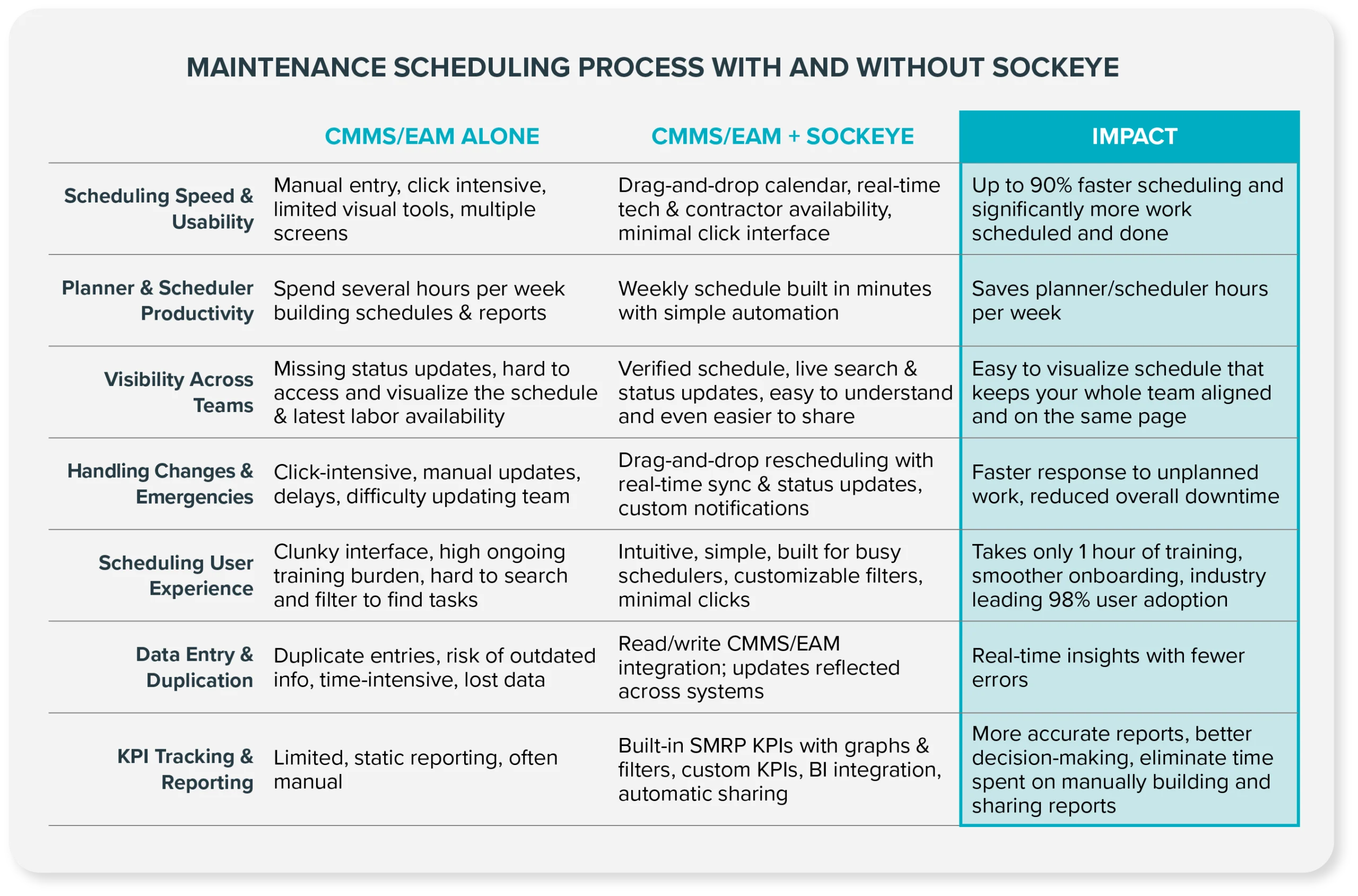
Best of all, Sockeye can be deployed very quickly. The schedulers can learn to use the software in a single 2-hour training session, while our team handles the majority of the integration efforts (your IT team only needs to provide access and oversight).
If scheduling is the main bottleneck in your maintenance workflow, you don’t need to replace your existing maintenance software — you just need a better scheduling layer.
👉 Schedule a short demo to see Sockeye in action.
FAQs
Work order scheduling software helps maintenance teams plan and assign maintenance work to technicians based on availability, priority, and required skills. It provides a centralized view of upcoming work orders, technician workloads, and maintenance schedules, making it easier to plan preventive maintenance and respond to urgent issues.
Most work order scheduling tools are part of larger platforms such as CMMS, EAM, or FSM software, although specialized scheduling bolt-ons like Sockeye also exist.
You can find work order scheduling software on software review platforms such as G2, Capterra, and Software Advice, where you can compare tools and read user reviews. Industry forums, Reddit, LinkedIn groups, and maintenance communities can also provide useful recommendations.
Another good approach is to ask colleagues and industry peers which tools they are using. Many organizations discover suitable solutions through referrals from other maintenance teams facing similar scheduling challenges.
One of the most common mistakes is choosing software based on features listed on marketing pages instead of evaluating how easy those features are to use in real scheduling scenarios.
Other common mistakes include:
- Skipping a pilot project or trial before committing to a purchase.
- Not clearly defining the problems the software needs to solve.
- Ignoring integration requirements with existing CMMS, ERP, or other systems.
- Underestimating implementation and training requirements.
- Choosing overly complex enterprise systems when simpler tools would work better.
The cost varies widely depending on the type of solution.
- Scheduling bolt-ons are usually more affordable since they integrate with existing systems rather than replacing them.
- CMMS and FSM platforms typically range from about $30–$150 per user per month, depending on features and company size.
- EAM systems can involve six- or seven-figure implementations, especially in large organizations.
