
Scheduling building maintenance can be tough. Preventive maintenance, inspections, corrective repairs, and emergency work all compete for the same people, and they’re often spread across multiple facilities.
Then the complications pile up. Technician availability is limited, and some jobs need specialized skills that only a few people have.
You may work with several contractors, each on their own schedule. Building access restrictions, like tenant hours or secure areas, narrow your windows even more. And priorities shift by the hour, so one burst pipe can wipe out the plan you made on Monday.
A great maintenance scheduling software takes some of that load off your planners and schedulers. It organizes recurring PMs, tracks labor availability and utilization, automatically matches planned work to available skilled labor, and makes it easier to rebalance the week when something urgent comes in.
If scheduling maintenance for your building(s) is a bottleneck you are trying to solve, this article compares 11 popular building maintenance solutions across scheduling functionality, pros, potential limitations, and pricing models.
Quick aside: Understanding the different types of building maintenance scheduling software
Finding a dedicated building maintenance scheduling software. In the vast majority of cases, scheduling is just one feature inside a larger platform like:
- CMMS: A CMMS (computerized maintenance management system) manages work orders, asset records, preventive maintenance schedules, and spare parts. It’s the core tool for most maintenance teams, though scheduling depth varies from one product to another.
- Facility management software (CAFM/FM): This software covers the day-to-day running of buildings, including service requests, work orders, space, and often vendors and contractors. It suits teams that manage many buildings or rely on outsourced services.
- EAM: An EAM (enterprise asset management) system tracks assets across their whole lifecycle, from purchase and maintenance to replacement. It’s built for large, asset-heavy organizations and goes beyond maintenance into costs, compliance, and long-term planning.
- IWMS: An IWMS (integrated workplace management system) combines real estate, space, facilities, and maintenance in one platform. It fits organizations that want maintenance tied to portfolio and workplace data.
A common problem is that, since scheduling is not the primary function in those large maintenance systems, and it has to work in conjunction with MANY other features, it just ends up being very complex or time-consuming.
Schedulers and supervisors typically just want to see ready work and available technicians — and match one with the other. Without needing to cross-reference 5 dependencies on 4 different screens, or start the scheduling process from scratch every time they need to reschedule one existing work order.
But if your CMMS, CAFM, or EAM already holds your work orders, asset records, and maintenance history, you do not want to replace it just to improve scheduling. Doing so can cause more disruption than it solves.
In those cases, a specialized scheduling tool like Sockeye can fill the gap while your existing system stays in place as your system of record. More details in the sections below.
Key features to look for in facility maintenance scheduling software
An effective scheduling solution helps your maintenance team schedule work around the practical constraints of operating buildings, instead of simply displaying work orders on a calendar. That means accounting for who is available, who is qualified, and what needs to happen first.
Not every platform offers advanced labor scheduling. Some focus mainly on generating maintenance tasks and setting due dates. As you compare tools, evaluate how deeply each one supports resource-constrained scheduling.
Must-have features, which cover the core of scheduling maintenance around real-world constraints:
- Preventive maintenance scheduling: Create recurring maintenance activities for HVAC equipment, electrical systems, elevators, fire protection equipment, plumbing, and other building assets. Recurring tasks keep inspections and servicing from depending on someone remembering them. This is the baseline, and some tools stop here.
- Work order prioritization: Organize maintenance based on urgency, safety concerns, service-level agreements, and operational impact. Clear priorities help your team decide what to do first when time and labor are limited.
- Labor availability and capacity planning: Account for technician working hours, absences, shifts, and contractor availability before assigning work. This prevents schedules that look fine on a calendar but can’t be completed with the people you have.
- Skills-based work assignment: Match maintenance tasks with technicians who have the required qualifications, certifications, and experience. This can be especially important for safety-critical or regulated work.
- Automated scheduling and workload balancing: Reduce manual scheduling effort while preventing technicians or crews from being overbooked. Schedulers spend less time building schedules by hand, and work is spread more evenly across the team.
- Integration capabilities: Exchange work orders, labor information, and scheduling updates with your existing systems, be that HR, workforce management, or BI software.
Nice-to-have features, which make scheduling easier to manage and review, but matter less than the core scheduling capabilities above:
- Visual scheduling and drag-and-drop adjustments: Make it easier to see upcoming work, resolve conflicts, and rearrange schedules when priorities change. Schedulers or supervisors can respond to urgent requests without rebuilding the weekly schedule from scratch.
- Multi-building and location-based scheduling: Coordinate workloads across dispersed properties. This becomes more useful as your portfolio grows.
- Contractor and vendor coordination: Schedule and share work with external service providers and manage outsourced maintenance responsibilities. Ideally, internal and outsourced work can then be scheduled in the same window.
- Mobile access and schedule updates: Give technicians access to assignments, work instructions, and schedule changes while working in the field. Schedule updates can also be sent via any messaging app, but it is a bit cleaner if this is built into your scheduling software.
- Reporting and scheduling KPIs: Monitor schedule compliance, labor utilization, overdue work, maintenance backlogs, reasons for delays, and custom scheduling KPIs relevant for your organization.
Comparison of best building maintenance scheduling software
The 11 tools below take different approaches to scheduling facility maintenance. They range from specialized scheduling bolt-ons to comprehensive EAM and IWMS platforms. All are here because they answer a popular use case for managing building maintenance operations.
The best choice ultimately depends on the size and complexity of your maintenance operations, as well as what you expect the software to do. The table below compares the 11 products by category and use case.
| Software | Category | Best suited for |
|---|---|---|
| Sockeye | Dedicated scheduling bolt-on | Organizations that need better scheduling without replacing their existing maintenance system of records |
| Limble | CMMS | Facility teams that want ease of use and juggle a decent amount of internal and contractor work |
| MaintainX | CMMS | Mobile-first maintenance teams and work execution |
| eMaint CMMS | CMMS | Multi-site maintenance teams needing highly configurable workflows and strict compliance |
| FMX | Facility management software | Schools, campuses, and institutional facilities |
| Corrigo | Facility management software | Multi-location facility maintenance and service provider coordination |
| Facilio | Facility management software | Large commercial building portfolios |
| ServiceChannel | Facility management software | Distributed properties that heavily rely on external service providers |
| IBM Maximo | EAM | Large, asset-intensive organizations with complex maintenance needs |
| Planon | IWMS | Enterprises managing real estate, workplaces, and facilities |
| Eptura Archibus | IWMS | Large organizations needing integrated building and maintenance management |
This is a broad overview that leaves a lot of important information up in the air. The following section dives deeper into each of those solutions, explaining their ideal use case, scheduling features, main pros, potential limitations, and pricing model.
1. Sockeye — The best dedicated maintenance scheduling tool
Sockeye is a simple scheduling bolt-on that usually sits on top of your existing maintenance software instead of replacing it. It reads your planned work orders, matches them to available labor, and helps you build balanced weekly schedules in minutes.
Key planning and scheduling features in Sockeye:
- Automated scheduling: Automatically matches selected work orders with available skilled labor based on predefined rules. The scheduler only needs to review, adjust some things if needed, and publish the schedule.
- Labor availability dashboard: Lets you enter technician and contractor shift patterns, then manually adjust for vacations or training in a couple of clicks. All done with a single window, with an option to synchronize availability based on data from your CMMS or HR software.
- Drag-and-drop rescheduling: You can simply drag and drop work to the next available slot when priorities change. You get a visual notification if a person or a team is overbooked. Plus, as you move things around, you can track utilization across teams in real time in the top right corner of your scheduling interface.
- Delay tracking: Track why specific work was delayed with a customizable drop-down table.
- SMRP-based KPI tracking: Track schedule compliance, hours spent on corrective vs preventive work, hours spent on planned vs unplanned work, standing work orders, and more. You can also define and track custom KPIs.
- CMMS and EAM integration: Connects through a read/write API or file-based import, with virtually all maintenance software. Popular integrations include SAP, JDE, Maximo, Emaint, Accruent Maintenance Connection, and FMX.
Pros: Sockeye improves scheduling without replacing the system that holds your work orders and asset records. It’s also quick to pick up (most schedulers get the hang of it after a single one-hour training session). This Capterra reviewer praised how easy it was to deploy.
Potential limitations: Sockeye works best alongside your CMMS or EAM, so you’ll typically still need a system of record underneath it.
Pricing: Sockeye runs on a month-to-month subscription with custom quotes, depending on integration type, number of users, and number of locations. You can start with a one-month trial to prove the concept using your own data.
2. Limble — Easy-to-use CMMS that handles both contractors and internal teams well
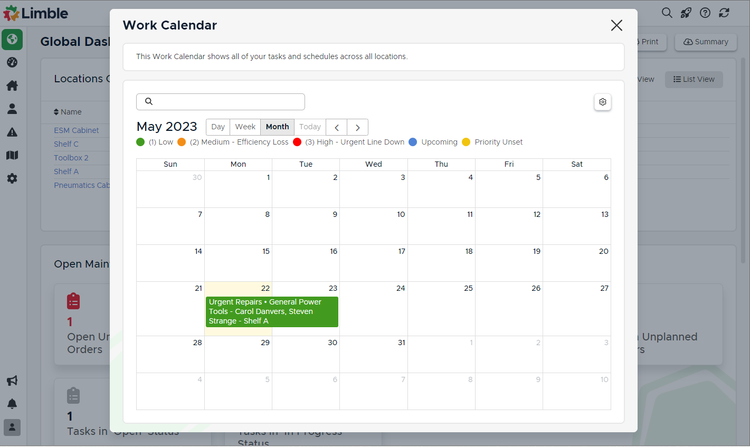
Limble is a cloud-based CMMS built to be easy to use. Work orders, PMs, and technician assignments live in one place, with a calendar and workload view. It suits facility teams that want centralized maintenance without a steep learning curve.
Key planning and scheduling features in Limble:
- PM scheduling: Supports time-based, meter-based, and threshold-based schedules. Conditional rules can skip holidays or limit PMs to a season, which suits seasonal building tasks.
- Drag-and-drop calendar: Lets you sort work by priority, team, location, or asset, then change due dates or assignments by dragging.
- Workload view: Shows who’s available, who’s overloaded, and what’s coming next, so you can balance capacity by person and by day.
- AI scheduling suggestions: Recommends how to group and balance work, such as giving similarly located tasks to the same technician. You choose which suggestions to apply.
- Mobile app: Technicians can update work orders and log time and materials from their phones.
Pros: Limble combines flexible PM scheduling with an easy learning curve. On G2, where it holds a 4.8 rating, ease of use is the most-cited benefit. One reviewer called the platform “very intuitive and customizable.”
Potential limitations: Some scheduling features depend on your plan. Meter and threshold scheduling is part of Premium+, and Standard and Premium+ are built for a single location. Multi-location support is an Enterprise capability, which matters if you schedule across several buildings. Some reviewers also say that setting up PMs at scale takes effort, while others want easier bulk updates.
Pricing: Limble’s pricing is custom and quote-based. There are three plans: Standard, Premium+, and Enterprise. Pricing is per user, so your cost grows as you add people.
3. MaintainX — Mobile-first CMMS built for frontline work execution
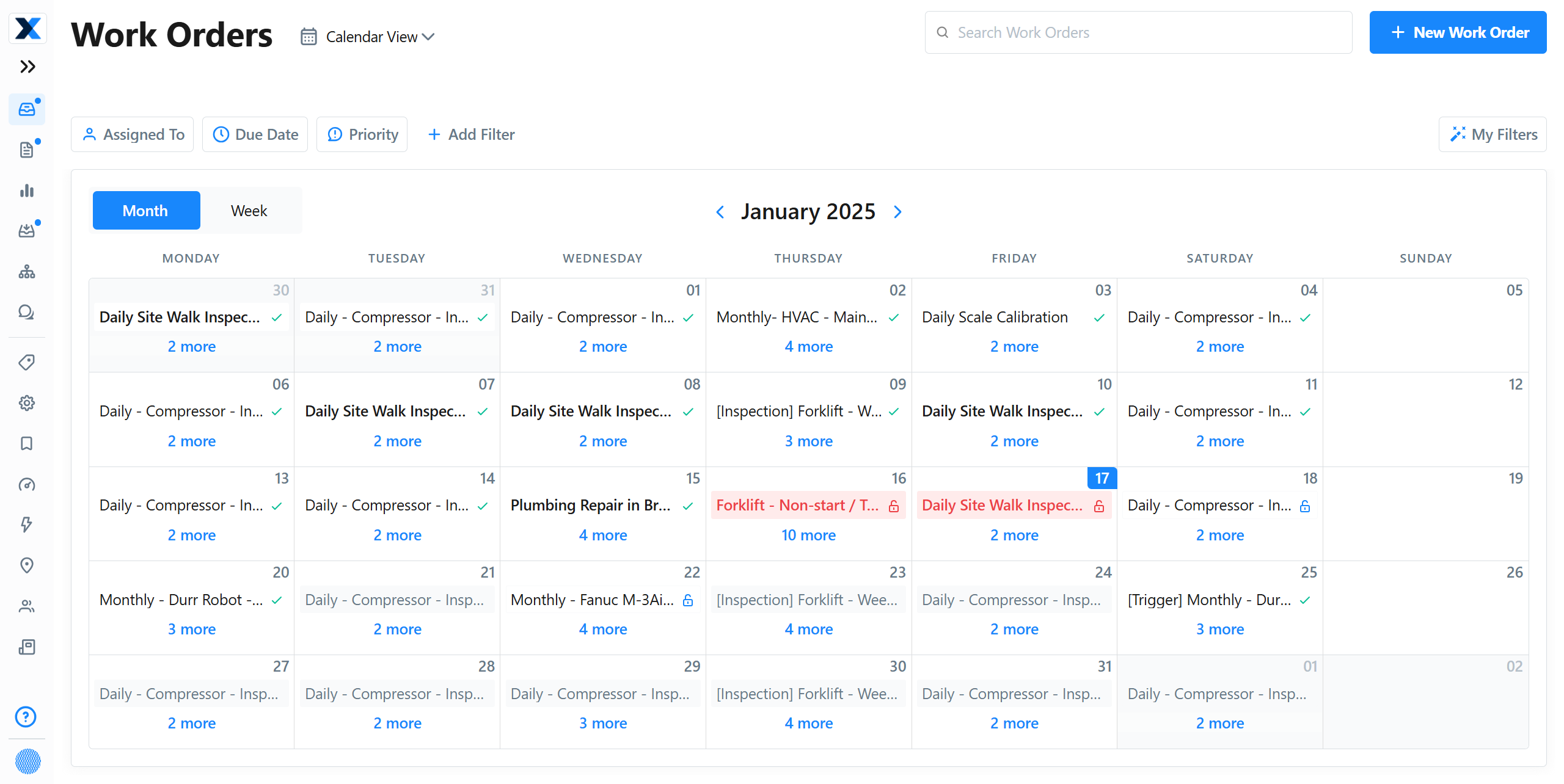
MaintainX is a mobile-first platform that combines work orders, PM plans, procedures, and team messaging. Technicians complete work in the app while managers plan and track it from one place. It fits teams that want recurring PMs and work orders handled mainly on mobile, and MaintainX lists facility maintenance as a use case.
Key planning and scheduling features in MaintainX:
- Recurring PMs: Repeats work orders on a time-based schedule, such as every Friday or every three months. Meter-based triggers are available on higher plans.
- Maintenance plans: Adds a separate planning layer for recurring work, including nested PMs that combine different intervals in one plan.
- Calendar rescheduling: Lets you change a work order’s due date by dragging it in the Calendar view.
- Workload view: Shows each team member’s schedule and capacity, and you can drag work orders into their calendars to schedule or reassign. This is part of Resource Planning on the Enterprise plan.
- Smart Time Estimates: Uses past work orders to predict how long new work will take, which feeds the workload view. This is also on the Enterprise plan.
- In-app messaging: Team chats and threads keep conversations in one place, and you can create a work order straight from a message.
Pros: MaintainX is easy to adopt, especially for field teams. On G2, where it holds a 4.8 rating from more than 1,600 reviews, easy navigation is the benefit reviewers mention most. One reviewer said it solved their PM generation problem, which fits building teams that like to set up tasks like inspections and filter changes once and let them generate automatically.
Potential limitations: Some of the scheduling depth sits in higher plans. Labor-aware scheduling, including workload-based scheduling and custom work schedules, is part of Resource Planning on the Enterprise plan. Some G2 reviewers want more advanced PM scheduling options and more customizable reminders.
Pricing: MaintainX has four different plans. Basic is free, Essential is $20 (billed annually), and Premium is $65 (billed annually). Enterprise is custom-priced and adds multi-site tools. A user is anyone with a unique login, and requester accounts are free.
4. eMaint CMMS — Configurable CMMS for multi-site maintenance teams
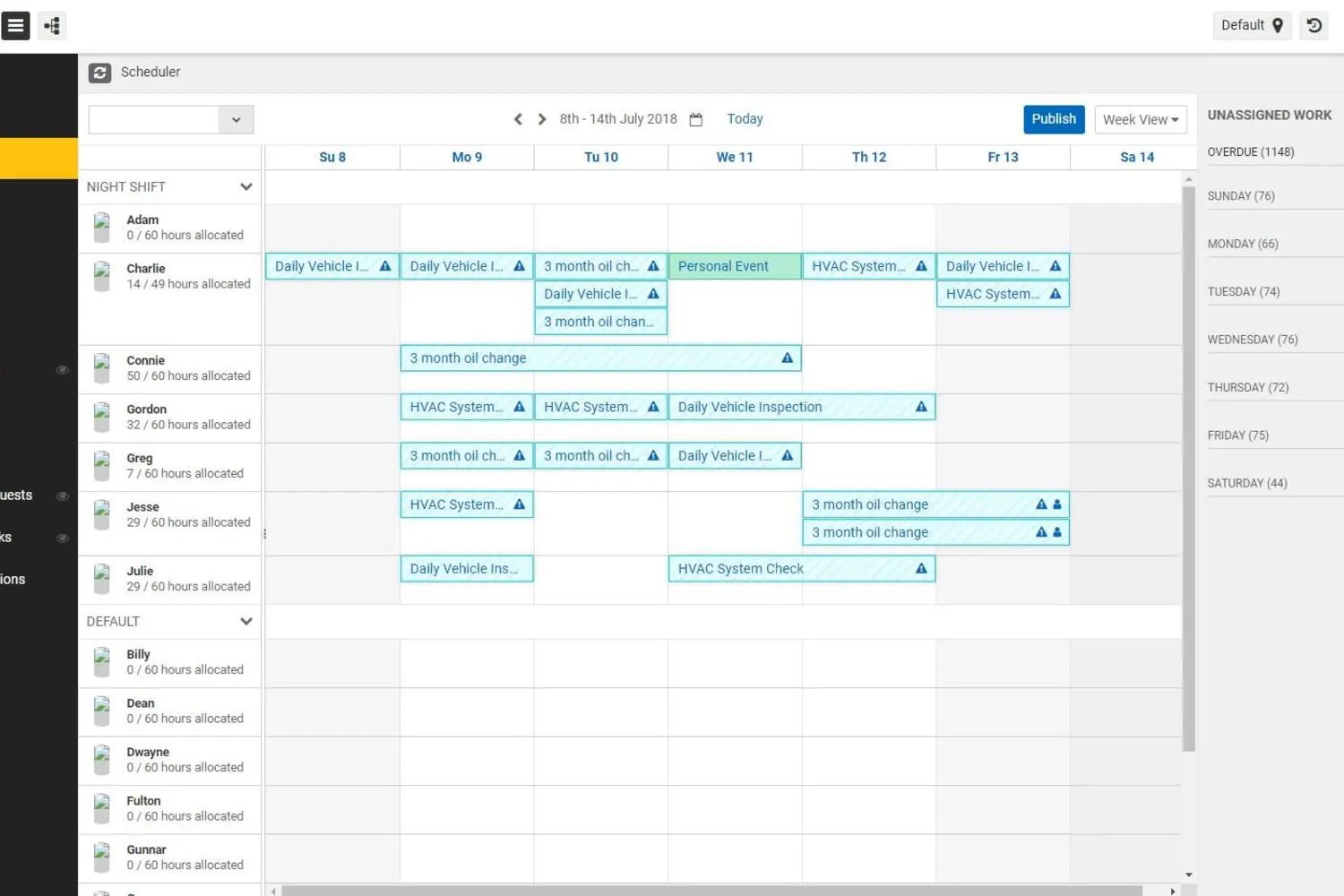
eMaint, from Fluke, is a maintenance management platform for work orders, PM scheduling, spare parts, and condition monitoring. It scales from one site to many with standardized processes. It also has a dedicated facilities page that pitches its drag-and-drop calendar for planning and assigning work.
Key planning and scheduling features in eMaint:
- Automated PM scheduling: Triggers PMs by time, meter readings, or asset conditions.
- Drag-and-drop calendar: Lets you assign work visually, with alerts for schedule conflicts and overscheduled technicians.
- Configurable work orders: Supports multi-asset and route-based inspection work orders, plus templates with built-in procedures.
- Condition-based triggers: Creates work orders when asset readings cross a threshold. eMaint connects to Fluke sensors and SCADA, PLC, and BAS/BMS systems, which is useful for building equipment.
- Offline mobile app: Technicians handle work orders, inspections, and parts in the field, and everything syncs when they reconnect.
- Multi-site standardization: Uses a master-child site hierarchy and task library to standardize work orders and procedures, with settings and permissions configurable per location.
Pros: eMaint lets you standardize maintenance across sites and still adapt it to each building. On G2, where it holds a 4.5 rating, reviewers most often praise its ease of use and customizable work order system. Read our eMaint maintenance scheduling review for more info.
Potential limitations: Setup takes effort. Reviews say data migration, configuration, and learning the system can take time. Also, reviewers mention scheduling as an area for improvement and ask for more flexible calendars and better visibility into technician assignments.
Pricing: Pricing is quote-based, and you can buy features à la carte. Professional has a three-user minimum, and Enterprise, which adds multi-site operations, SSO, and ERP and API integrations, has a five-user minimum. Plans are billed as a prepaid annual commitment, and setup costs vary by service level.
5. FMX — Facilities management platform for schools, campuses, and institutions
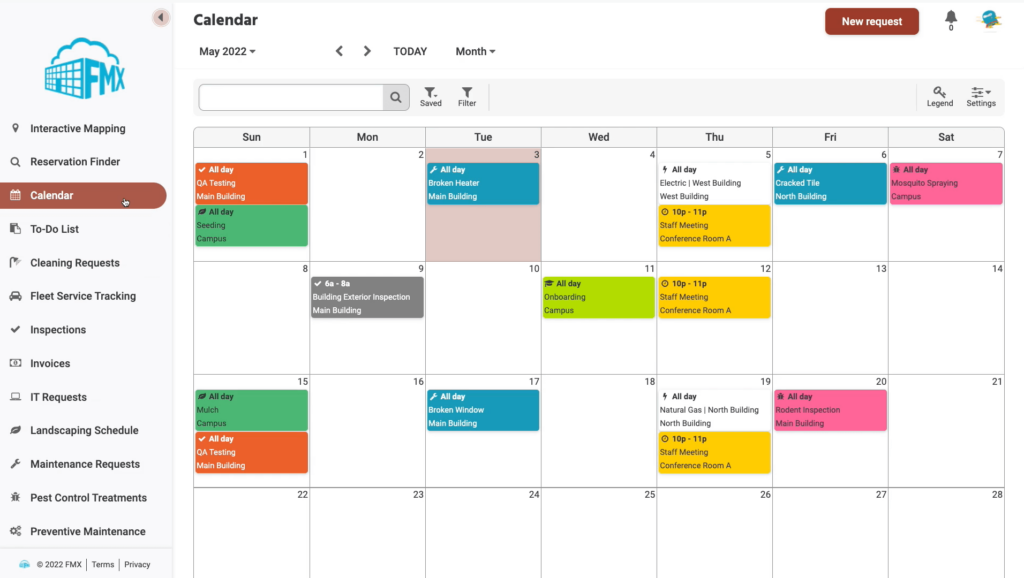
FMX is a cloud-based CMMS and facilities platform used in K-12, higher education, government, and commercial settings. It combines maintenance with facility scheduling, so work orders, PMs, and room or event reservations live in one system. That makes it a natural fit for schools and campuses with many buildings.
Key planning and scheduling features in FMX:
- PM scheduling: Uses time-based and meter-based intervals, with inspection checklists for tasks.
- Automatic assignment: Assigns work orders to technicians based on skill set, location, and workload.
- Building and grounds schedules: Tracks cleaning, landscaping, and pest control schedules alongside PMs.
- Central calendar: Shows reactive and proactive work in one calendar you can filter.
- Mobile access: Technicians can resolve requests and view upcoming tasks on the go.
Pros: FMX puts building maintenance and facility scheduling in one platform, so you can plan maintenance around how spaces are actually used. Users rate it highly too. It holds 4.7 on Capterra, with a 4.9 for customer service, and 4.7 on G2. One G2 reviewer said the PM section made it easy to build a solid planned maintenance approach.
Potential limitations: FMX’s scheduling centers on PM intervals, assignment, and calendars. Its building maintenance pages don’t describe shift-based availability or technician capacity planning. Setup can take effort when configuring forms and workflows, and reviewers ask for features such as more flexible alerts.
Pricing: Pricing is quote-based and depends on users, features, and custom workflows. Public K-12 schools are priced by student enrollment, with unlimited users at no extra cost. Request-only users, vendors, and partners aren’t billable. Contracts renew annually and include a one-time implementation fee. A free trial is available.
6. Corrigo — Facility maintenance with built-in service provider coordination
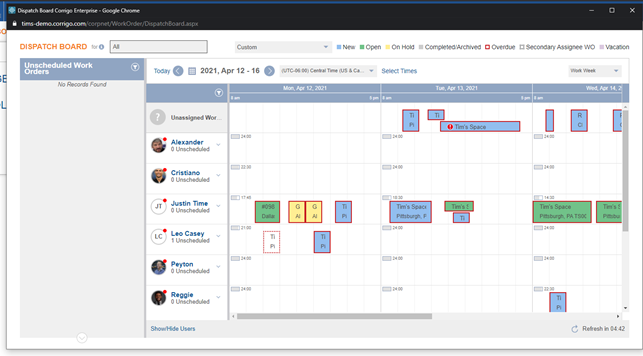
Corrigo, from JLL, is a cloud-based CMMS for work orders, preventive maintenance, and technician workflows. It suits teams that manage many locations and rely on outside service providers.
Key planning and scheduling features in Corrigo:
- PM scheduling: Automates preventive maintenance scheduling and workflows.
- AI-driven assignment: JLL says it assigns tasks based on priority, technician skills, and availability.
- Service provider network: Gives you access to a peer-vetted network of 70,000+ providers, with SLA monitoring, GPS check-ins, and automated alerts.
- Multi-property dashboard: Centralizes control across facilities.
- Mobile app: Supports offline work orders, QR and barcode scanning, and photo attachments.
Pros: Corrigo coordinates in-house and outsourced maintenance across many sites in one system. It holds a 4.5 rating on G2 from 140 reviews, and one reviewer called their asset management and reporting invaluable for them.
Potential limitations: Corrigo is geared toward large, distributed portfolios, so smaller single-site teams may find it more than they need. G2 reviewers also ask for more reporting options and mobile workflows that match the desktop version.
Pricing: Corrigo doesn’t publish prices, so you’ll need to request a quote. Pricing typically combines software licensing (per user or per site), optional modules like vendor management, and implementation fees (which depend on your deployment size, users, and integrations).
7. Facilio — Connected CMMS for large commercial building portfolios
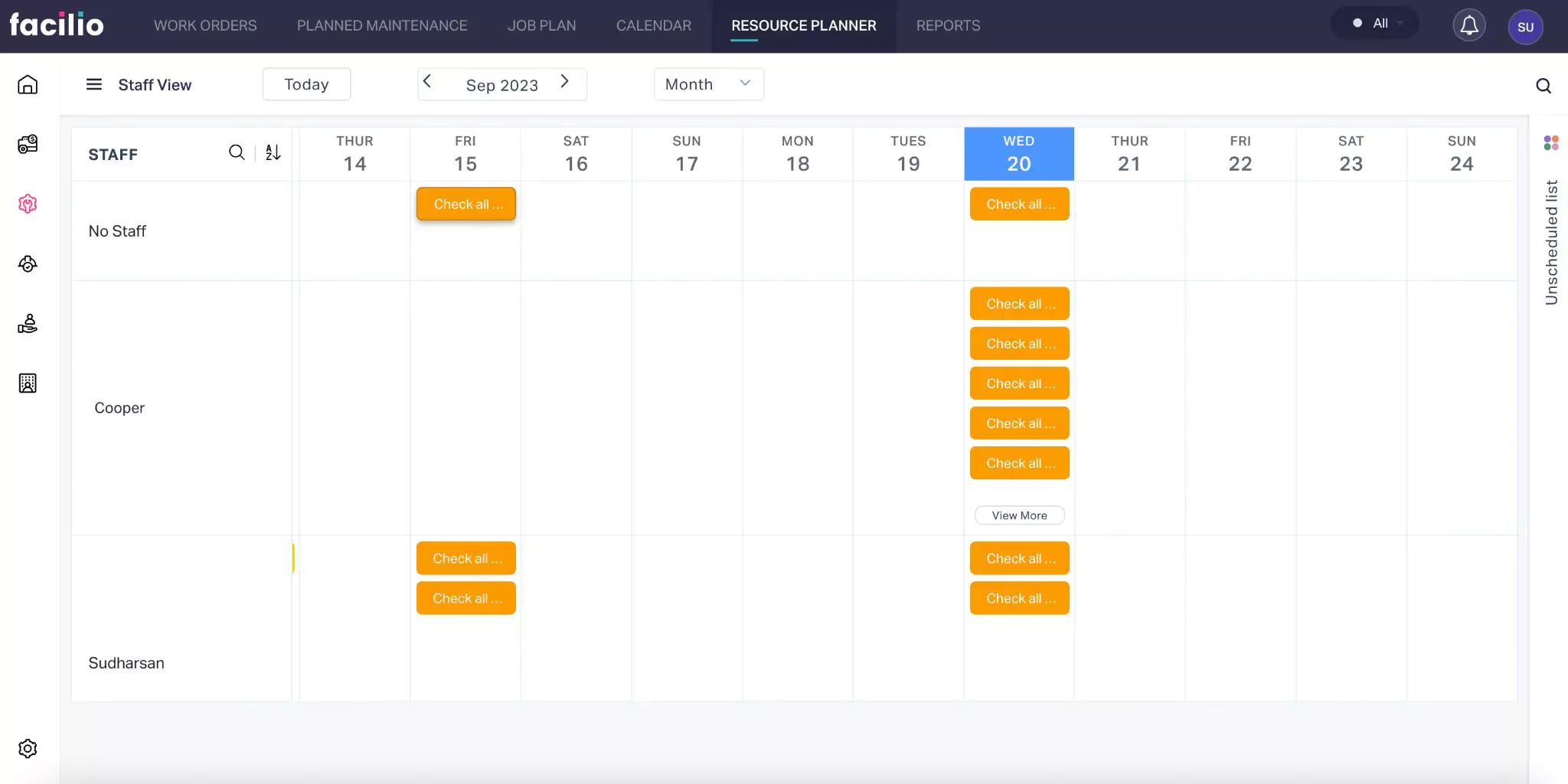
Facilio is a connected CMMS and building operations platform for multi-site portfolios. It targets commercial real estate, with proactive scheduling for tenant SLAs, and suits teams that manage many buildings.
Key planning and scheduling features in Facilio:
- Customizable PPM plans: Configures schedules by asset category, location, priority, or criticality.
- Reusable job plans: Lets you build a task list once and apply it to PPMs for assets with similar checklists.
- Calendar and workload view: Shows upcoming PM tasks and workload on one screen, so you can adjust schedules quickly.
- Automatic dispatch: Facilio says it assigns work based on calendar availability, technical skills, and qualifications.
- Vendor assignment: Sends work orders to vendors directly in the platform, and a vendor portal lets them update and close work.
- BMS and IoT integration: Connects ERP, BMS, and IoT systems through open REST APIs.
Pros: Facilio schedules work around technician availability and skills, and it connects to building management systems. Reviewers on Capterra and Software Advice mention a user-friendly interface that’s easy to customize.
Potential limitations: Some reviewers say preventive maintenance scheduling needs improvement. Its review base is also small (25 reviews on Capterra and 4 on G2), so there’s little user feedback on how scheduling holds up day to day.
Pricing: Facilio doesn’t publish prices, so you’ll need to request a custom quote for one of its three tiers: Standard (work orders and PM scheduling), Essential (adds inspections, inventory, and procurement), or Enterprise (adds vendor management, compliance controls, and SSO). Pricing is based on users or buildings, depending on your deployment model.
8. ServiceChannel — Contractor-driven work order management for distributed properties
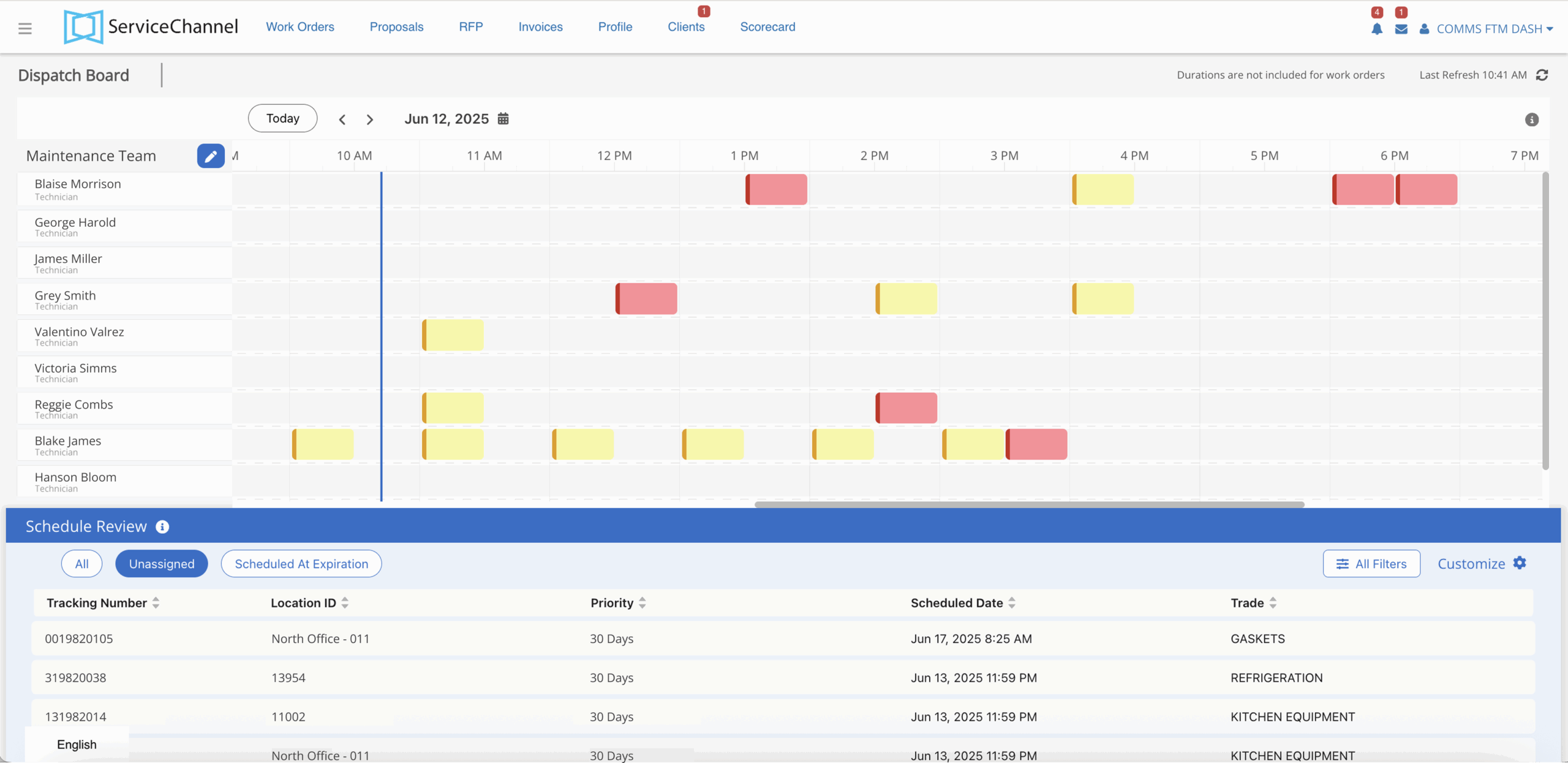
ServiceChannel is a facility management platform built mainly for teams that rely on outside contractors, with an add-on module for in-house technicians. It handles work orders, provider coordination, and invoicing in one place, backed by a marketplace of more than 70,000 providers in the US and Canada.
Key planning and scheduling features in ServiceChannel:
- Work order routing: You can assign, rank, and reroute work orders to providers based on conditions you customize.
- PM scheduling: Creates work requests and dispatches teams based on your PM schedules. You can bundle PM tasks across assets at one location into a single work order.
- Compliance scheduling: Schedules compliance-related maintenance tasks automatically.
- Dispatch board for in-house technicians: The Field Tech Manager module adds a dispatch board, technician shifts, and crews.
- Shared visibility: Internal and external work orders sit in one app, so your staff knows when providers will arrive.
- Mobile apps: Location staff and providers each get their own app for requests, check-ins, and job tracking.
Pros: You get one system for scheduling, status updates, and close-out, so you stop chasing contractors over email. Reviewers call scheduling, status updates, and uploading photos straightforward.
Potential limitations: ServiceChannel was built primarily as a contractor-coordination and vendor-marketplace platform. Although it has added an internal technician module, most teams are better off going with a CMMS or EAM if most of the work is done in-house. Reviewers also mention slow report pulls.
Pricing: ServiceChannel doesn’t publish prices, and no free trial is listed. You will have to reach out for a custom quote.
9. IBM Maximo — Enterprise asset management with optimization-based scheduling
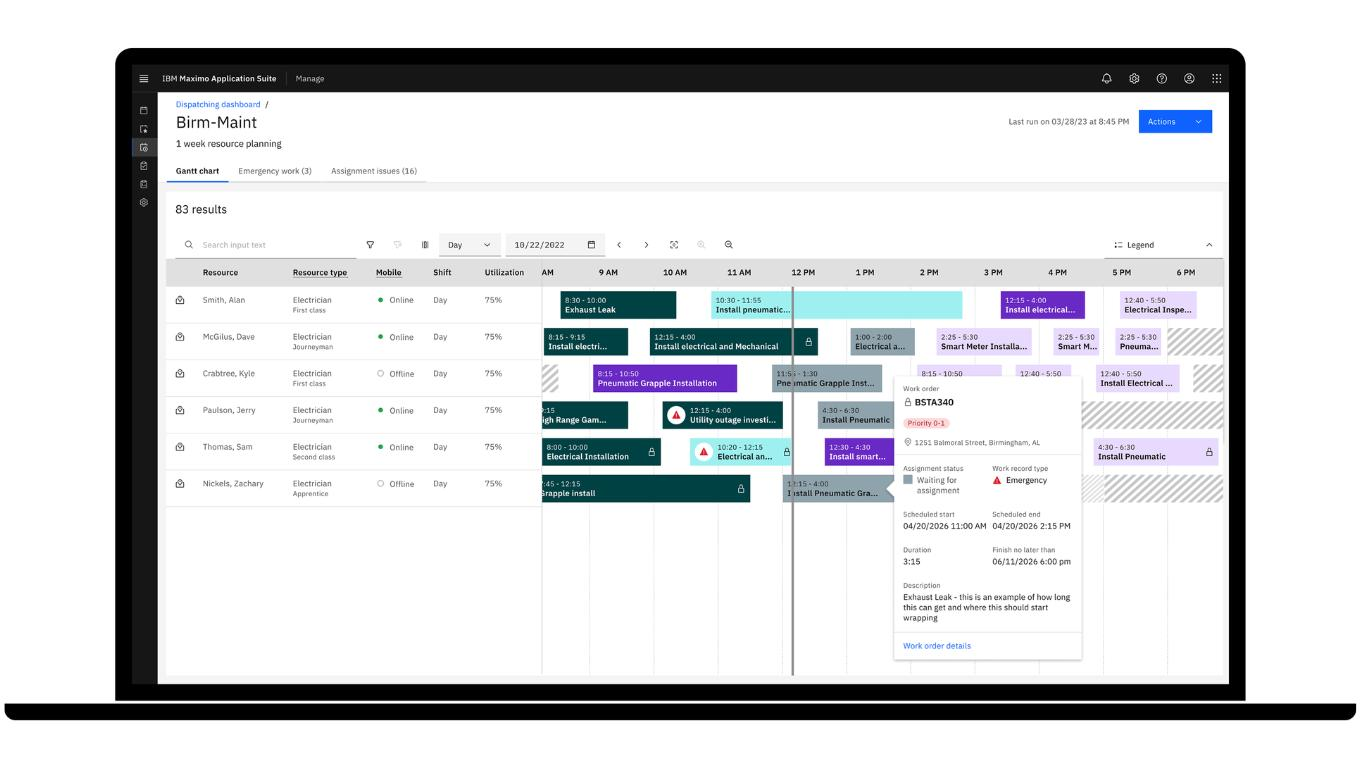
IBM Maximo is an enterprise asset management platform, now sold as the Maximo Application Suite. It’s built for large, asset-heavy organizations, but it also goes further on scheduling than most tools on this list. Its scheduling tools can automate decisions for long-range planning, scheduling, and dispatching while balancing competing constraints.
Key planning and scheduling features in Maximo:
- Graphical scheduling: Planners work in a Gantt-style view and can take many work order actions without leaving it.
- Resource leveling: You can view resource allocation and planned work by craft on the scheduling dashboard.
- Capacity planning: Optimization models cover capacity planning and maintenance scheduling optimization, and they factor in resource availability.
- Labor and crew assignment: Short-term assignment models help supervisors and dispatchers match work to people.
- Scheduling horizons: The optimizer covers long-term scheduling through short-term dispatching, so one tool handles both the annual plan and tomorrow’s crew list.
Pros: Maximo is one of the few platforms here that handles true resource-constrained scheduling, not just due dates. It also scales extremely well. G2 shows 4.4 from about 653 reviews, and Capterra reviewers highlight how customizable it is. For a more in-depth
Potential limitations: Maximo is complex. Some reviews note that initial setup, as well as scheduling functionality, can be complex and time-consuming. Some reviewers also describe a busy interface.
Pricing: IBM uses a credit-based licensing model called AppPoints, available as SaaS or client-managed software. IBM’s pricing page lists the Essentials Maintenance option starting at around USD $40K per year.
10. Planon — Enterprise IWMS that ties maintenance to real estate and space data
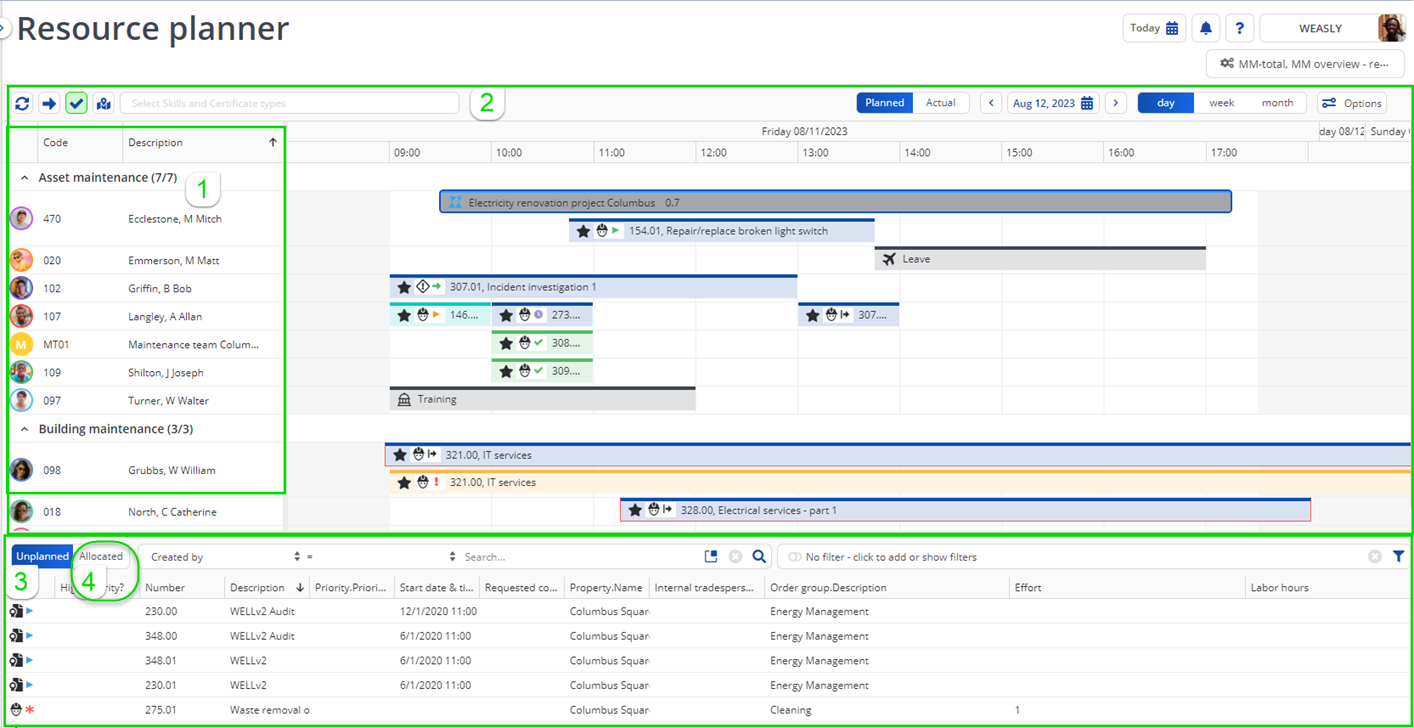
Planon is an integrated workplace management system (IWMS). It covers real estate, space, and facilities in one platform, with maintenance as one of its many modules. It fits organizations that want building maintenance connected to portfolio and workplace data. If you only need a scheduling tool, it’s a big step up in scope.
Key planning and scheduling features in Planon:
- Maintenance types: Supports regularly scheduled preventive work, reactive work orders, and predictive maintenance.
- Graphical resource planner: Lets you view and adjust maintenance workers’ activities.
- Maintenance plan viewer: Gives you visibility of maintenance schedules across the enterprise.
- Technician map view: Shows where technicians are working, so you can schedule assignments around location.
- Building automation triggers: Turns data from a building automation system into work orders and inspections.
- Mobile updates: Technicians can update work orders from a smartphone or tablet.
Pros: You get maintenance, space, and real estate data in one system, which helps if you schedule work across a large building portfolio. Capterra reviewer said it covers almost all facility management needs in one tool.
Potential limitations: Scheduling is one module in a much larger suite, so you’d be buying more than a scheduling fix. Public review data is also thin. Capterra shows 4.4 from 10 reviews, and G2 has just one review, so it’s hard to judge scheduling depth from user feedback.
Pricing: Planon doesn’t publish prices publicly; you’ll need to contact them directly for a quote.
11. Eptura Archibus — Enterprise IWMS with forecasting-ready maintenance scheduling
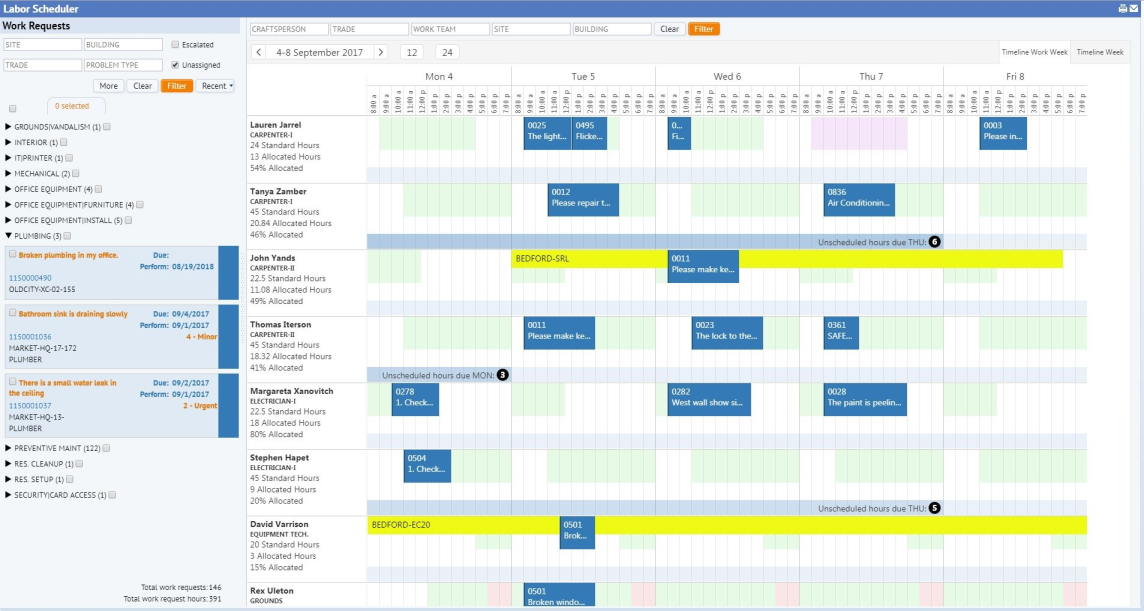
Archibus by Eptura is an integrated workplace management system (IWMS) that covers real estate, space, assets, and building operations. Its Maintenance module handles both reactive and preventive work. It’s aimed at large organizations that want maintenance scheduling tied to space and asset data.
Key planning and scheduling features in Archibus:
- PM scheduling: Generates work orders and requests from defined schedules, either automatically by rules or by running a generation task.
- PM Planner: Shows upcoming, completed, and missed PM work by week. You can move future schedule dates to balance resources and budgets, and see weekly labor hours and costs.
- Work and resource forecasting: Forecasts future work and resources by month or week.
- Labor Scheduler: Lets supervisors schedule craftspersons graphically and reassign work.
- Bulk PM schedule editing: Lets maintenance managers update preventive maintenance intervals, criticality, and scheduled dates across multiple grouped PM schedules simultaneously.
Pros: The forecasting view helps you see upcoming workload before it becomes a crunch. You also get space, asset, and maintenance data in one system. One Capterra reviewer values having a full suite for tracking facilities management activities.
Potential limitations: Reviewers mention upgrades are complicated, the interface is dated, and the mobile app has problems. Review volume is modest, however: Capterra shows 4.1 from 30 reviews, and G2 shows 4.0 from 19.
Pricing: Eptura doesn’t publish prices publicly, so you’ll need to contact one of their partners to get a quote.
When to use Sockeye to streamline facility maintenance scheduling
If you already run a CMMS or EAM, you probably have what you need for work orders, asset records, and preventive maintenance. The gap is often scheduling. Schedulers still lean on spreadsheets, disconnected calendars, and a lot of manual work to turn that data into realistic weekly schedules.
Sockeye makes sense if:
- You already have a CMMS or EAM: You want more capable scheduling without replacing a platform that otherwise works.
- Scheduling takes too much time: Planners spend hours assigning jobs, checking availability, and rearranging the weekly schedule.
- Workloads are uneven: Some technicians or crews are always overloaded while others have spare capacity.
- Labor availability is hard to see: Scheduling decisions need to account for shifts, absences, skills, and contractor capacity.
- Schedule compliance needs work: Your team needs to understand why scheduled work slips and how to build schedules that are easier to hit.
- You manage multiple facilities: You need consistent scheduling processes and clearer visibility into how resources are allocated.
Brands like Loves and Cargill already use Sockeye to simplify scheduling, increase accountability, and get more work done.
Why should you give it a try? We have a 98% adoption rate, which is unheard of in this industry.
Find out why by scheduling a personalized demo. No obligations, just a relaxed chat to see if and how Sockeye could make your team’s life easier.
