

eMaint gives maintenance teams the tools to manage assets, parts, work, and schedules. But as the number of work orders, technicians, shifts, and scheduling constraints grows, building and maintaining an efficient weekly schedule can still require a lot of manual work.
That is where Sockeye can help. Sockeye bolts onto eMaint to automate and simplify maintenance scheduling while eMaint remains your system of record.
Below, we will look at how eMaint scheduling works today, the problems users commonly encounter, and where Sockeye can make the workflow faster and easier to manage.
A quick overview of eMaint CMMS scheduling and dispatch features
eMaint provides a built-in Scheduler for assigning work orders, organizing technician workloads, and viewing upcoming maintenance on a calendar. The Scheduler uses a drag-and-drop interface that lets planners see assigned and unassigned work and adjust the schedule as priorities change.
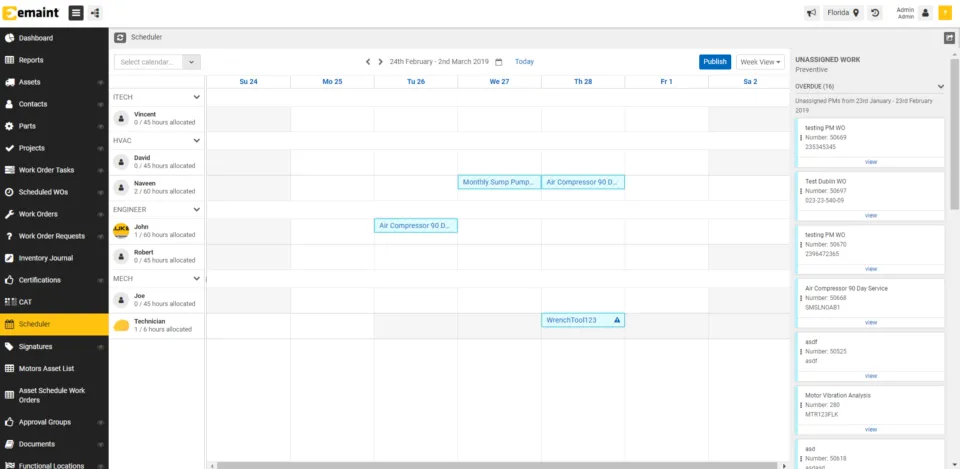
A typical scheduling workflow in eMaint looks like this:
- Create or generate the work order: Corrective work can be entered manually or originate from a work request, while preventive maintenance work orders can be generated from time-, usage-, or condition-based PM schedules.
- Review upcoming work: Planners can review open work orders in the Scheduler and use eMaint’s PM Projection tools to forecast preventive maintenance due over the coming week, month, year, or another planning period.
- Assign and schedule work: Work orders can be assigned to employees, contractors, or vendors for specific dates, times, and locations. In the Scheduler in eMaint X5 (latest version), planners can drag and drop work orders onto the calendar and reassign them when necessary. Work orders are also color-coded based on the type of maintenance work being scheduled.
- Check workloads and resolve conflicts: Calendar views and filters help planners review work by technician, work order type, and other criteria. eMaint also provides scheduling-conflict and overscheduling alerts to help identify overloaded resources and level workloads.
- Dispatch and track the work: Assigned technicians can access work orders through eMaint’s mobile tools, review job and asset information, record labor and parts, update status, attach documentation, and close work in the field.
eMaint also connects scheduling to the wider work management process. Planners can use configurable work order fields and workflows, dashboards and reports, project tracking, and mobile work order management to follow jobs from request through completion. For larger projects, eMaint also supports Gantt charts, while recurring PM schedules can be created based on calendar intervals or equipment usage.
Overall, eMaint covers the standard CMMS scheduling workflow fairly well — at least if you are using the newest eMaint X5 version of the software.
Where the process can become more demanding is when the planners/schedulers need to continuously balance a large backlog against changing labor availability, craft requirements, delays, and weekly capacity — which is where a dedicated scheduling tool can add another layer of functionality and protect you from having to relearn everything after major updates.
Problems users have with the eMaint scheduler
It is important to distinguish the current Scheduler from older versions of eMaint. The scheduling workflow and surrounding functionality have changed considerably as eMaint has moved from X3 to X4 to X5. User reviews do mention improvements to the Scheduler in X5 compared with X4 — though many are still not satisfied with its functionality.
Here are the most common scheduling-related complaints we gathered from big software review sites:
- Scheduler usability: Some users report that scheduling can take time to learn or is less user-friendly than they would like. [“We use the scheduler module each and every week, there could be so much more done with it to enhance its ease of use.” — James, Maintenance Coordinator, G2] [“The scheduling aspect isn’t very functional.” — Wesley, Planner/Scheduler, G2]
- PM projection management: Incorrect projection settings can generate large numbers of future work orders. eMaint specifically warns that future work orders can flood the system when the Scheduler and PM Projection tools are not configured appropriately. [“The scheduler is not use friendly. Not being able to forecast maintenance in agave through the scheduler.” — Zac, Maintenance Manager, Capterra]
- Somewhat rigid scheduling process: Multiple users complain about the scheduler being “too basic” or forcing them to do things in a specific way. [“PM Scheduling not flexible enough to account for variances in production schedule.” — Brian, Plant Manager, Capterra] [“I don’t like how basic the scheduler is. The scheduler needs to capability to fit an oil and gas facility. We have multiple work orders with a lot of work operations that need to be executed. The current scheduler doesn’t allow the ability to look at the work operations. It only references the work order record detail.” — Marcus, Reliability Manager, G2]
- Complex weekly scheduling: As technician count, backlog size, crafts, shifts, absences, and schedule changes increase, planners have more variables to reconcile. eMaint provides the work-order data and scheduling tools needed to manage those variables, but it takes time to learn and adopt. [“I would like to see a more user friendly calendar for scheduling tasks and projects. It would be nice to have the freedom to schedule things that aren’t directly tied to an asset or work order.” — Christopher, Lab Analyst, G2]
- Configuration requirements: Advanced scheduling depends on how eMaint, PM projections, workflows, resources, and other settings are configured. eMaint itself recommends specialist assistance for setting up some of these capabilities correctly.
These limitations matter most when you are trying to build a detailed weekly schedule across a larger maintenance team. And if you struggle to do that in eMaint, Sockeye is here to save the day.
Sockeye bolts onto eMaint to simplify and speed up work order scheduling
Sockeye is a maintenance scheduling bolt-on, so you can keep eMaint as your primary CMMS and use Sockeye as a dedicated workspace for building and managing schedules. Sockeye will pull ready-to-schedule work from eMaint, help you create daily and weekly schedules, and synchronize relevant work order statuses between the two systems.
The main advantages of using Sockeye are its automation, super simple scheduling workflow that takes only one hour to master, and live labor utilization data for easy workload leveling and quick rescheduling.
On top of that, you get:
- Centralized dashboard to keep labor availability up-to-date.
- Customizable drop-down list to track why work orders get delayed,
- Overtime warnings to see when someone is overbooked.
- Built-in SMRP KPIs to track the performance of your team and the effectiveness of your schedule.
For teams already invested in eMaint, Sockeye can become a huge time and money saver. You don’t have to think about switching to another software. You do not have to retrain the team after every bigger update. You definitely do not need to maintain scheduling spreadsheets alongside eMaint.
Instead, you get additional scheduling functionality where the existing workflow needs more depth or flexibility.
Talk to the Sockeye team to see how a dedicated scheduling layer can fit into your existing eMaint setup.
