
A technician can be busy all day without spending most of that day on productive maintenance work. Walking to the storeroom, waiting for equipment to become available, searching for drawings, and figuring out poorly planned jobs can consume hours without moving much maintenance work forward.
That is why improving technician utilization is less about pushing people to work faster and more about improving the system around them.
Better planning, scheduling, materials management, information access, and coordination can convert more of the labor hours you already pay for into useful maintenance work.
Most content about technician utilization focuses on field technicians, and rightfully so. However, this guide will zero in on technicians working on-site — which means less discussion about routes and dispatching and more about job readiness, weekly schedules, labor capacity, break-in work, process bottlenecks, and similar.
QUICK TAKEAWAYS
- Technician utilization measures how much available labor time is spent on productive maintenance work.
- Better planning reduces delays during jobs, while better scheduling reduces delays between jobs.
- Parts availability, information access, cross-training, and operations coordination can significantly improve technician utilization.
- High utilization is not automatically good — track it alongside wrench time, schedule compliance, backlog, overtime, and PM compliance.
- The goal is not 100% utilization, but removing process inefficiencies so technicians can complete more of the right work.
What is technician utilization?
Technician utilization measures how much of a technician’s available work time is spent on productive maintenance activities.
A commonly used formula is:
Technician utilization rate (%) = Productive maintenance hours ÷ Available labor hours × 100
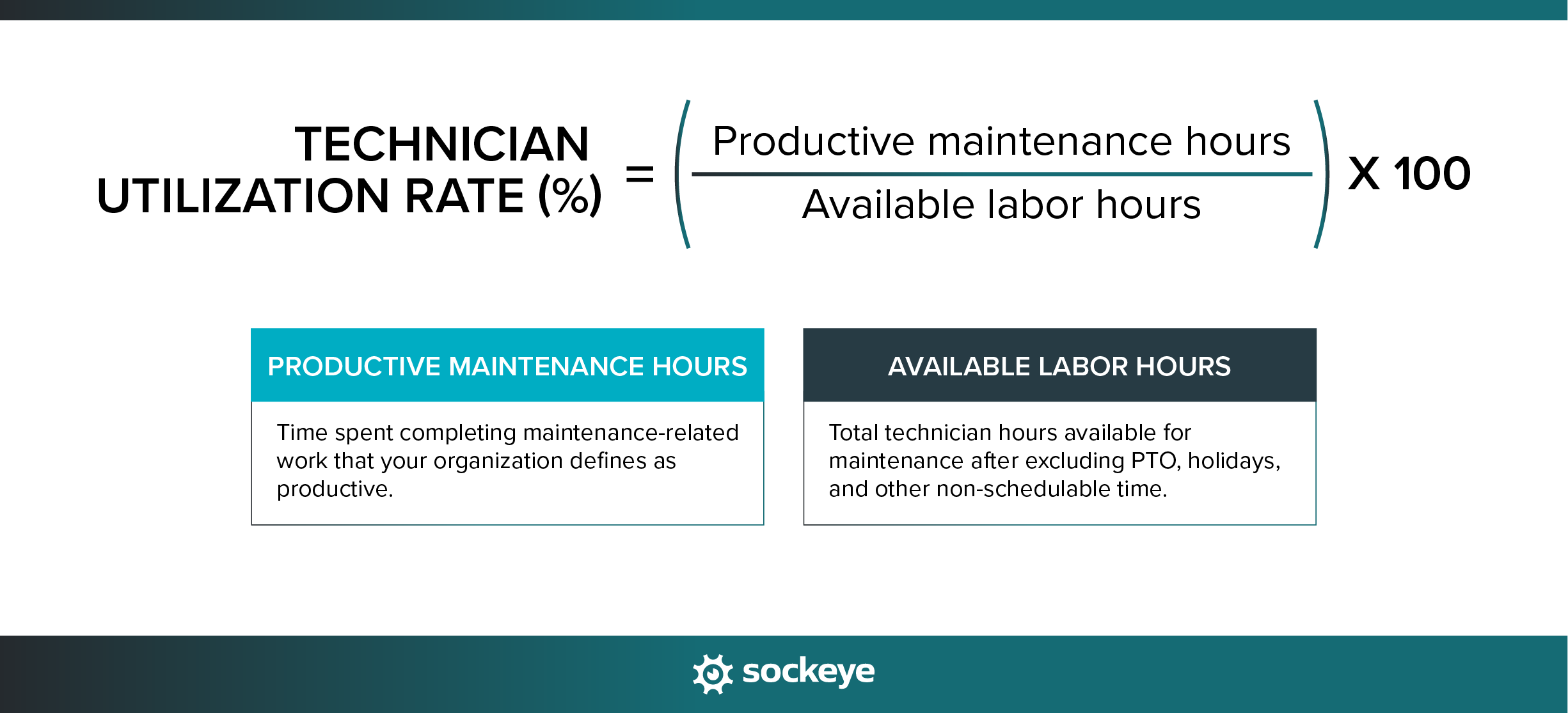
For example, if a technician is available for 40 hours in a week and spends 30 hours performing productive maintenance work: 30 ÷ 40 × 100 = 75% technician utilization
Maintenance teams can use technician utilization to identify unused labor capacity, excessive non-productive time, staffing imbalances, and scheduling problems.
One important distinction is that technician utilization is not exactly the same as wrench time. Wrench time typically measures the share of working time spent physically performing maintenance tasks, while utilization can be defined more broadly to include other productive activities such as inspections, documentation, or job-related travel.
Be sure to standardize the definition at your facility and how you will measure utilization internally. The most important part of the equation will be what you decide to classify as “productive” time.
What is a good technician utilization rate?
A good technician utilization rate depends on how your plant defines productive and available time, so there are no universal benchmarks. As a practical guideline, a plant might aim for roughly 70–80% utilization.
The more important goal is to improve your own baseline while monitoring other relevant metrics (schedule compliance, wrench time, backlog, overtime…) alongside it.
For reference, some industry research suggests that wrench time is around 45% on average, and can climb up to 55%+ with good planning and scheduling.
How better maintenance planning and scheduling improves technician utilization
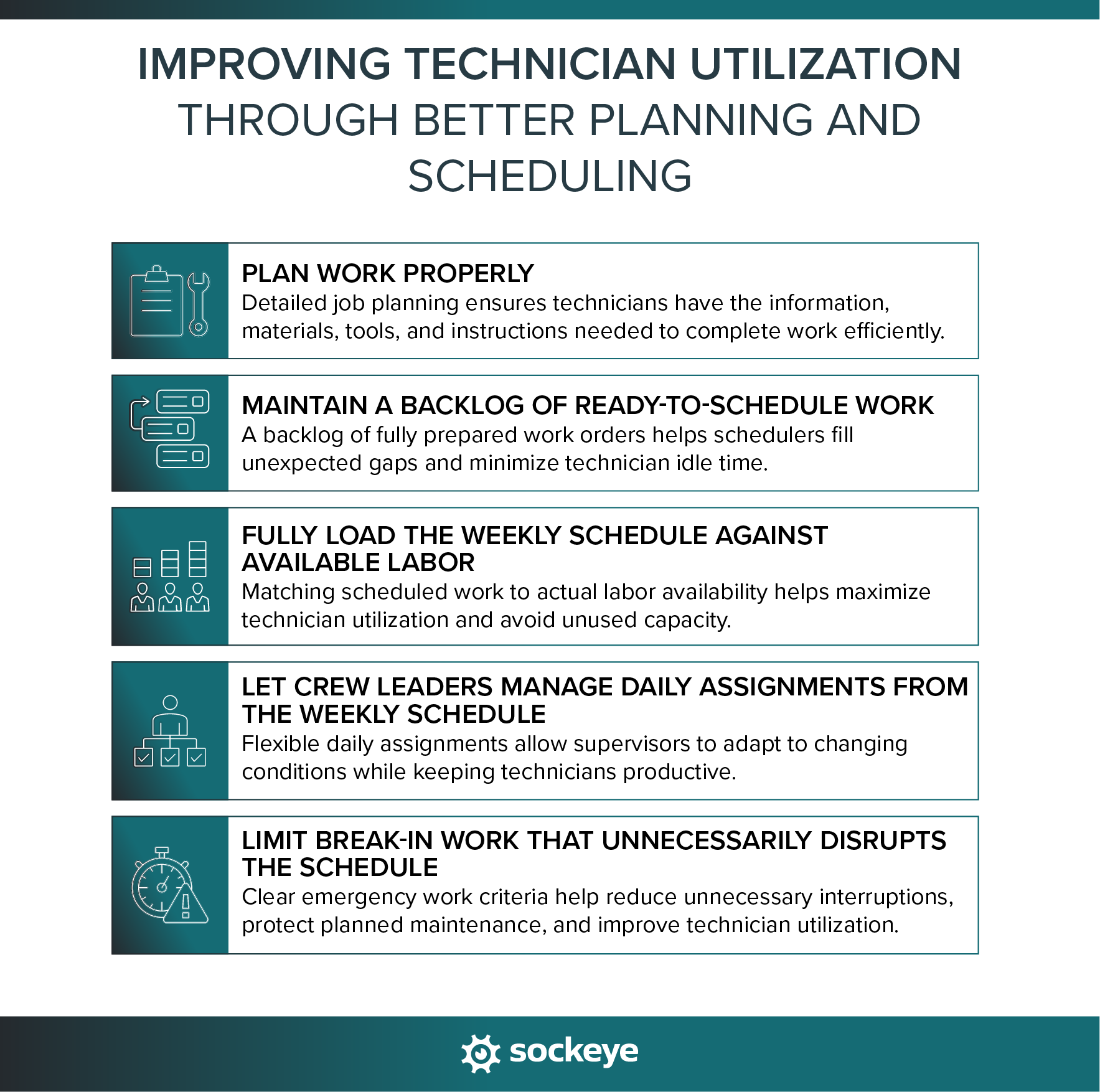
Proper work order planning and scheduling improves technician utilization in two ways: planning reduces delays during jobs, while scheduling reduces delays between jobs. This puts technicians and contractors in a position to spend more of their available time completing valuable maintenance work.
Plan work properly
Proper job planning reduces the time technicians spend searching for information, finding parts, figuring out the job scope, or returning to the maintenance shop after work has already started.
A well-planned maintenance job should define:
- Scope of work: What needs to be repaired, inspected, replaced, or adjusted.
- Estimated labor hours: A realistic estimate of how much technician time the job should require.
- Required skills: The craft, certification, or competency needed to complete the work safely.
- Procedures and instructions: Digital SOPs and checklists that outline clear sequential steps, standard job plans, or troubleshooting guidance.
- Parts, materials, and special tools: Components, consumables, and equipment that should be available before the job starts.
- Permits and safety requirements: Lockout/tagout, confined-space permits, hot-work permits, or other controls.
- Supporting documentation: Drawings, manuals, asset history, photos, and previous work-order notes.
Job plans, and especially time estimates, should improve over time. But this is easier said than done. As Doc Palmer explains it:
“Maintenance work simply is not assembly-line work with enough repetitions to allow detailed time and motion studies or allow enough craft experience on the work. So the estimates made by planners have a great variance in accuracy from actual labor hours, perhaps as much as plus or minus 100%!”
Doc Palmer, PE, MBA, CMRP (Author OF McGraw-Hill Maintenance Planning and Scheduling)
Technicians are often in the best position to report back inaccurate labor estimates, missing steps, and unnecessary procedures. Give them an easy way to share that feedback.
IMPORTANT CONSIDERATION: Another common problem is that planners and schedulers spend too much of their time manually building and adjusting schedules instead of improving job plans. A scheduling tool like Sockeye can automate most of the scheduling process, giving them more time to focus on work preparation, job-plan quality, and backlog readiness.
Maintain a backlog of ready-to-schedule work
A scheduler cannot keep technicians productively loaded if there is not enough planned work ready to assign.
The key is to separate requested work from ready-to-schedule work. A work order should only enter the ready backlog once the scope, labor requirements, parts, procedures, and other prerequisites are sufficiently defined.
A healthy maintenance backlog helps you prioritize work consistently, fill unexpected gaps, and reduce idle time between jobs.
This becomes particularly important when planned jobs finish earlier than expected or production suddenly makes equipment available.
Fully load the weekly schedule against available labor
If a crew has 400 genuinely available labor hours next week but only 310 hours of work are scheduled, you have effectively planned for 90 hours of unused capacity.
Maintenance planning literature commonly recommends loading the weekly schedule to the available labor forecast rather than deliberately leaving large blocks of time empty for possible reactive work.
However, 100% schedule loading does not mean booking every technician minute-by-minute. It means having enough worthwhile, ready work available to consume the crew’s forecast labor capacity across the week.
Accurate labor availability is critical here. Work order schedulers like Sockeye help teams keep availability data current by accounting for factors such as sick time, planned time off, and other labor constraints — so the weekly schedule can be built against the actual capacity rather than a theoretical headcount.
Let crew leaders manage daily assignments from the weekly schedule
Trying to prescribe every technician’s exact activities several days in advance can work against utilization because maintenance work is inherently variable.
Sometimes, a better approach is to use the weekly schedule to define the crew’s workload, then let supervisors manage daily assignments based on actual conditions.
- Weekly schedule: Establishes the amount and priority of work the crew should complete.
- Daily assignments: Supervisors assign technicians based on job progress, equipment availability, emergencies, absences, and changing priorities.
This gives crew leaders enough flexibility to keep technicians moving when reality diverges from the original plan. If one job runs long, another asset becomes available early, or a technician with a specific skill is needed elsewhere, the supervisor can rebalance work without rebuilding the entire weekly schedule.
Limit break-in work that unnecessarily disrupts the schedule
Some reactive work is unavoidable, and often takes priority. But technician utilization will suffer if all requests are treated as urgent and repeatedly interrupt planned work.
Just think about it. Frequent break-in work will force technicians to:
- Abandon jobs mid-task: Partially completed work often has to be restarted or rechecked later.
- Travel to another area: Switching jobs adds walking, driving, and setup time.
- Retrieve different tools and parts: Technicians may need to return to the shop or storeroom.
- Restart interrupted work later: Context, setup, permits, or equipment access may need to be re-established.
- Leave other scheduled work waiting: One interruption can create delays across several jobs.
To protect the weekly schedule (and planned preventive work), the whole team should sit down and define clear criteria for what qualifies as emergency work. It would also help avoid the other extreme, where teams underload schedule in an effort to blindly protect schedule compliance.
Other practical ways to improve technician utilization
Poor planning and scheduling are only part of the picture. Many other process inefficiencies and bottlenecks can hurt technician utilization. Let’s see how to tackle the most common culprits.
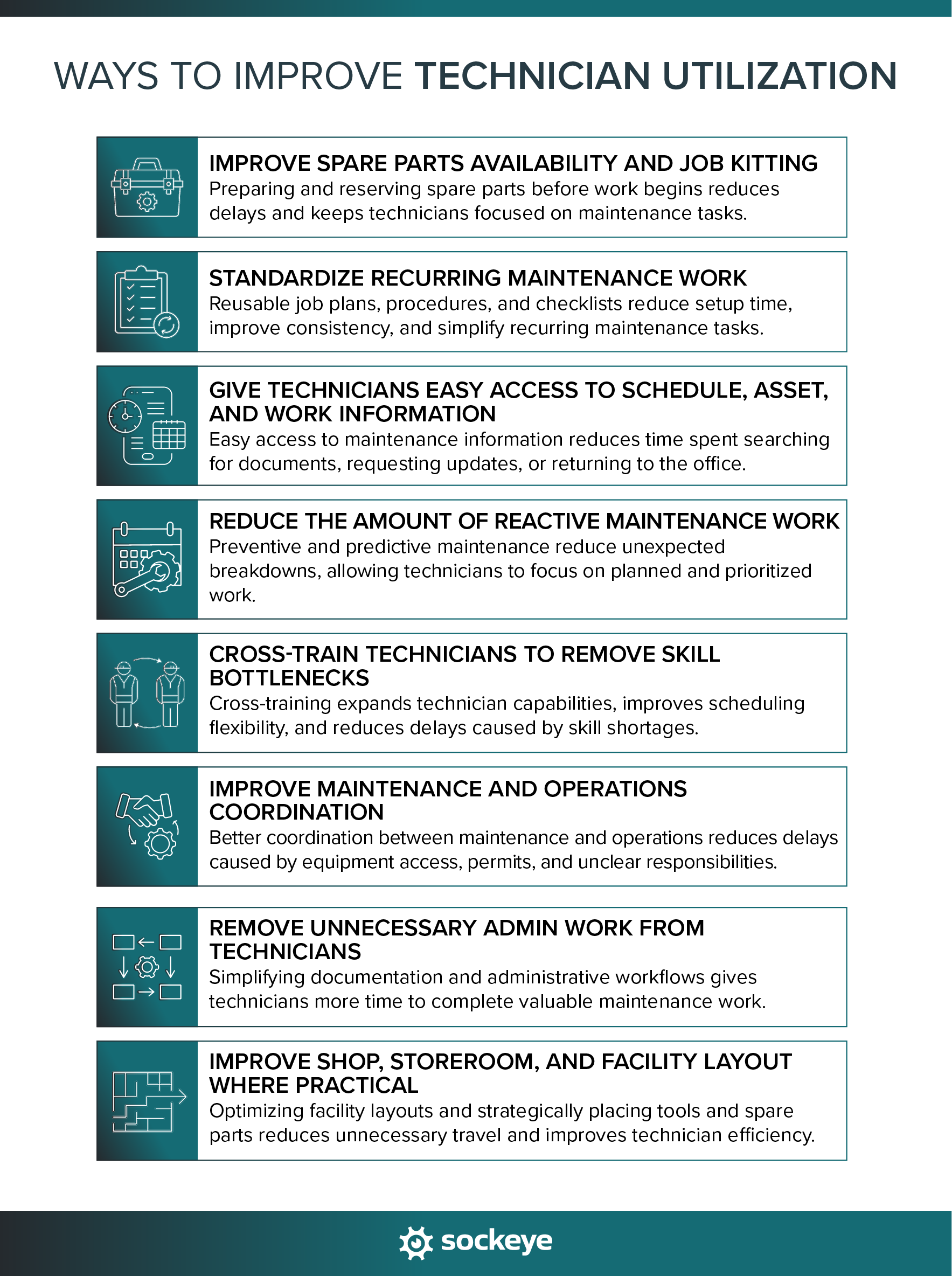
1. Improve spare parts availability and job kitting
Technicians lose productive time when they have to walk to the storeroom, search for components, wait for parts to be issued, or discover that a required item is not available.
You can reduce those losses by improving how parts are prepared and managed. For example, you could:
- Reserve parts against work orders: Make sure planned jobs do not compete for the same components.
- Kit common planned jobs: Prepare the required parts together before the technician starts the work.
- Stage large or specialized components: Move bulky or hard-to-access items closer to the job site when practical.
- Improve BOM accuracy: Keep asset bills of materials current so planners and technicians can identify the correct parts faster.
- Set reorder points for critical spares: Reduce the risk of stockouts for components that can delay important maintenance work.
Job kitting is especially useful for repeatable or larger planned jobs because it reduces the time technicians spend gathering materials after the work has already started.
2. Standardize recurring maintenance work
Standardizing repeat maintenance tasks can reduce diagnostic time, setup time, dependence on tribal knowledge, and variation between technicians.
Create reusable job plans, procedures, and checklists for common repairs, inspections, and preventive maintenance tasks. Each repeat job then starts from a tested baseline instead of requiring planners or technicians to rebuild the work from scratch.
Standardized work also boosts technician efficiency and productivity and makes future planning faster. Planners can reuse and refine existing job plans instead of starting from zero.
3. Give technicians easy access to schedule, asset, and work information
Ideally, frontline teams should be able to access key asset and schedule information — work orders, drawings and manuals, asset history, SOPs and checklists, troubleshooting guides, bills of materials, live maintenance schedule — directly through a CMMS or mobile device.
The easier this information is to access at the point of work, the less time technicians spend walking back to the maintenance office, searching through shared folders, or waiting for someone else to provide answers.
4. Reduce the amount of reactive maintenance work
Frequent unplanned breakdowns make technician utilization harder to manage because emergency work constantly interrupts planned jobs and forces the team to change priorities.
Reducing reactive maintenance usually means strengthening preventive maintenance, predictive maintenance, inspections, and early defect identification. The more failures you can identify and plan for in advance, the easier it becomes to keep technicians working on prepared, prioritized jobs.
There is an important caveat: high utilization or wrench time caused by technicians constantly repairing failed equipment is not necessarily a sign of healthy maintenance performance. Utilization should be viewed alongside reliability, planned-versus-reactive work, and other maintenance KPIs.
5. Cross-train technicians to remove skill bottlenecks
Cross-training improves technician utilization by giving supervisors more flexibility when workload and available skills do not line up perfectly.
For example, you might have spare mechanical capacity while electrical work is piling up. If technicians are trained and authorized to handle a broader range of recurring tasks, schedulers and supervisors have more options for balancing work across crews.
Cross-training can also:
- Reduce single-person dependencies: Common jobs do not have to wait for one specific technician.
- Improve schedule flexibility: More technicians can be assigned to a wider range of work.
- Help group related tasks: A technician with broader skills may be able to complete several tasks during the same equipment access window.
- Reduce idle time: You have more options when the originally assigned work becomes unavailable.
6. Improve maintenance and operations coordination
Poor coordination between maintenance and operations can leave technicians waiting even when the work itself is fully planned.
Common delays include waiting for equipment to be released, cleaned, isolated, or shut down, as well as waiting for permits or confirmation that production is ready for maintenance to begin.
You can reduce these delays by improving:
- Equipment handoff procedures: Define how and when production releases assets to maintenance.
- Cleaning and isolation responsibilities: Make it clear who prepares equipment before maintenance starts.
- Permit turnaround: Standardize how permits are requested, approved, and closed.
- Shutdown and startup procedures: Use repeatable processes for taking equipment out of service and returning it to operation. Companies will often print out shutdown/startup/LOTO procedures and glue them to the side of the respective equipment.
- Maintenance-production communication: Assign clear contacts so technicians are not left waiting for decisions.
The less time technicians spend waiting for production access, the more of their available labor capacity can be converted into completed maintenance work.
7. Remove unnecessary admin work from technicians
Some documentation is essential, but unnecessary administrative work can reduce the time technicians spend on value-adding maintenance activities.
Review how much technician time is spent on tasks such as:
- Entering duplicate data: Recording the same information in multiple systems or forms.
- Finding work orders: Searching for assignments or job information that should be easy to access.
- Completing overly long forms: Capturing information that is rarely used or could be automated.
- Attending unnecessary meetings: Pulling technicians away from productive work without a clear operational benefit.
- Providing manual status updates: Reporting progress that could be captured directly in the CMMS.
- Chasing supervisors for assignments: Waiting to find out what job should be completed next.
The goal is to remove administrative waste that adds little value or can be simplified through better workflows and tools.
8. Improve shop, storeroom, and facility layout where practical
In larger plants and facilities, physical layout can have a meaningful effect on technician utilization.
Technicians may spend a significant amount of time walking between:
- Maintenance shops: Returning for tools, instructions, or equipment.
- Storerooms: Collecting parts and consumables.
- Tool cribs: Checking out specialized tools.
- Assets: Moving between jobs spread across a large facility.
- Permit offices: Completing required paperwork before work can begin.
Not all travel can or should be eliminated. However, some plants can reduce unnecessary travel time by using satellite storerooms, job carts, staged tools, localized critical spares, logically organized MRO storerooms, or better placement of frequently used equipment.
Try not to optimize technician utilization in isolation
High technician utilization is only valuable if technicians are spending that time on the right work. That is why technician utilization should be reviewed alongside other maintenance metrics that show whether labor is being used effectively, proactively, and with acceptable quality.
| Pair utilization with | Why |
|---|---|
| Wrench time | Helps identify execution delays and non-productive time during jobs. |
| Schedule compliance | Shows whether planned work is actually being completed on time. |
| Planned vs. reactive work | Shows whether labor is being used proactively or mostly for responding to failures. |
| PM compliance | Shows whether preventive maintenance is being protected and completed on time. |
| Overtime | Helps identify capacity shortages, workload imbalances, or excessive reactive work. |
| Rework or FTTR (First Time Fix Rate) | Prevents higher output from hiding poor-quality or rushed repairs. |
For example, a technician may have very high utilization because they spend most of the week repairing failed equipment. That may look positive in isolation, but if reactive work is rising and PM compliance is falling, the maintenance program is moving in the wrong direction.
The same principle applies to wrench time. Higher wrench time can indicate fewer delays, but it does not tell you whether the work was necessary, completed correctly, or prevented future failures. Workforce productivity metrics need operational and reliability context.
Boost maintenance technician utilization with Sockeye
Sockeye is a scheduling bolt-on that you can integrate with any CMMS or EAM software. It’s designed to streamline and automate the scheduling process — you plan the work in your existing maintenance software, then do the scheduling in Sockeye.
Sockeye helps maintenance teams make better use of available labor by improving how work is scheduled, balanced, adjusted, and tracked.
Relevant Sockeye capabilities include:
- Labor-capacity visibility: Account for technician and contractor availability, shifts, time off, and other labor constraints when building the schedule.
- Automated scheduling: Let Sockeye build the schedule by matching work to technicians based on their availability and competencies required for the job. This reduces the manual effort, giving planners and schedulers more time to improve job readiness and backlog quality.
- Drag-and-drop rescheduling: Adjust assignments quickly when priorities, equipment availability, or job progress change.
- Live, easily shareable schedule: Give planners, supervisors, and other stakeholders a clearer view of current and upcoming maintenance work.
- Capacity leveling: Identify overloaded and underloaded crews so work can be distributed more effectively across available labor.
- Schedule-performance tracking: Measure schedule compliance and other maintenance KPIs to identify where productive capacity is being lost.
Just look at how the AV Group integrated Sockeye with IBM Maximo to give supervisors real-time visibility into crew capacity, helping them shift labor between overloaded and underloaded crews before unnecessary overtime occurred. The company reported improved workforce utilization, less emergency work, and increased production uptime.
You could do the same.
If your planners and schedulers are spending too much time manually building schedules, balancing labor, and sifting through unreliable metrics, schedule a Sockeye demo and see how the platform can help make your maintenance team more productive.
