
Technician productivity and efficiency are important performance metrics for both manufacturers and field service teams. They directly affect how much work gets done and how well labor costs are controlled.
When productivity is high, teams complete more jobs without burning out or adding headcount. When it’s low, backlogs grow, schedules slip, and managers are left guessing where time is being lost.
This article breaks down:
- The difference between technician productivity and efficiency
- How to calculate productivity in a practical way
- Proven ways to improve both without turning metrics into punishment
- Common issues that quietly drag productivity down.
Let’s start by clearing up a common source of confusion and making sure we are on the same page.
The difference between technician productivity and technician efficiency
If you want to measure and improve technician performance, you first need to understand the difference between productivity and efficiency. Confusing them can lead to incorrect conclusions and poor decisions.
At a high level:
- Technician productivity looks at how much work gets done.
- Technician efficiency looks at how time is used while working.
You can have technicians who are very efficient but not productive, and productive teams that still have efficiency problems. Knowing which one you’re measuring helps you focus on the right improvements.
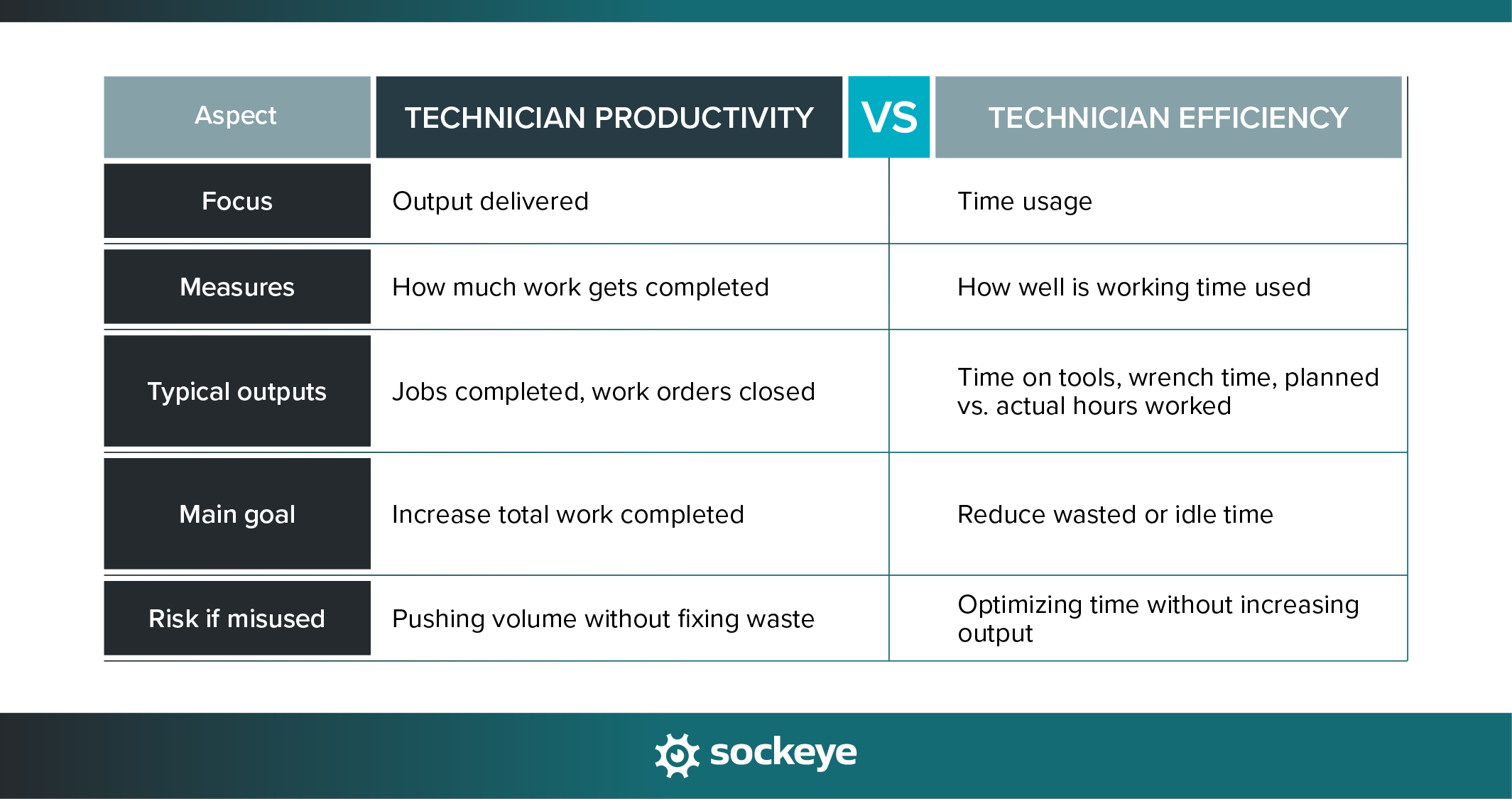
Efficiency makes productivity possible, but it doesn’t ensure it. A technician can spend 90% of their time “on tools” and still work on low-priority or poorly planned jobs. That’s efficient time usage — but not necessarily productive output.
Technician productivity explained
Technician productivity measures the output delivered relative to available labor time.
In simple terms, it answers the question: How much useful work are we getting from the time we’re paying for?
Common productivity outputs include:
- Jobs completed
- Work orders or PMs closed
- Other revenue-generating or production-supporting tasks.
Why productivity matters:
- It directly impacts revenue and production capacity.
- It helps with workforce and capacity planning.
- It affects customer satisfaction and SLA performance for field teams.
- It highlights underutilized or overloaded teams.
When to prioritize productivity over efficiency: If you’re struggling with backlogs, missed deadlines, or limited capacity, productivity should come first. An efficient technician who isn’t assigned enough meaningful work still won’t move the needle.
Technician efficiency explained
Technician efficiency measures how well time is used while technicians are working. It focuses on minimizing waste — not necessarily increasing output.
Common efficiency indicators include:
- Time on tools vs. travel, waiting, or meetings
- Planned hours vs. actual hours worked
- Idle time between tasks
Technician efficiency matters because it reduces wasted labor and operational friction that quietly eat into capacity. By minimizing time lost to travel, waiting, and administrative work, teams can improve margins and lower hidden labor costs.
Better efficiency can also improve a technician’s day-to-day experience by removing common sources of frustration and allowing them to focus on the work they’re trained to do.
With that out of the way, let’s look at how technician productivity is actually calculated.
How to calculate technician productivity?
There’s no single “correct” way to calculate technician productivity. It depends on your business model, the type of work technicians do, and how you define productive output. A manufacturer focused on maintenance execution may measure productivity differently than a field service organization billing by the job.
While many teams rely on time-based metrics like utilization or wrench time, true productivity connects the work completed to the labor required to complete it. This makes productivity a much stronger indicator of capacity, planning effectiveness, and operational health.
Technician productivity calculation formulas
Here are a few different ways to approach it:
- Jobs completed ÷ labor hours
- Work orders closed ÷ technician hours
- Maintenance tasks completed ÷ available technician hours
Let’s use work orders closed ÷ technician hours, a common approach in manufacturing.
A maintenance team completes 80 work orders in a week. The team logged 320 technician hours during that same period.
Productivity = 80 ÷ 320 = 0.25 work orders per hour
This means the team completes one work order every 4 labor hours. Tracking this metric over time helps maintenance managers understand whether productivity is improving, declining, or keeping steady.
Tools and data sources
Accurate productivity tracking depends on reliable data. Common sources include:
- CMMS systems and work order scheduling bolt-ons used by industrial and facility maintenance teams to track completed tasks.
- Time tracking tools that capture clock-in, clock-out, and job-level time.
- Dispatch and scheduling software for field teams to track assignments, travel, and job execution.
Once productivity is tracked consistently, the real value comes from using that data to improve how work gets planned and executed — which is exactly what we’ll cover next.
Ways to increase technician productivity and efficiency
Improving technician productivity isn’t (just) about pushing people to work faster. It’s about removing friction and productivity drains.
The most effective teams track productivity over time, compare it against internal benchmarks, and use the data to improve systems.
Here are five tried and tested ways to increase technician productivity.
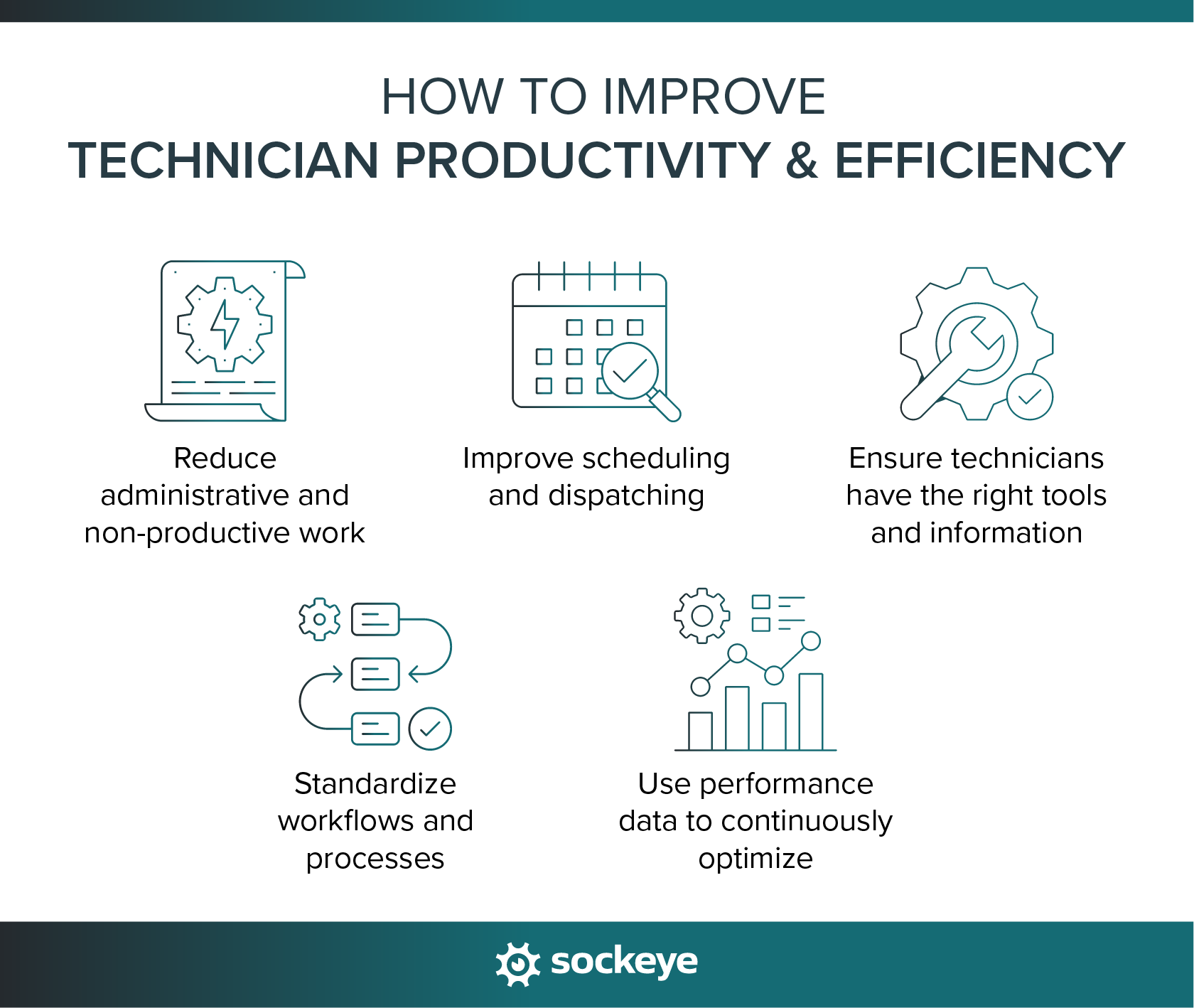
1. Reduce administrative and non-productive work
As we alluded to in the beginning, one of the fastest ways to increase productivity is to improve efficiency. The goal is to reduce the amount of time technicians spend on work that doesn’t directly contribute to maintenance execution or job completion.
Common productivity and efficiency drains include:
- Manual paperwork and duplicate data entry.
- Chasing approvals or clarifying job details.
- Excessive reporting requirements or daily meetings.
- Waiting for parts, tools, updates, instructions, or status changes.
- Searching for the latest version of the schedule (common problems with teams that rely on spreadsheets).
To address this, use a CMMS or EAM software to:
- Digitize paperwork and reporting so technicians don’t have to fill out lengthy forms by hand to close jobs.
- Use mobile tools for real-time updates and access to asset and work order info to eliminate back-and-forth communication.
- Automate repetitive processes like work status updates, approvals, and time tracking.
Properly documenting and logging work is essential. However, digital tools can make that process way faster — and significantly more accurate.
2. Improve scheduling and dispatching
Even highly skilled technicians lose productivity when scheduling and dispatching are poorly executed. Gaps between jobs, last-minute changes, and mismatched assignments all lead to wasted time that adds up quickly across a team.
To improve productivity through scheduling:
- Match technicians to jobs based on skills and availability (and location, if you manage field teams). This way, work is completed faster and with fewer handoffs.
- Reduce idle time and gaps between jobs by sequencing work more effectively and planning transitions in advance.
- Balance workloads across teams and shifts to avoid overloading some technicians while others sit idle.
- Use tools like Sockeye to get real-time visibility into labor availability and utilization, allowing you to schedule teams closer to full capacity without going into overtime.

Better maintenance scheduling doesn’t just keep technicians busy — it ensures the right work is done at the right time by the right people.
3. Ensure technicians have the right tools and information
Technicians can’t be productive if they show up to a job unprepared. One way to ensure that rarely happens is to follow maintenance planning best practices:
- Provide accurate and complete job details upfront so technicians know exactly what work needs to be done before they start.
- Make sure parts, tools, and required documentation (approvals, permits, safety instructions, etc.) are ready and available.
- Give technicians quick access to manuals, asset history, and customer or equipment data in the field so they don’t have to stop work to look up information.
Modern CMMS and field service management software make this super easy by allowing technicians to scan QR codes on assets and instantly pull up equipment history, manuals, open work orders, and troubleshooting guidelines.
4. Standardize workflows and processes
It is impossible to maximize productivity if everyone is doing their own thing. Inconsistent workflows increase variability in job duration and make work order planning and scheduling much harder than they need to be.
Do this to help teams move faster and more predictably:
- Create maintenance SOPs and checklists for recurring tasks to speed up job completion without sacrificing quality.
- Reduce decision-making friction by clearly defining steps, responsibilities, and expected outcomes.
- Improve handoffs between teams — such as maintenance, production, and quality — to avoid delays and rework. Clearly define ownership, required inputs, and completion criteria so work doesn’t stall due to unclear responsibilities or missing information.
With clear processes in place, technicians spend less time deciding what to do next and more time actually doing the work.
5. Use performance data to continuously optimize
Tracking productivity only matters if the data is used to improve how work gets done. High-performing teams treat productivity metrics as a feedback loop. They:
- Track productivity trends by technician, team, and job type to understand where output is increasing or falling over time.
- Use insights to improve planning and scheduling, not to micromanage individual technicians (unless someone really isn’t pulling their weight).
- Identify bottlenecks and best practices, such as recurring delays, consistently overrun jobs, or teams that complete similar work faster.
For instance, Sockeye lets teams track why specific work is delayed by simply selecting a reason from a modifiable drop-down list. Managers can review these delay codes weekly or monthly (inside Sockeye or forward them to their favorite BI tool) to uncover trends and root causes.
We had a client find 120 hours in wasted time per month doing this analysis (they identified missing spare parts and technicians avoiding to work on specific assets as root issues).
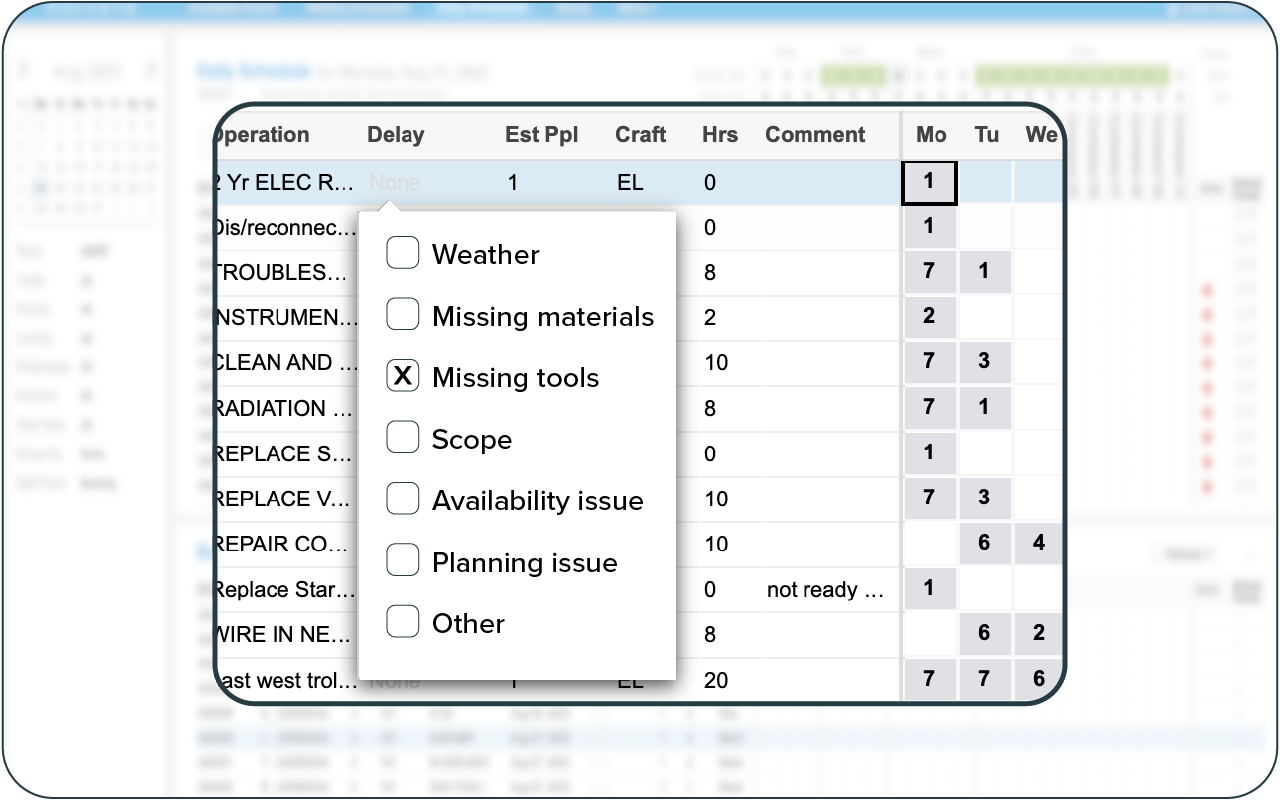
Generally, you’ll want to use performance data to identify system-level issues like poor planning, parts delays, or unrealistic schedules — and help managers make smarter decisions that improve technician productivity sustainably.
Underlying issues that make technicians less productive
These problems often sit upstream — in planning, scheduling, and visibility — and quietly erode productivity over time. Let’s see where to look.
Por job planning due to the lack of time
Maintenance planners and schedulers should be two distinct roles. However, due to various constraints, they are often squeezed into a single role.
The problem occurs when your planner/scheduler is stretched thin — they will make sure the work is scheduled, while job planning is rushed or skipped altogether. This directly lowers the amount of total work done by increasing delays and rework.
How do you protect and find time for proper job planning? You use tools like Sockeye that automate maintenance scheduling. When your planner/scheduler creates a weekly schedule 90% faster, that opens a lot more time for planning work.
Too much reactive scheduling
When most work is scheduled reactively, technicians spend their days responding to breakdowns instead of executing planned work. Emergency jobs disrupt schedules, cause frequent context switching, and create inefficiencies like travel back-and-forth, repeated setups, and work being done out of sequence.
This lowers productivity because planned work gets pushed aside, idle time increases, and technicians are constantly restarting instead of completing tasks efficiently.
Reducing reactive scheduling starts with better planning, clearer prioritization, and building enough visibility into upcoming work to protect time for planned maintenance.
Lack of visibility into technician availability
When managers don’t have a real-time view of technician availability, scheduling becomes guesswork. Work may be assigned to technicians who are already overloaded while others remain underutilized, leading to delays, missed deadlines, and uneven workloads.
You need tools that give you an accurate, up-to-date schedule insights: who is available, what they’re working on, and when they can realistically take on new work.
To get all of that info, large organization can use its CMMS or EAM software and combine it with Sockeye for an easy way to track and update technician and contractor availability.
Parts shortages and inventory mismanagement
When inventory levels are inaccurate or parts aren’t staged ahead of time, technicians end up waiting, searching storerooms, or abandoning jobs mid-task to source materials. That is the opposite of being productive.
Avoiding this problem requires up-to-date parts inventory information. A CMMS, ERP, or a standalone parts inventory software are all viable options. Look for solutions that tie work orders to parts inventory, send low-stock alerts, and integrate with purchasing/procurement systems.
Measuring the wrong KPIs or misusing metrics
Productivity drops when teams focus on the wrong metrics or use performance data in a punitive way.
Measuring activity instead of output, or obsessing over individual metrics without context, can lead technicians to game the system rather than do the right work. For example, optimizing for “time on tools” alone may increase efficiency on paper while real output stays flat.
This lowers productivity by driving the wrong behaviors and masking systemic issues.
Avoid this trap by choosing KPIs that reflect real outcomes, reviewing them at the team level, and using metrics as a tool for improvement and decision-making.
Boost technician productivity with Sockeye
For manufacturers, improving technician productivity starts with visibility. Without a clear view of how labor is being used, where time is lost, and why work gets delayed, it’s nearly impossible to optimize performance in a sustainable way.
Sockeye is built to give maintenance and operations teams that visibility — while simplifying the whole maintenance scheduling process.
Sockeye helps manufacturers:
- See technician utilization in real time, so planners and supervisors understand who is available and where capacity exists.
- Track productive vs. non-productive time, making it easier to spot delays, bottlenecks, and systemic issues.
- Make better scheduling and workload balancing decisions using real-time availability data instead of assumptions.
- Identify root causes of inefficiency, such as why work orders stall, jobs run long, or planned work gets pushed aside.
The result is a higher level of accountability — leading to more work getting scheduled and done.
If you’re interested in learning more about Sockeye, here is a quick video overview:
FAQ
Track technician productivity by measuring output against labor input, such as work orders completed. Use maintenance software to simplify tracking select trends and metrics over time. Remember to review data at the team level to identify systematic improvement opportunities.
Technician efficiency focuses on the percentage of paid or scheduled time that technicians spend on value-adding work. Efficiency is often referred to as time on tools, wrench time, or labor utilization, and it helps identify wasted time caused by travel, waiting, or administrative work.
Example: A technician is clocked in for an 8-hour shift. During that time, they spend 5.5 hours performing hands-on maintenance and inspections, while the remaining time is spent on meetings, travel, and documentation. Technician efficiency = (5.5 ÷ 8) × 100 = 68.75%.
There is no universal average because productivity depends on industry, job complexity, planning quality, and measurement method. Many organizations see productivity ranges vary widely, which is why comparing against internal benchmarks over time is more useful than relying on industry averages.
Improve technician efficiency by reducing non-productive time. This includes cutting administrative work, improving job planning, minimizing travel and waiting time, standardizing workflows, and ensuring technicians have the right tools, parts, and information before starting a job.
Better planning and scheduling reduce delays, idle time, and rework by ensuring jobs are fully defined, parts are available, and work is assigned based on skills and availability.
