
Effective maintenance team scheduling requires 3 main inputs:
- Ready to schedule work sitting in your backlog.
- Up-to-date labor availability data across crews and contractors.
- Real-time labor utilization numbers to level workloads between teams.
In theory, your CMMS should give you all of that data. But that is not always the case. The problem lies with legacy CMMS solutions, where the labor data is not particularly reliable — as well as many enterprise CMMS and EAM software, where the same data takes ages to find and maintain.
This creates real scheduling problems.
In this short overview, we’ll show you how to use a CMMS for maintenance team scheduling and what to do if your current maintenance software makes scheduling way harder than it needs to be. Hint: the fix is way simpler than you think.
Typical CMMS labor scheduling workflow
A “CMMS” is a very broad term. The scheduling workflow varies significantly depending on your CMMS and how robust its scheduling tools are.
Using a lightweight CMMS, scheduling may feel like assigning work from a list to a technician’s calendar. In an enterprise CMMS or EAM, scheduling often involves more planning fields, screens, clicks, approvals, and configuration.
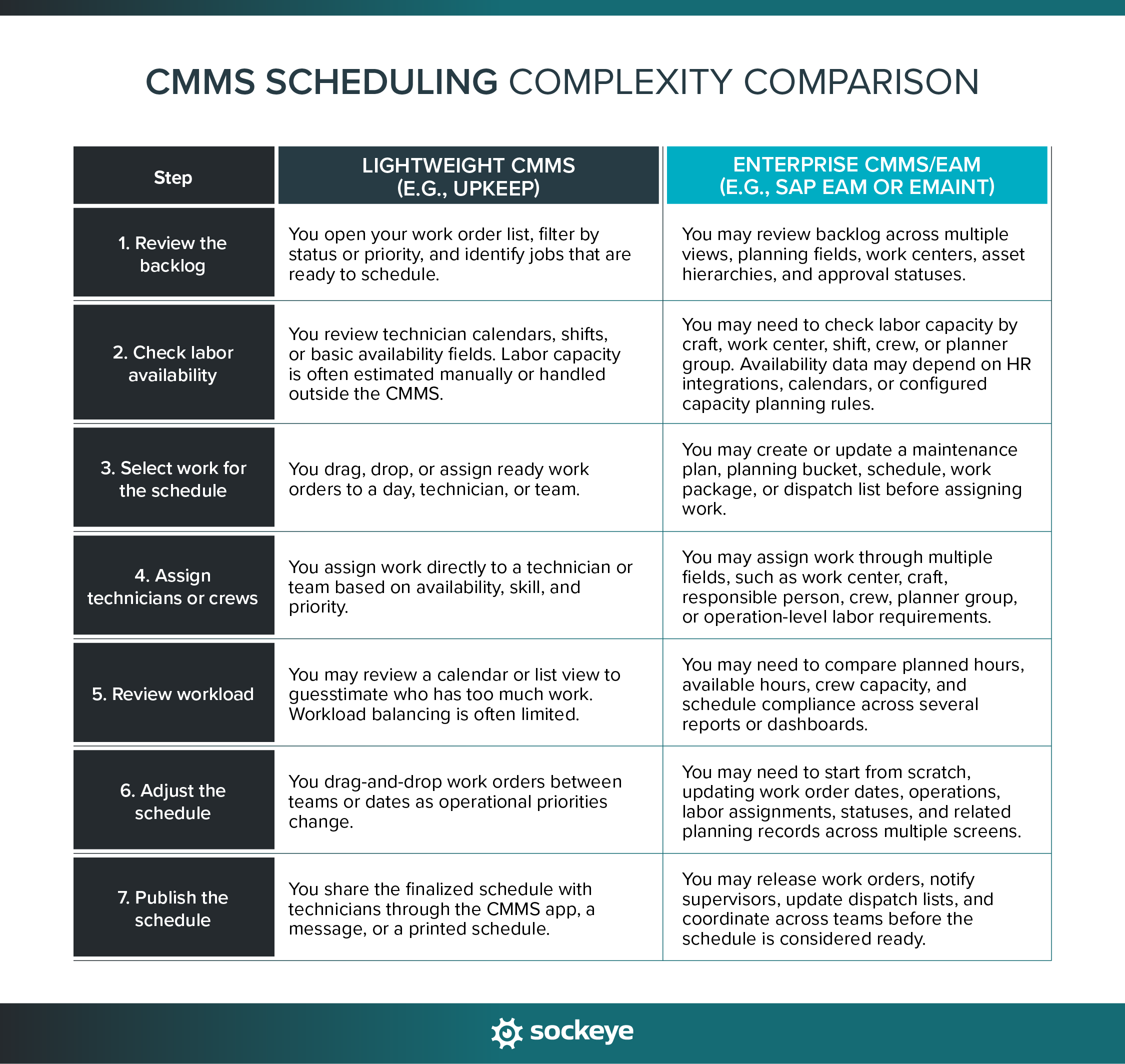
The core process is similar across most CMMS platforms. You review the backlog, confirm available labor, pull in the highest-value ready work, assign the work, review workload, and publish the schedule.
The difference is how much effort it takes to do each step. Simpler tools may be faster to learn and easier to use, while enterprise platforms can support more complex maintenance environments but often require more setup, training, and manual coordination.
Common issues that hinder the maintenance scheduling process when using a CMMS
A CMMS can help you organize maintenance work, but scheduling still breaks down when the scheduling workflow is too slow, the data is incomplete, or schedulers cannot easily see how work is distributed across teams.
Common issues include:
- Scheduling is slow and complex: In many enterprise CMMS platforms, planners need to move between multiple screens, modules, and reports. That makes weekly and daily scheduling slower than it needs to be, often pushing teams back to using spreadsheets.
- Rescheduling is just as painful: When emergency work, missing parts, callouts, or production changes interrupt the plan, some CMMS tools force you to start from scratch, as if you are making a brand new schedule.
- Labor availability is hard to keep accurate: Even if your CMMS syncs with HR software, you might not be able to make manual changes easily when needed.
- No real-time labor utilization data: Many CMMS tools do not give schedulers a simple visual way to track labor utilization as they schedule or reschedule work. This makes proper workload leveling all but impossible.
- Limited scheduling automation: Most CMMS tools can generate PMs and WOs based on specific triggers, but they do not automatically build balanced weekly schedules for you. That’s often because they are missing some labor availability and utilization data.
These issues do not necessarily mean you have invested in the wrong CMMS system. In many cases, the CMMS is strong at asset management, work order history, and compliance — it just was not built to give a fast, visual, and flexible way to create or balance maintenance schedules.
But there is a simple way to fix that — and it’s called Sockeye.
How Sockeye streamlines maintenance team scheduling
Sockeye is a small but powerful maintenance scheduling add-on that can integrate with any CMMS or EAM. It’s purpose-built for this single use case. We developed it in consultation with experienced schedulers to create a workflow that matches how scheduling happens on a busy plant floor.
For more info, watch this 90-second overview:
Here is how Sockeye helps solve the scheduling issues we covered above:
- Faster, more automated schedule creation: Simply select work in the backlog and click “Schedule”. Our automation will match the work orders with qualified available labor. Then simply review, make manual adjustments if needed, and publish the schedule.
- Easier rescheduling: When priorities change, you can adjust the schedule quickly by just dragging and dropping work to the next available slot or team.
- More accurate labor availability: Our labor availability dashboard is populated based on your shift patterns or data from your HR software. You can make manual adjustments in just a couple of clicks.
- Clear labor utilization: As you schedule work, Sockeye visualizes in real-time scheduled hours against available hours. This way, schedulers can quickly see which technicians, crews, or teams are overloaded and which still have capacity.
- Better workload leveling: With availability and utilization visible in one place, creating effective, balanced, and realistic maintenance schedules has never been easier.
On average, teams that implement Sockeye cut down time spent on weekly scheduling and daily rescheduling by 80%.
The AV Group is the perfect example. Their weekly scheduling is now completed in under an hour, which previously took up to five days. Sockeye provides them with trustworthy KPIs, real-time resource leveling, and live labor utilization data, leading to reduced overtime, expedited payroll, and improved production uptime. Read their full story.
“Sockeye identifies where deficiencies are in your man hours, so you can level between crews. For instance, if Crew A is 40 hours over schedule, but Crew B is only 35% scheduled, you can move your resources to level it out to avoid overtime pay. That saves you money.”
Todd Hicks, Planning and Shutdown Superintendent
Not satisfied with how your current maintenance software handles scheduling? We can set you up with a free pilot project to test Sockeye on your own data. This requires no IT involvement.
Start by scheduling a quick demo with our team.
