
For many maintenance teams, Infor EAM (later rebranded as HxGN EAM, then once again recently as Octave Attune EAM) is both a powerful asset management platform and a frustrating place to build weekly maintenance schedules.
It gives organizations the structure and planning capabilities needed to manage complex maintenance operations. You can create work orders, schedule preventive maintenance, track assets, manage labor, monitor materials, and connect maintenance activity to broader asset performance goals.
The problem is not that Infor lacks functionality. The scheduling workflow is just not fast, visual, and intuitive enough for many planners, supervisors, and maintenance teams to use week after week. So they resort to spreadsheets or manual workarounds.
In this article, we’ll break down:
- How maintenance scheduling in Infor EAM is supposed to work.
- The common friction points that slow teams down when creating and assigning work orders.
- How Sockeye provides a practical way to extend Infor EAM with a faster, more visual scheduling layer.
Let’s start from the top.
An overview of work order scheduling in Infor
Infor EAM (now known as HxGN EAM or Octave Attune EAM) is an enterprise asset management platform used to manage assets, maintenance work, labor, materials, inspections, and preventive maintenance programs. For maintenance teams, the scheduling function helps turn approved work orders into a realistic plan based on asset priority, labor availability, work order activities, and required resources.
In Infor, scheduling usually happens at the work order activity level. A work order can include one or more activities, and each activity can include details such as the trade, estimated hours, assigned employee, scheduled start date, and scheduled end date.
Here are the key components of planning and scheduling inside Infor EAM:
- Work orders: Work orders are the core records used to manage maintenance work. They define the asset, location, problem, priority, status, requested work, and other details needed to plan and execute the job.
- Work order activities: Activities break a work order into schedulable pieces of work. You can use activities to define labor needs, trades, estimated hours, assigned employees, and schedule dates.
- Task plans: Task plans are predefined sets of work order activity details that can be referenced on a work order or a preventive maintenance task. They help reduce manual data entry and keep recurring maintenance work consistent.
- Preventive maintenance schedules: PM schedules generate recurring work orders based on time intervals or meter readings. This helps you plan recurring maintenance before equipment fails.
- Daily scheduling: The WO Daily Scheduling form lets you schedule work orders by defining selection criteria for equipment, work orders, activities, and employees. There are a lot of different fields to choose from and fill out.
- Drag-and-drop scheduling: You can assign employees to work order activities by dragging and dropping activities onto days where employees have availability.
- Labor availability: Scheduling depends on accurate employee availability, shift patterns, trades, and estimated hours. If availability data is missing or outdated, the schedule can quickly become unrealistic.
- Schedule management: Schedulers can reschedule work orders, change work order status, review comments, and freeze or unfreeze activity schedules when needed.
Infor EAM gives maintenance teams the building blocks they need to create a structured maintenance schedule. But in practice, the scheduling experience depends heavily on clean work order data, accurate labor availability, and disciplined use of activities, task plans, and PM schedules.
Now let’s look at how that workflow usually plays out week to week.
Infor’s typical scheduling workflow
A typical Infor EAM scheduling workflow starts with approved work orders and ends with assigned work order activities on a daily or weekly schedule.
In theory, the workflow is straightforward. You identify ready work, check labor availability, assign work to employees or crews, review utilization, and update the schedule as priorities change.
In practice, the workflow depends heavily on how your organization has configured work orders, activities, trades, shifts, calendars, PM schedules, and backlog views.
Here is what the typical process looks like:
- Review open and approved work orders: Start by identifying preventive maintenance, corrective maintenance, inspection, and backlog work that is ready to schedule.
- Confirm work order activities: Check that each work order has the right activities, trades, estimated hours, and schedule dates. In Infor EAM, scheduling is commonly handled at the work order activity level.
- Check labor availability: Review available capacity by employee, trade, shift, or crew. Infor EAM can calculate labor availability and show labor utilization IF employee records, shifts, and calendars are up to date and configured correctly.
- Pull backlog work into the schedule: Select unscheduled work based on priority, asset criticality, due dates, compliance requirements, and available labor hours.
- Assign work to employees or crews: Assign work order activities to specific employees, crews, shifts, or dates. In the WO Daily Scheduling form, schedulers can drag work order activities onto employee calendar grid cells when daily scheduling is configured correctly.
- Review utilization and workload balance: Check whether labor is underbooked, fully loaded, or overbooked, then adjust the schedule to balance workload.
- Freeze the schedule when needed: Freeze activity schedules once the team has committed to a plan. Frozen schedules help protect the baseline schedule from accidental changes.
- Update the schedule as work changes: Reschedule work, update assignments, adjust dates, and change statuses when break-ins, missing parts, labor changes, or production changes affect the plan.
One important thing to understand about Infor EAM scheduling is that the workflow is activity-driven. You are not simply dragging a generic job onto a calendar. You are working with work orders, activities, labor records, trades, estimated hours, shifts, employee availability, and status rules.
That structure gives you traceability and control. But it also means scheduling can become slow or even break down when work order data is incomplete, labor availability is inaccurate, or schedulers need to make frequent changes across multiple records.
This is where teams typically run into problems.
The challenges with Infor’s scheduling process
Infor comes with all of the standard scheduling capabilities that you would expect from an established EAM software.
The challenge is that using those capabilities efficiently requires clean data, a carefully configured setup, a fair bit of training, and a rigorous scheduling discipline with lots of clicks and screens.
“Some of the issues with Infor EAM is that there are features that are unintuitive and are also very confusing. The task scheduling is one such feature that is extremely confusing.” — Verified User in Utilities on G2
Here are the most common friction points scheduling teams run into:
- Steep learning curve: As a broad enterprise system, new planners and schedulers need time to understand where and how work orders, activities, labor, shifts, PM schedules, backlog work, and reports fit together. User reviews commonly mention that navigation is confusing, especially when managing multiple assets or workflows.
- Heavy setup requirements: Scheduling depends on accurate employee records, trades, shifts, calendars, availability exceptions, work order activities, estimated hours, and status rules. If the setup is incomplete, you won’t be able to trust labor availability and utilization numbers.
- Activity-level scheduling requirements: Infor EAM schedules labor hours against work order activities. Their internal documentation notes that hours can only be scheduled for work orders with activities, which means incomplete activity data can stop or slow down scheduling.
- Availability data issues: Schedulers need accurate crew and contractor availability before they can build a realistic schedule. Each time a scheduler needs to calculate availability, they need to navigate to “WO Scheduling” view, enter the organization, trade, department, start date, and end date, and click “Calculate”. Very time-consuming.
- Limited real-time utilization visibility: Infor EAM can show labor utilization, but you do not always get a simple live dashboard. Schedulers may still need to calculate labor availability, review scheduled hours, compare capacity against demand, and adjust assignments manually before they know whether a crew, trade, or technician is underbooked, fully loaded, or overbooked.
- Click-heavy rescheduling: When priorities change, schedulers may need to update work order activities, labor assignments, schedule dates, statuses, and comments. In a busy maintenance environment, this can make break-in work and daily schedule changes slow and painful.
- Configuration-dependent visual scheduling: Infor’s WO Daily Scheduling can color-shade calendar days, displaying available hours inside calendar grid cells. However, the usefulness of that view depends entirely on having a correct setup and clean, up-to-date availability data — which is easier said than done.
- Reporting gaps: Custom scheduling KPI reports take a lot of time and expertise to set up. Since there are a lot of dependencies and formulas, small mistakes/changes can create unusable reports.
Over time, these friction points create real operational consequences.
Backlogs grow because scheduling time eats into planning time. Preventive maintenance gets pushed out when urgent work interrupts the plan. Supervisors rely on overtime to recover. Technicians lose confidence in the weekly schedule.
And perhaps most importantly, teams start working around the existing maintenance system instead of through it.
They build schedules in spreadsheets. They don’t properly track labor availability. They make decisions in meetings and update Infor later. That creates duplicate work and ruins your reports. It also becomes a barrier to implementing best practices and taking advantage of scheduling opportunities.
But there is a simple way to fix that — and it’s called Sockeye.
Extend Infor EAM scheduling capabilities with Sockeye
Sockeye is a lightweight work order scheduling bolt-on that makes scheduling faster, simpler, and more visual — without replacing Infor EAM as your system of record.
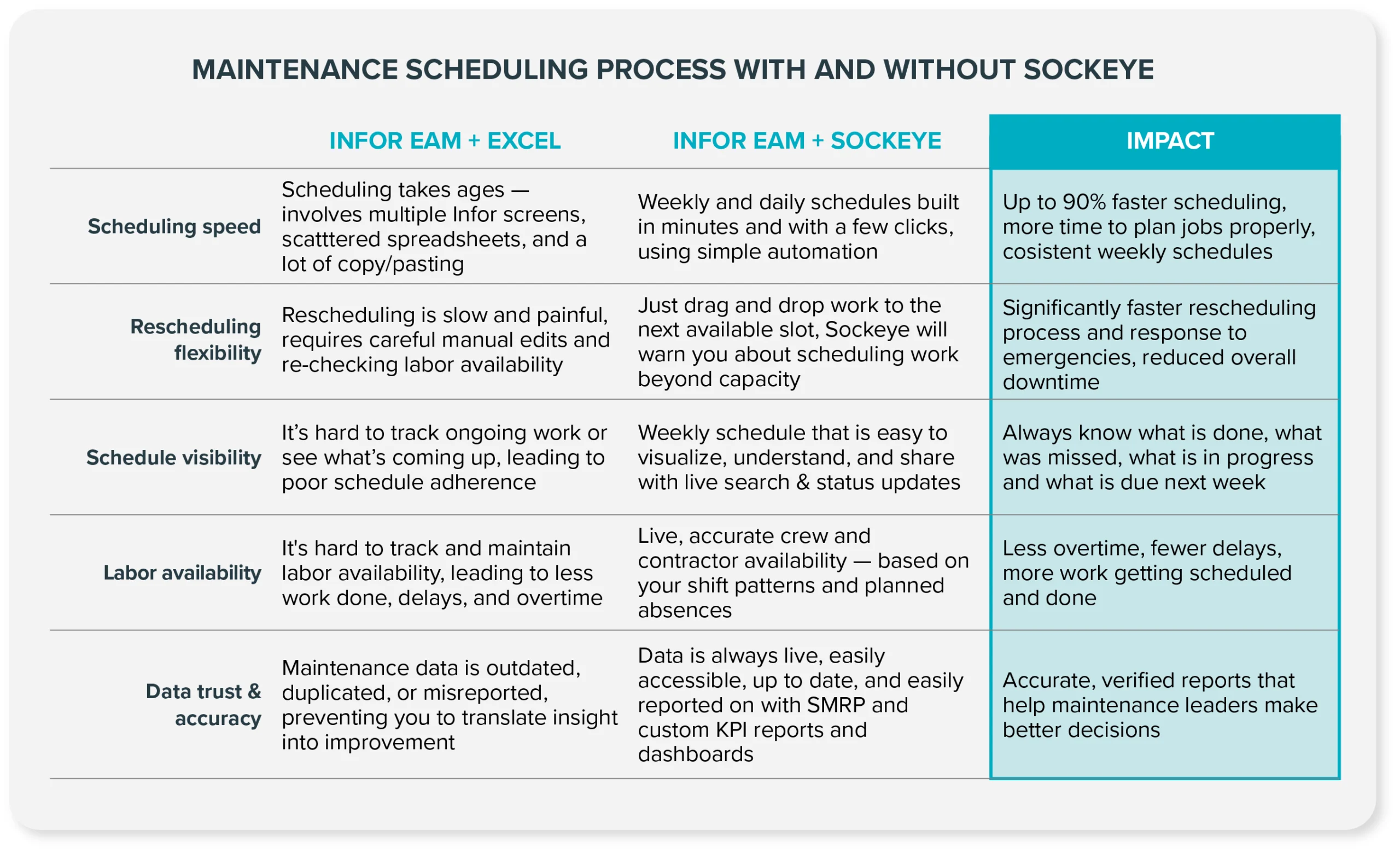
Instead of building schedules across multiple Infor screens, reports, and spreadsheets, Sockeye gives schedulers one centralized view of work orders, labor availability, utilization, and weekly schedules. The interface is designed to be simple, so schedulers can build and adjust schedules without having to dig through complex EAM workflows.
You manage data and plan work in Infor, then schedule it in Sockeye. Work order statuses sync back to Infor without creating any duplicate or lost data.
Here’s how this plays out on the plant floor:
- Two-way integration with Infor EAM: Sockeye connects to Infor through read/write integration (or a different type of integration, based on your security policy), so your team can schedule work in Sockeye while keeping Infor EAM as the system of record.
- Scheduling automation: Let Sockeye match selected work with available labor — you just need to review and polish the schedule. This reduces manual scheduling effort by up to 90% and leaves more room for proper job planning.
- Labor availability dashboard: Review and manually update labor availability for all teams and contractors inside a single window. It only takes a couple of minutes to do. This data can also be synced automatically from your CMMS or HR software.
- Drag-and-drop rescheduling: Schedulers can move work between days, shifts, crews, or technicians by dragging and dropping work to the next available slot — instead of manually updating multiple EAM records every time priorities change.
- Real-time labor utilization visibility: Schedulers can track % utilization for trades and contractors as they schedule work, including visual indicators when a technician becomes overbooked. This helps create more balanced schedules and reduce avoidable overtime.
“Sockeye’s greatest advantage is ease of scheduling. With a simple drag-and-drop, you can allocate workers. What used to take me up to five days of work can now be done with Sockeye in just under an hour. And because Sockeye synchronizes the data directly from our CMMS, we know the information is valid and trustworthy.”
Todd Hicks, Planning and Shutdown Superintendent AT THE AV GROUP
For teams that have already implemented Infor EAM, Sockeye is the easiest and fastest way to streamline maintenance scheduling.
If you are interested in evaluating Sockeye, we can set up a free pilot project that allows your team to validate user adoption and confirm the scheduling workflow. This requires no effort from your IT team.
Get started by talking with a Sockeye representative.
