
Even in 2026, many maintenance teams still rely on manual, Excel-based work order scheduling. The problem is that spreadsheets only work at a small scale. As soon as you expand operations, you get missed work orders, reactive firefighting, and uneven technician workloads.
At the other extreme, some teams use large CMMS or EAM platforms with scheduling tools that are too inefficient for daily use. When scheduling takes hours instead of minutes, planners fall behind, and execution suffers.
Work order scheduling sits at the center of maintenance execution. It’s the step that turns approved work into action — if it fails, everything stalls. That’s why selecting a work order software should not be done lightly.
To help you evaluate your options, we’ve reviewed the best work order scheduling software available in 2026. Each solution is assessed using the same criteria — core features, ideal use cases, limitations, real-world feedback, and pricing.
What to look for when evaluating work order scheduling software
Work order scheduling software helps you assign, prioritize, and sequence maintenance work so it actually gets completed. But not all tools handle scheduling the same way. The right solution should reduce manual effort, improve visibility, and help you make better decisions — without adding complexity.
When evaluating work order scheduling software, focus on these core capabilities:
- Ease of use and setup: If scheduling requires navigating through multiple screens, adoption will fail. Look for software that is fast to configure and easy to learn.
- Drag-and-drop (re)scheduling: Drag-and-drop scheduling lets you quickly assign and reschedule work orders as priorities change. A simple, intuitive interface is essential for creating and managing effective weekly and daily schedules.
- Schedule visualization: The work order schedule you create should be easily shared and understood by all stakeholders (technicians, operators, production managers, etc.).
- Clear work order priorities: The software should support priority levels and make them visible in the schedule. This helps ensure urgent and safety-critical work is handled first.
- Resource and labor visibility: You need to see technician availability, skill sets, and current workload while scheduling. Without this, schedules look good on paper but fail in execution.
- Real-time updates and status tracking: Schedules should update automatically as work orders are completed, delayed, or reassigned. This keeps planners and supervisors aligned throughout the day.
- Mobile access for technicians: This might not be important to everyone, but field technicians should be able to receive scheduled work orders on mobile devices, with clear start times, priorities, and instructions.
- Integration capabilities: Your work order scheduling software should integrate seamlessly with ERP, HR, BI, or other related software you might be using.
- KPI and performance reporting: The software should track and generate automatic reports on schedule compliance, backlog, work order completion rates, and other relevant KPIs.
On top of this, think about how your team works day to day. Where are your biggest scheduling challenges? What features would actually make your job easier? Consider:
- Offline capability: If it has mobile access, will the software still function in areas with poor or no internet connection?
- Type of solution: Do you need a complete work order management software, or just a scheduling bolt-on to connect with your existing system? This is the case if you struggle with work scheduling, but other areas (asset/vendor/inventory management) are covered well by your existing CMMS or EAM software.
- Implementation and training requirements: Will you need help from consultants and developers to set up the software? How much training is needed to use the software? Will you need additional training sessions with every bigger software update?
- Pricing and scalability: Does the cost structure make sense for your team size and expected growth?
Having all of these requirements clear upfront will make it much easier to evaluate your options.
Top 6 work order scheduling solutions
Work order scheduling software comes in many forms — from lightweight bolt-ons to robust CMMS and FSM platforms. Below are six of the strongest work order scheduling solutions in 2026, each serving a different type of maintenance operation.
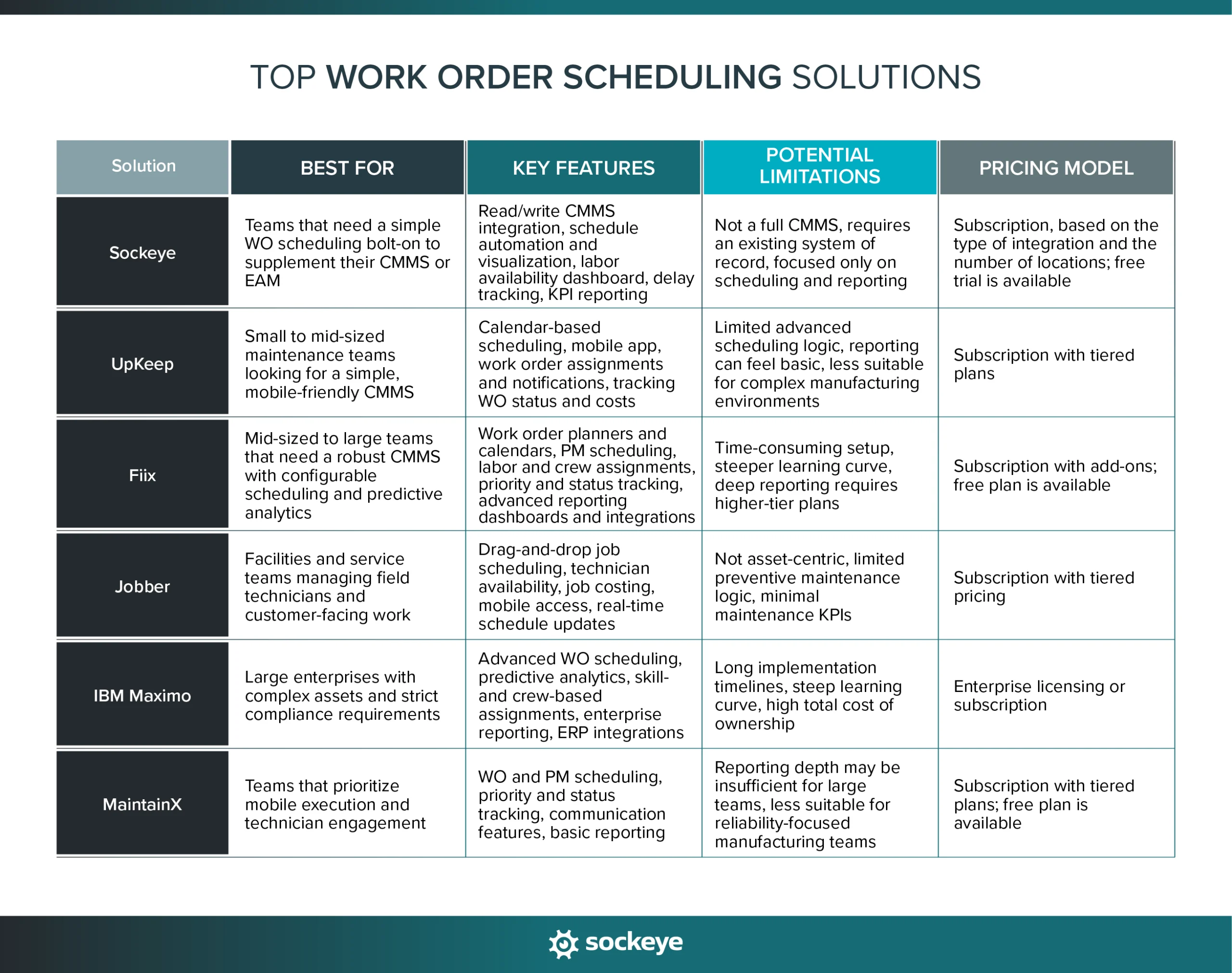
1. Sockeye
Sockeye is a purpose-built work order scheduling and reporting bolt-on designed specifically for maintenance planners and schedulers. Unlike full CMMS systems, Sockeye focuses entirely on making weekly and daily scheduling faster, clearer, and easier to manage.
Best for: Sockeye is ideal for teams who already have a CMMS or EAM but struggle with its scheduling module (or revert to spreadsheets). They can outsource scheduling to Sockeye without replacing their existing system.
Key features:
- Automated work order scheduling: Create weekly and daily schedule in minutes by letting Sockeye automatically match available labor to ready-to-schedule work orders.
- Drag-and-drop rescheduling: Quickly adjust existing schedules with a simple, visual interface. Just drag and drop the work order in the next available slot.
- Live Labor Availability Dashboard: Easily edit and keep technician and contractor availability up to date. Use it to schedule more work, balance workloads, and reduce overtime.
- Delay tracking: Track the reasons work orders are delayed to identify and fix root causes.
- Integrated KPI reporting: Create and track SMRP and custom KPIs based on verified data. You can auto-generate reports or forward the data to your BI software.
- Fast deployment: Go live in as little as one week with minimal setup and IT involvement.
- Seamless integration with existing systems: Offers read/write API or file-based import; ties into CMMS/EAM & HR/labor systems so you’re not duplicating or siloing your data.
Potential limitations: While you can technically use it as a standalone work order scheduling solution, Sockeye works best when connected to existing CMMS or EAM software such as SAP, JDE, Maximo, FMX, or others.
Here’s what existing users say about Sockeye:
- “It shows the available work. It shows the available labor. It’s just a matter of clicking and dropping. It’s fantastic.” — Cade Schoonover, Assistant VP of Maintenance and Reliability at Cargill [FOOD MANUFACTURING]
- “Sockeye’s greatest advantage is ease of scheduling. With a simple drag-and-drop, you can allocate workers. Scheduling used to take me hours to do for just one crew, and I planned schedules for six different crews. What used to take me up to five days of work can be now done with Sockeye in just under an hour.” — Todd Hicks, Planning and Shutdown Superintendent at the AV Group [PULP MANUFACTURING]
Sockeye does not offer a free plan, but you can use the 30-day free trial to verify user adoption before you buy.
2. UpKeep
UpKeep is a mobile-first CMMS that combines work order management, scheduling, and asset tracking in a single platform. It’s widely used by maintenance teams looking for an easy-to-adopt system with strong technician engagement.
Best for: Small to mid-sized maintenance teams that want an all-in-one CMMS with straightforward work order scheduling and strong mobile support.
Key work order scheduling features:
- Calendar-based scheduling: Schedule work orders using daily and weekly calendar views that are easy to understand and adjust.
- Technician assignments and notifications: Assign work orders to technicians and notify them automatically through the mobile app.
- Priority and due date management: Set priorities and deadlines to ensure critical work is scheduled and completed on time.
- Mobile-first execution: Technicians can view schedules, update statuses, and close work orders directly from their phones.
- Basic reporting and dashboards: Track work order completion rates, overdue work, and specific KPIs to monitor scheduling effectiveness.
Top advantages of using UpKeep based on user reviews:
- Very easy to learn and use. [“The system is pretty straightforward and user-friendly, and it’s easy to learn.” — Herman, G2]
- Strong mobile app for technicians. [“It’s alright, mobile app was nice for my technicians, and I was able to track the reporting on my work orders for my team.” — Verified Reviewer, Capterra]
- Fast implementation with minimal setup. [“The implementation process about 1 year ago was smooth once planned out and locations, categories, parts were imported into UpKeep.” — Adam, G2]
Top disadvantages of using UpKeep based on user reviews:
- Limited advanced scheduling and optimization capabilities. [“The platform is designed for a more traditional break/fix style work force management application. It has forced us to adapt some of our (albeit maturing) processes to meet the capability within the platform in order to capture the data and detail that we are looking for.” — David, Capterra]
- Reporting can feel basic for larger teams. [“Some of the reporting is a bit clumsy. It would be nice to have more customizable fields for assets and parts. Would be nice to be able to send better summary reports to requestors.” — Aaron, G2]
- Several users mention technical issues and glitches with the app. [“We are dealing with a lot of technical issues on a regular basis. The program has not operated without issues since we started using it.” — Chris, Capterra]
Top alternatives: MaintainX, Limble.
3. Fiix
Fiix is a robust, cloud-based CMMS designed to help maintenance teams manage work orders, assets, and preventive maintenance at scale. It offers more structure and configurability than lightweight CMMS tools, making it a common choice in complex manufacturing environments.
Best for: Mid-sized to large maintenance teams that need a full CMMS with configurable work order scheduling, predictive analytics, and deeper asset context.
Key work order scheduling features:
- Work order calendars and planners: Schedule and view work orders across daily, weekly, and monthly timelines.
- Preventive maintenance scheduling: Automatically generate and schedule PM work orders based on time, usage, or meter readings.
- Labor and crew assignments: Assign work orders to individuals or crews with visibility into workload and availability.
- Priority and status tracking: Use priority levels and real-time status updates to manage changing maintenance demands.
- Reporting and dashboards: Track work order completion, backlog, and maintenance trends related to scheduling performance.
Top advantages of using Fiix based on user reviews:
- Strong preventive maintenance and asset management capabilities. [“Fiix is highly regarded for its user-friendly interface, robust features for asset and work order management, excellent mobile support, and strong customer service.” — Pramod, Capterra]
- Flexible configuration options for different maintenance workflows. [“Fiix tracks our asset cost spend and justifies our workflow through the work order module.” — Brian, G2]
- Offer many advanced features to optimize WO management. [“Fiix makes maintenance optimization quite straightforward thanks to its advanced features.” — Mehmed, Capterra]
Top disadvantages of using Fiix based on user reviews:
- Implementation and scheduling setup can be time-consuming. [“Initial setup and configuration is a tedious task and takes up a lot of time.” — Aman, G2]
- Interface can feel complex for new users. [“Can be difficult to navigate the browser page and App for beginners who are un familliar with how it works. Some of the areas are not clear on what it actuall is and how the information will display.” — Franklin, G2]
- Managing reports and work requests across multiple sites could be more streamlined. [“When managing multiple sites, work request generation can be challenging. Streamlining this process would be beneficial. Creating customized reports in Fiix can sometimes be cumbersome. It requires a bit of a learning curve.” — Verified User, G2]
Top alternatives: Limble, eMaint.
4. Jobber
Jobber is a field service management (FSM) platform focused on scheduling, dispatching, and customer communication. It offers strong work order scheduling and invoicing tools for service-based teams managing jobs in the field.
Best for: Contractors and service teams that manage field technicians, recurring service jobs, and customer-facing work rather than asset-heavy maintenance programs.
Key work order scheduling features:
- Drag-and-drop job scheduling: Quickly assign and reschedule jobs using a visual calendar designed for dispatch-heavy workflows.
- Route and workload visibility: See technician availability and daily workloads to avoid overbooking and missed appointments.
- Recurring job scheduling: Automatically schedule recurring work orders for routine service tasks.
- Mobile technician access: Technicians can view schedules, job details, and updates from a mobile app.
- Real-time schedule updates: Schedule changes sync instantly, keeping dispatchers and technicians aligned.
Top advantages of using Jobber based on user reviews:
- Very intuitive scheduling and job tracking interface. [“Easy to use and schedule jobs. I can track all ours jobs and see easily when they have been paid or if they are late.” — Becky, Capterra ]
- Strong mobile experience for field technicians. [“The strength of its mobile app stands out, allowing my staff to stay organized by viewing their schedules, clocking in, following checklists, and completing tasks without needing to call the office.” — Kim, G2]
- Excellent customer communication tools.
Top disadvantages of using Jobber based on user reviews:
- Not designed for asset-centric maintenance. [“Unfortunately, it isn’t optimized for HVAC companies that use maintenance agreements (service contracts) without some form of work around that complicated things.” — Mark, G2]
- Hard to update existing jobs. [“One of the biggest issues is the lack of a change order function. When project scopes evolve — as they often do — we’re forced to create new jobs or invoices to reflect those changes, rather than simply modifying the existing job.” — Verified User, G2]
- Lacks advanced maintenance KPIs and reporting. [“It lacks some reporting features which are a bit basic compared to similar tools. Perfect to adapt to your workflows, but it lacks some of depth needed for cost analysis.” — Alex, Capterra]
Top alternatives and honourable mentions: FieldEdge, ServiceTitan, Housecall Pro.
5. IBM Maximo
IBM Maximo is an enterprise-grade EAM platform used by large organizations to manage assets, work orders, and maintenance processes at scale. It includes powerful scheduling capabilities, but they are part of a much broader and more complex system.
Best for: Large enterprises with complex assets, strict compliance requirements, and dedicated IT resources that need an end-to-end asset and maintenance management platform.
Key work order scheduling features:
- Advanced work order scheduling: Schedule work orders across assets, crews, and locations with support for complex rules and constraints.
- Preventive and predictive maintenance scheduling: Generate and schedule work based on time, usage, condition monitoring, or IoT data.
- Labor and crew management: Assign work based on skills, certifications, availability, and shifts.
- Enterprise reporting and analytics: Analyze schedule compliance, backlog, asset performance, and maintenance trends across multiple assets and locations.
- Integration across enterprise systems: Connect scheduling with ERP, supply chain, and operational systems.
Top advantages of using Maximo based on user reviews:
- AI-supported scheduling and automations. [“The automated work order scheduling and real-time tracking of tasks improve operational efficiency and help prioritize maintenance based on asset condition and criticality.” — Jeremiah, G2]
- Strong asset management and compliance capabilities. [“I use IBM Maximo Application Suite to manage assets, reducing unplanned downtime, safety incidents, and compliance failures. Its containerized architecture allows scalable, flexible deployment across organizations, from a single plant to worldwide sites.” — Khushivant, G2]
- Highly configurable for complex maintenance environments. [“Highly configurable product with tremendous out of the box capability.” — Verifies User, G2]
Top disadvantages of using Maximo based on user reviews:
- Long and costly implementation. [“It can be a bit complex at first, especially the implementation and how difficult it was to adapt.” — Wasay, G2]
- Steep learning curve for all stakeholders. [“The learning curve for Maximo can be quite stiff. Also, in order to customize to its fullest capacity, Maximo will require a lot of hands on work from your IT team. It can be quite a handful to get up and running.” — Carl, Capterra]
- Powerful, but complex scheduling that is hard to master. [“Maximo is not user friendly. Most of the screens has lots of fields which are all not used. It requires many training sessions for the users to start using Maxio.” — Priya, G2”]
Top alternatives and honourable mentions: Oracle JD Edwards, SAP EAM, Infor EAM.
6. MaintainX
MaintainX is a mobile-first CMMS focused on work order execution, team communication, and standard operating procedures. It combines maintenance scheduling with digital checklists and real-time collaboration to help teams stay aligned.
Best for: Maintenance and facilities teams that prioritize mobile execution, technician engagement, and standardized workflows, especially in distributed or frontline-heavy environments.
Key work order scheduling features:
- Calendar-based work order scheduling: Schedule and assign work orders using simple daily and weekly views.
- Mobile-first technician experience: Technicians receive scheduled work, updates, and instructions directly on their mobile devices. When done, they can close the WO, capturing the right data through pre-filled templates, time tracking, signatures, and required fields.
- Standardized templates and checklists: Attach SOPs and checklists to work orders to standardize how work is done.
- Priority and status management: Use priority levels and real-time status updates to manage daily workload changes.
- Basic reporting and activity tracking: Track work order completion, schedule compliance, response times, and maintenance activity trends.
Top advantages of using MaintainX based on user reviews:
- Very intuitive and easy for technicians to adopt. [“What I appreciate most is the intuitive and user-friendly interface, which enables our team to adopt and navigate the platform easily without extensive training.” — Gustavo, G2]
- Strong mobile app and communication features. [“The mobile app is where it really shines for us. Our techs can open and close work orders on the production floor, attach photos of issues, and complete sanitation-safe checklists without carrying paper around the plant.“ — Dale, Capterra”]
- Fast setup with minimal configuration. [“Easy implementation with intuitive setup, minimal training, and fast rollout across the team.” — Christopher, Capterra]
Top disadvantages of using MaintainX based on user reviews:
- Limited reporting and customization options on non-Enterprise pricing plans. [“What I liked least about MaintainX is that many of the features and reporting capabilities needed for larger, multi-site operations require a significant investment in the Enterprise level. To fully customize workflows, gain deeper analytics, and achieve the visibility leadership expects, you have to upgrade well beyond the base plans.” — Verified Reviewer, Capterra]
- Reporting depth may be insufficient for larger, reliability-focused teams. [“…the biggest shortcoming in MaintainX is the reporting tool, …they need to work on providing the measures Maintenance & Reliability professionals need to improve their programs.” — John, G2]
Top alternatives: UpKeep, Limble.
How to choose the best solution for your business
There’s no universal “best” work order scheduling software. The right choice depends on how your maintenance operation actually runs today — and where you want it to go. Before comparing tools, step back and clarify your requirements.
Ask yourself the following questions:
- What industry are you in? Work order scheduling looks different in manufacturing, facilities management, and field service. For example, manufacturing teams often need tight coordination with production, facilities teams need a good work request portal, and field teams need GPS tracking and dispatch management.
- How large is your maintenance team? Scheduling for three technicians can be handled very differently from scheduling for 40 technicians across multiple sites. Larger teams require stronger workload balancing, visibility, and standardization.
- How complex is your scheduling process? Some teams need simple scheduling with a calendar-based view. Others require automation that accounts for skills, shifts, dependencies, and equipment availability.
- Do technicians need mobile access? If technicians have to travel a lot or move between sites, mobile accessibility is important.
Once your requirements are clearly defined, your next steps should be practical and structured. Shortlist 3 or so tools that seem like a good match. Validate them through hands-on testing. Hopefully, you will have access to a free plan or trial to properly test the software.
After that, the only thing left is to run a small-scale pilot implementation with real work orders and real users. If this looks good, you have found your solution.
Why manufacturers use Sockeye as their main work order scheduling solution
What really makes Sockeye stand out is its laser focus on one thing — scheduling. It was built from the ground up specifically for maintenance planners and schedulers who need a faster, easier way to build and manage schedules.
Unlike all-in-one platforms, Sockeye is designed to sit on top of your existing maintenance system. It connects directly with your existing CMMS or EAM system, pulls in ready-to-schedule work orders, and returns a list of scheduled work orders and their current status.
This means you improve work order scheduling without disrupting the systems you already rely on.
Sockeye’s interface mirrors how weekly scheduling actually happens in busy manufacturing plants:
- Step 1: Check and adjust labor availability: Review technician capacity, shifts, and availability before building the schedule.
- Step 2: Find the right work orders: Use simple search and filtering to quickly identify the work you want to schedule.
- Step 3: Click “Schedule”: Sockeye’s automation builds an optimized schedule based on your inputs in seconds.
- Step 4: Review and fine-tune the schedule: Make final adjustments and confirm assignments before releasing the schedule.
The entire process happens in minutes, across just two screens. It’s simple, visual, fast — and the reason why Sockeye boasts an industry-leading 98% adoption rate.
If scheduling is the main pain point in your current maintenance setup, there’s no need to rip and replace your CMMS or EAM. Simply implement Sockeye and fill in that gap.
You can test Sockeye through a risk-free trial that requires no IT involvement — just a copy of your schedule and an hour of a scheduler’s time.
👉 See how Sockeye simplifies scheduling by getting a short product demo.
FAQs
Work order scheduling software focuses on assigning, prioritizing, and sequencing work orders. It typically includes labor availability, technician assignments, scheduling views, priority handling, and real-time work order status updates.
Yes, but they are few and far between. There are some basic Work Order solutions that let you receive tickets and schedule work. But those are geared toward property maintenance and field service companies and usually lack advanced functionality for scheduling preventive work.
The best bet for industrial businesses is to look at scheduling bolt-ons like Sockeye.
Depends on the software. Some work order scheduling solutions do allow work orders to be linked to parts availability, asset downtime, and production calendars to avoid conflicts and delays. For example, when a technician closes a WO that says they used two air filters, the solution can automatically update spare parts inventory to reflect that.
It depends on the type of WO software, the size of your organization, and your customization and integration needs. A simple solution like Sockeye can be up and running in a couple of weeks, a lightweight CMMS might be ready in a month or two, while implementing a whole EAM could take a year or more.
Sockeye is hosted on Microsoft Azure, which has industry-standard certifications (like ISO and SOC 2). Data is always encrypted, and backups are stored in a separate geographic region. On the access side, Sockeye supports role-based user permissions, SSO (Single Sign-on), and 2FA (two-factor authentication).
