
DATA CENTER MAINTENANCE SCHEDULING SOFTWARE
Simplify Scheduling and Protect Uptime in Your Data Center
Build and maintain realistic maintenance schedules with ease by leveraging our automation and live labor availability and utilization data. Make sure critical facility work is completed on time, keeping you in line with customer requirements and SLA targets.
the only CMMS/EAM SCHEDULING BOLT-ON
Here’s how Sockeye works
KEY FEATURES

Automatic scheduling

Schedule visualization

Work order status tracking

Delay reasons tracking

SMRP and custom KPI reports

Full CMMS/EAM & HR system integration
SEAMLESS READ/WRITE INTEGRATION WITH ANY MAINTENANCE PLATFORM









IDEAL USE CASES
Sockeye is perfect for

Data centers already using a specific CMMS/EAM
Sockeye works best as a CMMS add-on. If you struggle to schedule work through existing software, use Sockeye’s intuitive interface instead.

Teams that need better visibility and reporting
See what is scheduled, who is assigned, and why is work delayed. Use pre-built reports or define custom KPIs based on internal requirements.

A quick implementation with straightforward & flexible setup
Sockeye can be live and running in just 2 weeks, with full support from our internal team. It is so simple to use it only takes one hour to learn.
Test Sockeye for 30 days.
No IT involvement required.
Confirm user adoption and get a proof of concept before spending a single cent.
TAKE THE FREE TRIALFEATURES & BENEFITS
Automate work order scheduling & reporting
SCHEDULING AUTOMATION
Create weekly schedules in minutes
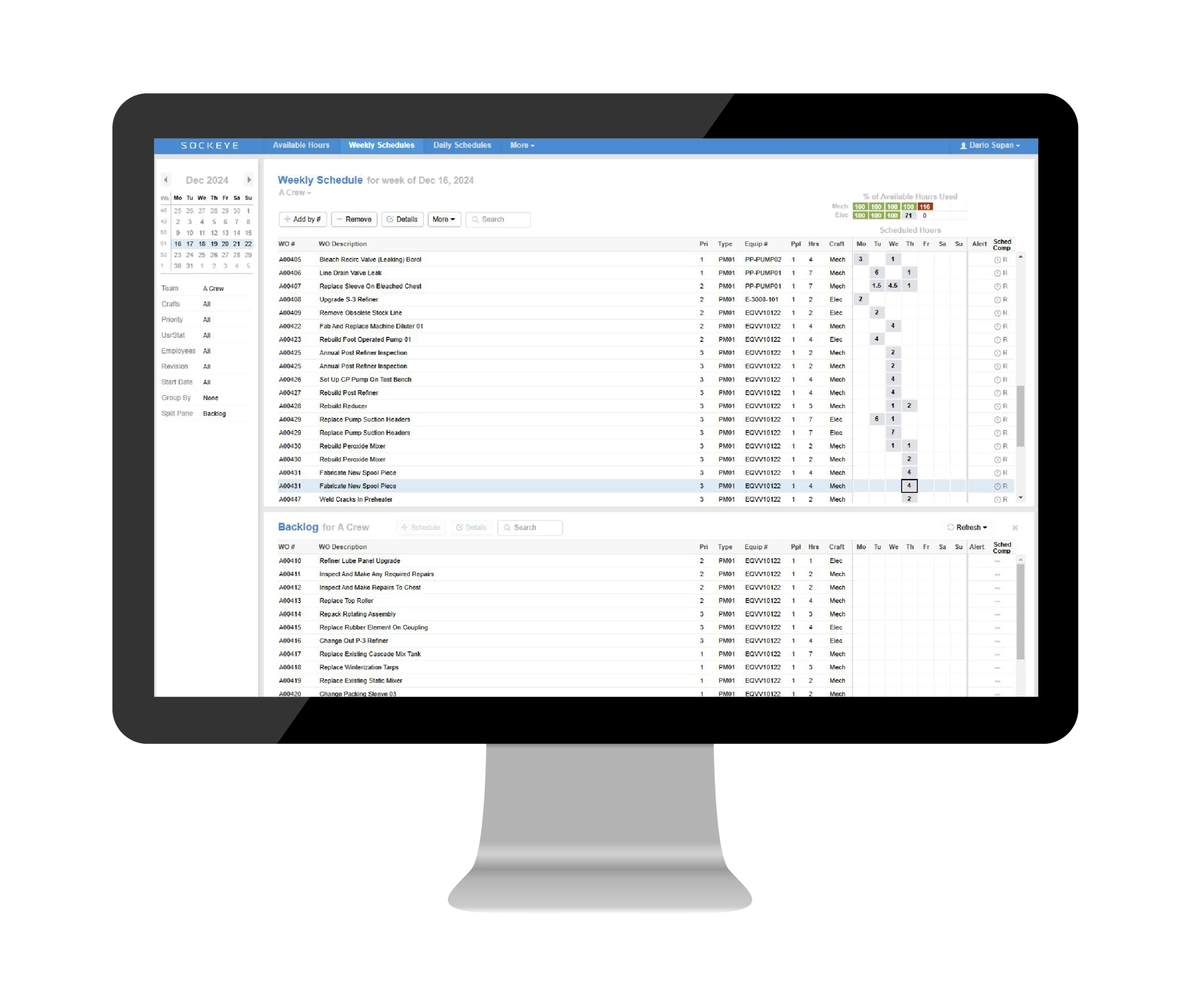
Sockeye’s automation can build reliable weekly schedules in just a few clicks. You can then share those live schedules to keep your team aligned and accountable.
Changes to the schedule can be done just as quickly — by simply dragging and dropping work to the next available slot.
LABOR AVAILABILITY & UTILIZATION
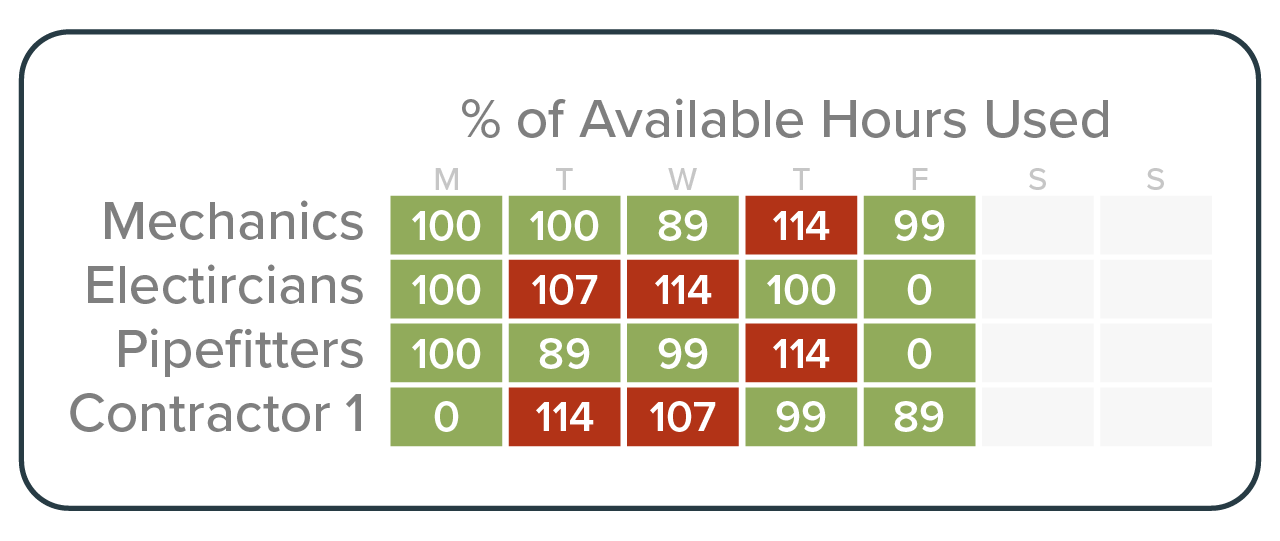
Balance work across teams, shifts, and vendors
See crew and contractor availability and capacity in one place. Assign work without overloading crews or creating coverage gaps. Spot conflicts early and make better use of every approved maintenance window.
“Sockeye identifies where deficiencies are in your man hours. For instance, if Crew A is 40 hours over schedule, but Crew B is only 35% scheduled, you can move your resources to level it out to avoid overtime pay. That saves you money.”
Todd Hicks, Planning and Shutdown Superintendent at the AV Group
EQUIPMENT UPTIME
Reduce risk from delayed maintenance
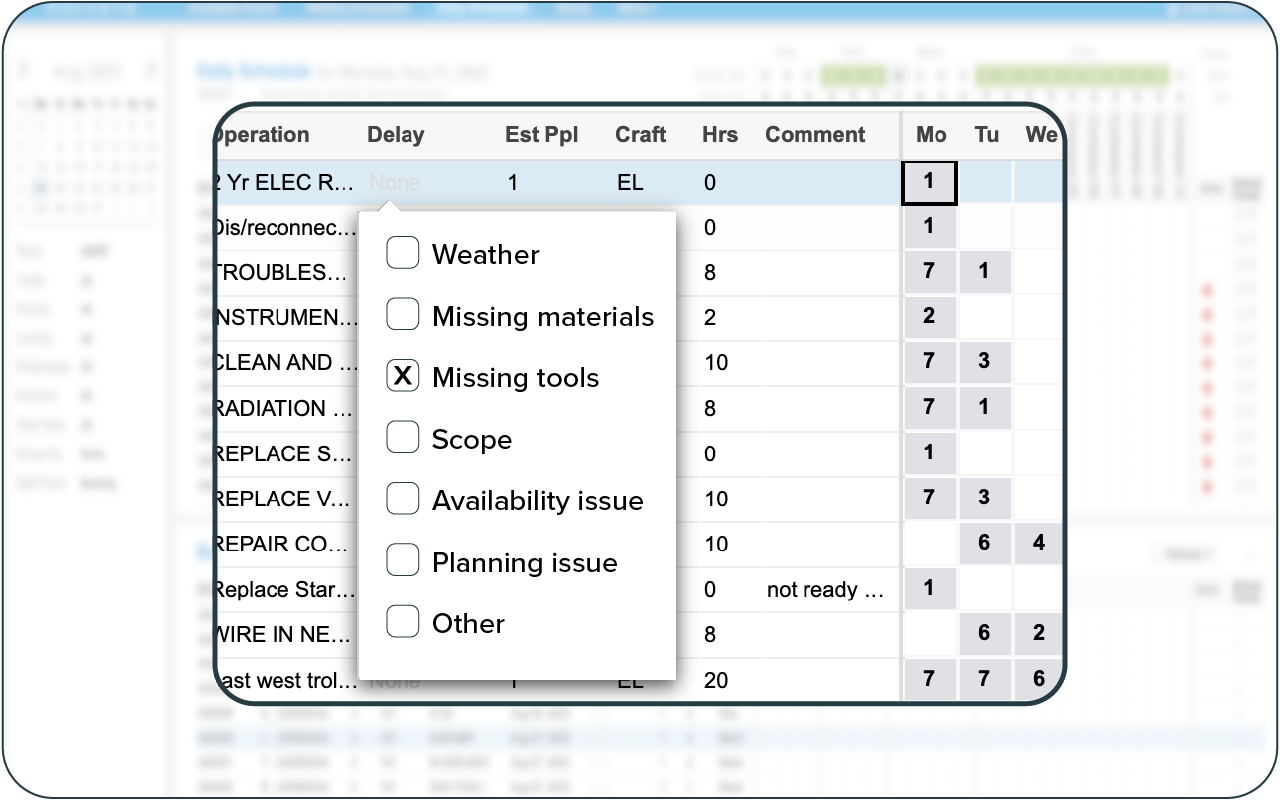
Prioritize PMs and corrective work before they become uptime risks. Track delayed work, understand why it moved, and keep critical electrical, cooling, and facility assets on schedule.
Give your planners and schedulers the visibility they need to protect redundancy, avoid surprises, and reduce unplanned downtime.
KPI REPORTING
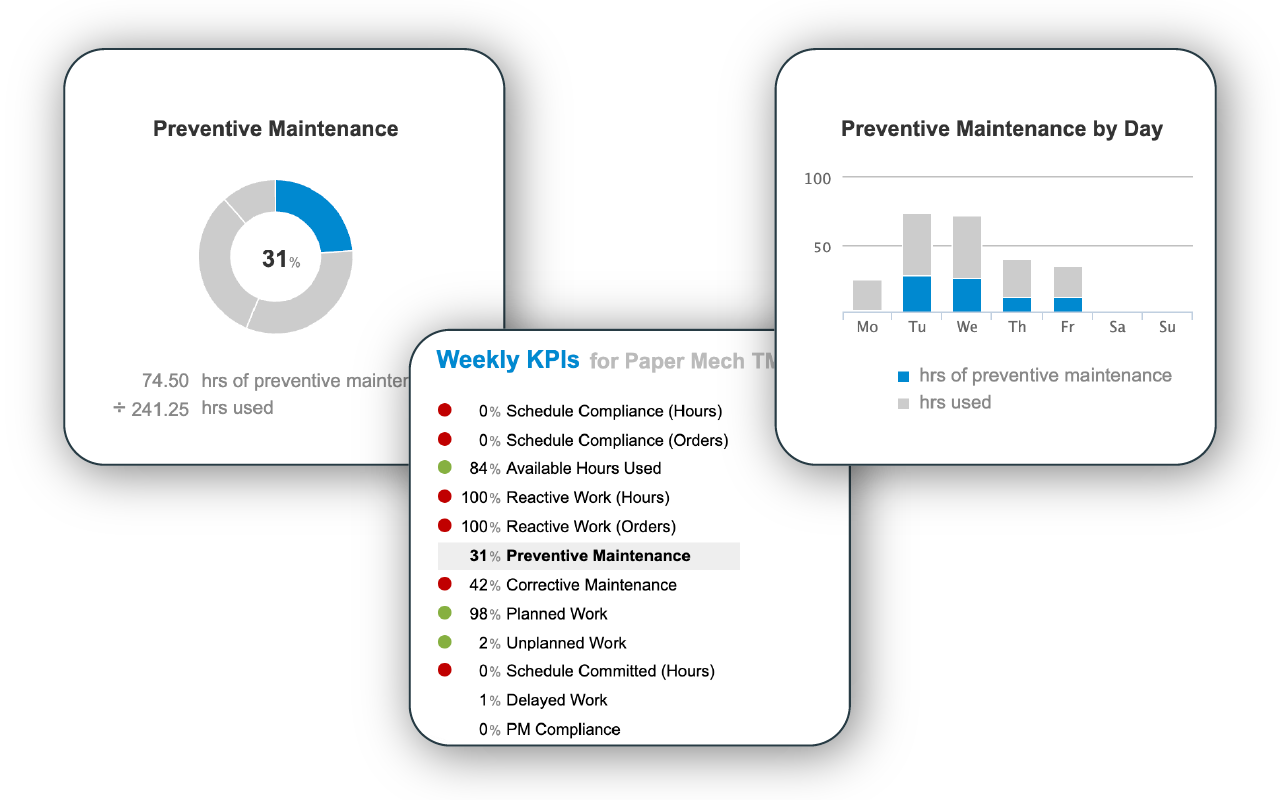
Track and report relevant scheduling KPIs
Automatically generate SMRP and custom KPI reports for key metrics like schedule compliance, labor utilization, time spent on reactive vs preventive work, and backlog trends — or send all data to your favorite business intelligence software.
Support internal reviews, customer reporting, compliance checks, and critical facility audits with scheduling data you can trust.
Trusted by enterprises across North America
We built a scheduling tool so intuitive and effective that it takes just one hour to learn — and 98% of facilities that try Sockeye continue using it long-term.





How to get started
Simplify data center maintenance scheduling
Juggling your CMMS, spreadsheets, shift notes, and maintenance windows — and still struggling to keep critical work on track? Sockeye helps manage the uptime demands, scheduling constraints, and operational complexity of data center facilities.
BOOK A DEMO
Step 1
Get a customized product demo
We start with a call from one of our product specialists to understand your specific needs. We then run a customized demo with your entire team so you can see how Sockeye makes scheduling easy.

Step 2
Start your risk-free trial
Test drive Sockeye using a file-based integration (Excel). This requires no investment or IT resources and just a few hours from the scheduler. Verify that Sockeye is right for you before you go all in.

Step 3
Get the most out of your team
No more disjointed scheduling, missing data, and flying blind. Consistently build daily/weekly schedules, check the latest status, and maximize preventive maintenance by maximizing productivity.
Frequently Asked Questions
Sockeye uses two primary types of integration:
1. API-Based Integration
Sockeye uses API-based integration to adapt to every enterprise’s unique needs, providing customized read/write configurations with your maintenance and/or HR systems. This means that any last-minute changes made in your CMMS are reflected in Sockeye — and vice versa.
2. File-Based Integration
Sockeye uses an Excel template to port data between the CMMS and Sockeye — simply export your CMMS data into Sockeye’s Excel template and click ‘refresh’ to update your data. The implementation requires minimal effort and no IT resources or custom coding.
Learn more about integration types
A full production rollout with API integration takes 4 to 6 weeks, while a file-based integration can be done in under 2 weeks.
Sockeye’s experts handle most of the integration work; your IT team just needs to provide access (API endpoints or database views) and some oversight. Because Sockeye is cloud-based, there is no server to install or software to maintain on-premises — it’s all handled by our cloud infrastructure.
Yes. Sockeye can help teams plan internal labor and contractor work in the same schedule, so vendor visits, access requirements, and crew capacity are easier to coordinate.
Sockeye supports read/write CMMS integration. The exact data exchanged typically includes work order details, scheduling fields, and resource info.
Configurations can be customized as read-only or selective write-back to accommodate your IT/security policies.
Sockeye allows you to input your technician and contractor shift patterns to track labor availability. You can easily edit labor availability for vacations, training, etc, with a couple of clicks.
Yes, Sockeye integration is customized according to your unique scheduling and IT requirements. Read/write integration, read only, write only specific fields, etc. — Sockeye is designed to meet your enterprise’s unique integration requirements.
We take data security very seriously. Sockeye is hosted on Microsoft Azure, which has industry-standard certifications (like ISO and SOC 2). Data is always encrypted, and backups are stored in a separate geographic region.
On the access side, we support role-based user permissions, SSO (Single Sign-on), and 2FA (two-factor authentication).
From Fortune 100 enterprises to single-site enterprises, Sockeye is ready, vetted, and prepared for your IT security review.
Learn more about Sockeye’s security
Maintenance scheduling should be quick and easy.
Sockeye keeps it that way.
Cut time spent creating maintenance schedules by up to 90% and free up room for better job planning. All without replacing your existing CMMS software.
Book a Demo