
Many pharmaceutical manufacturers already have strong systems of record, such as SAP PM, Maximo, or another CMMS/EAM platform. For them, improving maintenance scheduling does not mean getting more or better data.
The problem is that, even with those tools, turning backlog into a realistic daily and weekly schedule is often complex and slow. Schedulers are left with two similarly bad options:
- Use the existing CMMS/EAM and spend most of the available time creating and updating schedules — instead of allocating resources and preparing detailed job plans.
- Use spreadsheets and other manual workarounds to speed scheduling up — but risk compromising compliance and data accuracy.
The good news is that you do not need to upgrade to a different CMMS. You need Sockeye — a lightweight scheduling bolt-on that sits on top of your existing maintenance software.
Let’s see how to combine it with industry best practices to streamline maintenance scheduling for pharmaceuticals.
Before that, a quick overview of why creating balanced pharma maintenance schedules is so difficult.
Common maintenance scheduling challenges in pharma
In this industry, scheduling is not just a resource-allocation exercise.
You are not only deciding which team should do which job on which day. Planners and schedulers have to account for production campaigns, QA expectations, calibration and cleaning windows, documentation requirements, contractor availability, and more.
That makes maintenance scheduling for pharma especially difficult. A work order may be technically due, but the equipment may be tied up in a batch. An asset may be available, but a contractor may still need access, permits, or gowning. A task may be finished, but the machine may not be ready for release until documentation and QA review are complete.
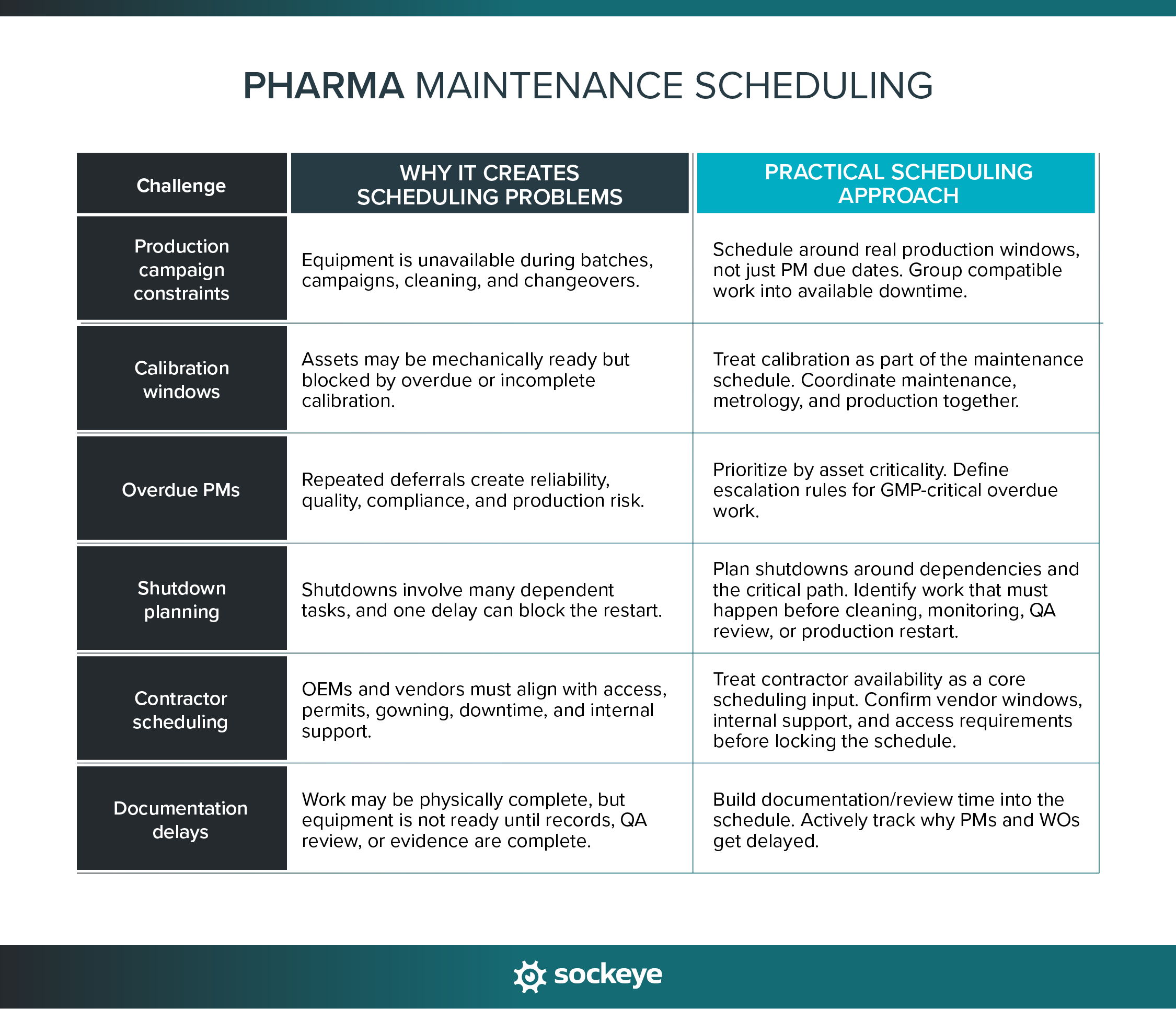
One would think that having a modern computerized maintenance management system provides the data and scheduling workflows needed to efficiently address most of these challenges. Unfortunately, that is not always the case.
Why is scheduling still hard when you already have SAP PM or a comparable solution?
SAP PM, Maximo, Infor, Emaint, and similar CMMS/EAM platforms play an essential role in pharma maintenance. They help teams manage work orders, asset histories, PM plans, compliance records, materials, approvals, and maintenance data.
But they are not built for fast, visual, day-to-day scheduling, leading to several glaring issues that Sockeye is built to solve.
1. Teams rely on Excel because scheduling in the CMMS is too slow
We’ve worked with many teams that decided to export work orders from the CMMS into Excel because building weekly schedules inside the CMMS was too cumbersome — forcing them into a rigid process with dozens of clicks and screens.
But, over time, Excel workarounds create more problems than they solve.
The schedule becomes disconnected from the CMMS. Updates need to be entered twice. Managers do not know whether the spreadsheet reflects the latest work order status. Planners spend hours copying, pasting, formatting, and reconciling data instead of improving the schedule.
You can avoid all of that with Sockeye. As a purpose-built scheduling and reporting add-on, Sockeye integrates with any CMMS or EAM software. We can do a one-way, two-way (read/write), or file-based integration, based on your security requirements.
You use Sockeye to schedule work — and do everything else in your CMMS. The data syncs between the two systems.
Why do pharma companies do this?
Because Sockeye’s scheduling automation and a super simple interface cut down scheduling effort by up to 90%!
“What used to take me up to five days of work can now be done with Sockeye in just under an hour. Because Sockeye synchronizes the data directly from our CMMS, we know the information is valid and trustworthy. When our guys get to the stores, we know that the parts ordered have been activated. We can also trust the data in Sockeye for payroll. With just three keystrokes, we pay 75 people.”
Todd Hicks, Planning and Shutdown Superintendent AT AV Group
2. Simple schedule changes take too many clicks
Pharma equipment schedules change constantly because of production delays, contractor issues, QA holds, and urgent corrective work. If rescheduling is difficult, the schedule becomes outdated quickly. The team may stop updating the schedule in the CMMS because the effort does not match the pace of change on the plant floor.
Sockeye makes schedule adjustments easier with an intuitive visual interface and a workflow that matches how scheduling is done on a busy plant floor:
- Schedulers can use drag-and-drop rescheduling to quickly move work orders to the next available slot or team, with visual indicators if teams or individuals are overbooked.
- In the upper right corner, as you make changes to the schedule, you can track labor utilization in real-time. This helps you keep the workload even between teams and avoid unnecessary overtime.
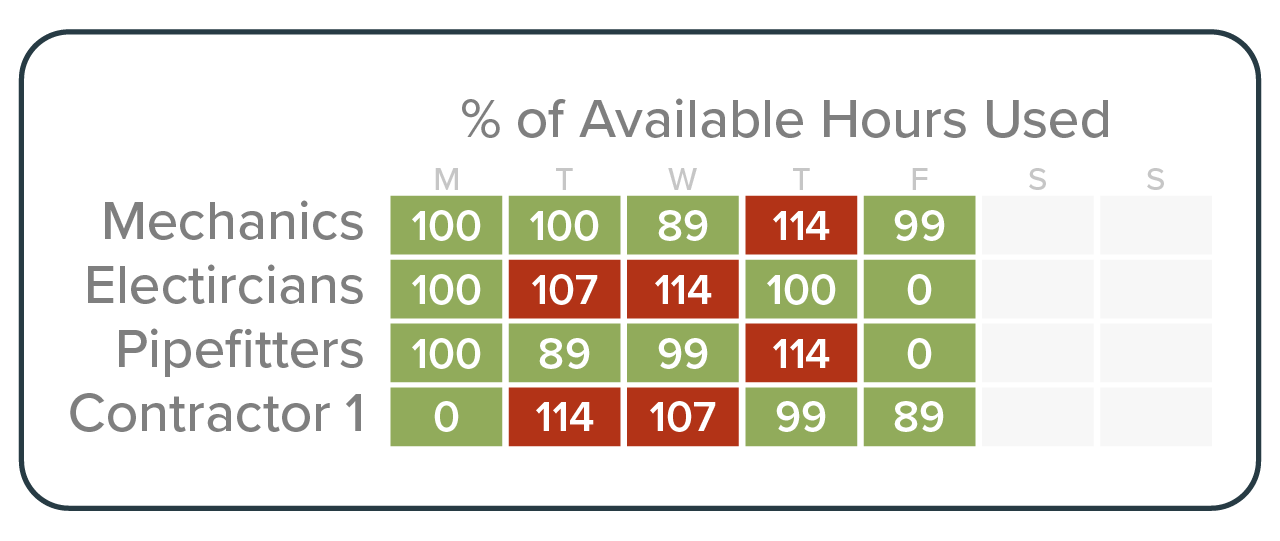
For pharma teams, faster schedule updates help keep maintenance plans aligned with what is actually happening on the floor.
3. Labor availability is unreliable
Having up-to-date crew and contractor availability is essential for creating balanced maintenance schedules, in pharma manufacturing or otherwise. EAM solutions often make that difficult — either because it is click-heavy to keep it up-to-date for a large team or because the data syncs from an HR software and can’t be changed manually without approval.
The tool you are using to create work orders should be able to answer the basic scheduling questions.
Can the team complete all planned PMs this week? Is one crew overloaded while another crew has capacity? Will a shutdown work require overtime? Are contractors available during the downtime window, or does the schedule need to move?
Sockeye makes this easy through a single Labor Availability Dashboard. The data can be pulled from your CMMS or HR software, pre-populated based on your shift patterns (most common), or directly input into Sockeye.
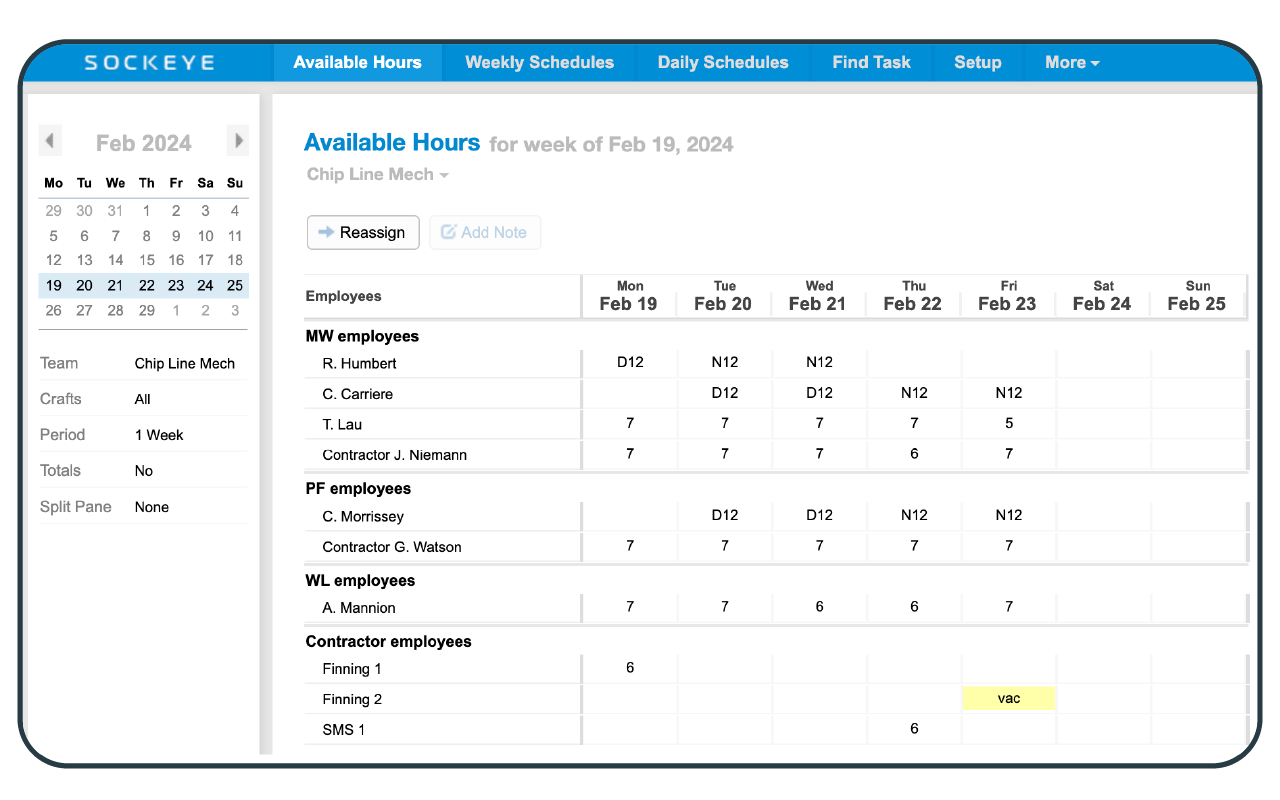
With everything in one place, it takes minimal effort to keep crew and contractor availability current. If someone is sick, sent for training, or whatever else, you just click and edit the corresponding field next to their name.
4. Backlog visibility is too cluttered for practical scheduling
A CMMS backlog can contain hundreds of work orders. When schedulers have to filter through too many screens, fields, statuses, and work order types, it becomes harder to find the work that should actually go into the next weekly schedule.
That clutter can slow down prioritization. PMs, overdue work, GMP-critical tasks, and high-priority corrective work may all be mixed with jobs that are not ready to schedule yet.
Here’s how Sockeye helps reduce that clutter:
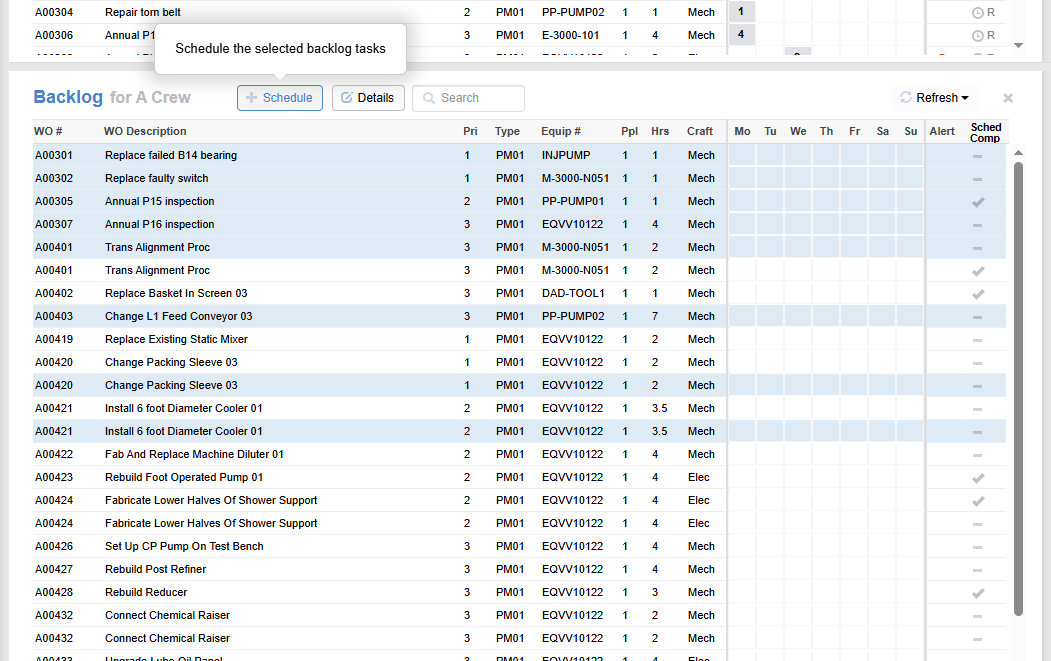
- Sockeye receives ready-to-schedule work from your CMMS. During onboarding, for each client, we modify the Backlog view to only show the data you want. For example, if you only want to see the work order ID, type, description, planned hours, and craft, those are the only fields we are going to map and show.
- You can quickly navigate through the dashboard and find specific work using the integrated search function. You can search for everything from the exact WO number to something vague like “bearing”. Simple, but very useful.
5. Managers do not have a clear view of schedule performance and delays
Maintenance and plant managers need more than a list of open and closed work orders.
They need to know which work is in progress, whether scheduled work actually happened, why work was delayed, and what caused the schedule to change during the week. Without that visibility, it is hard to improve planning, reduce delays, or hold effective schedule review meetings.
A work order may be completed eventually, but that does not always mean the schedule worked well. The job may have moved because of any number of reasons, from missing parts to QA holds to labor constraints.
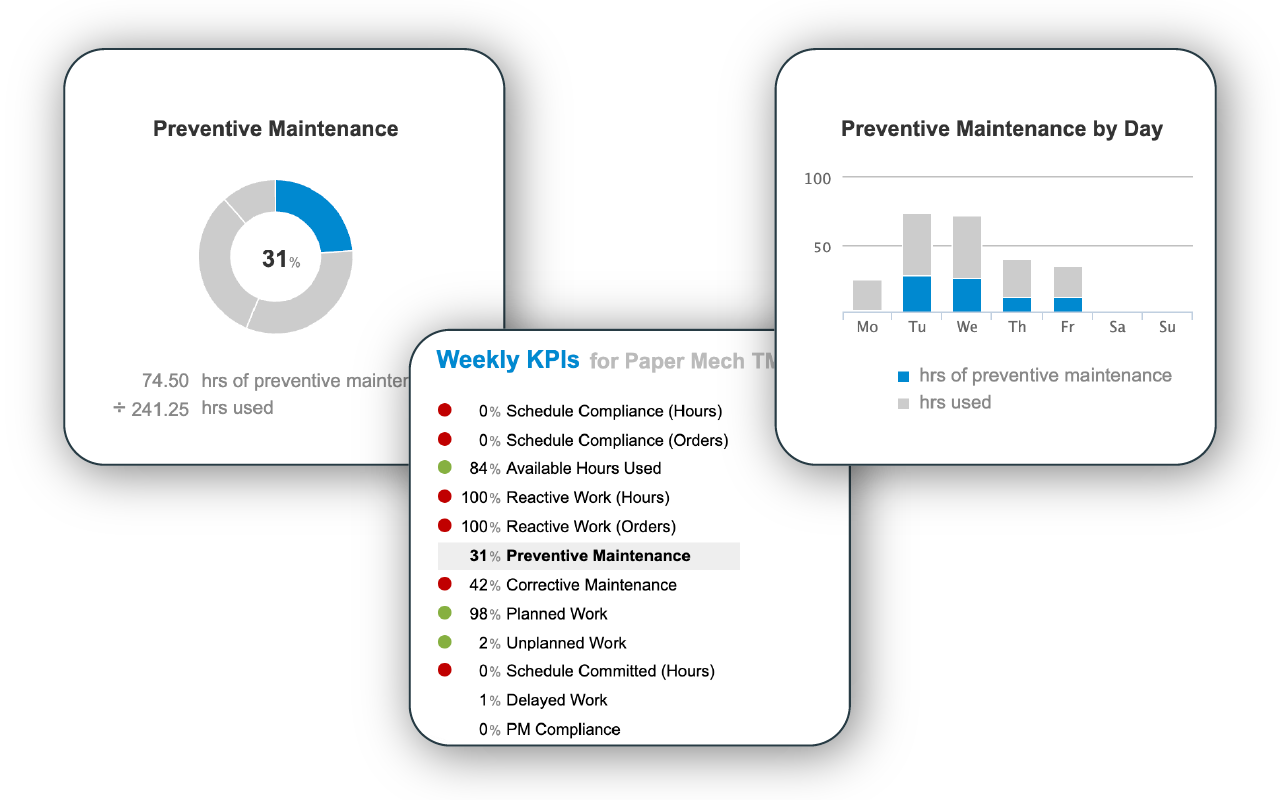
If your existing maintenance software makes reporting a pain, Sockeye has your back. It gives managers strong scheduling and reporting visibility so they can review schedule performance with more context:
- Track the effectiveness of your schedule with out-of-the-box KPIs defined according to SMPRP standards
- Track other scheduling-related metrics by creating custom KPI dashboards.
- Each scheduled work order comes with a delay tracking field. From a customizable drop-down list, technicians or supervisors can mark down why specific work was delayed. It’s immensely helpful in identifying and solving productivity and schedule compliance issues.
- Need deeper insights correlated with other business data? You can forward all Sockeye data to your business intelligence software.
6. Multi-site teams struggle to standardize scheduling
Pharma manufacturers with multiple sites may use the same CMMS, but that does not mean every facility schedules work the same way.
One site may rely on weekly planning meetings. Another may depend heavily on Excel. Another may schedule mostly inside the CMMS. Each site may also use different fields, filters, status definitions, and reporting habits.
That variation makes it harder to compare schedule performance across facilities. It can also make standardization difficult, even when the company has already invested in a shared CMMS/EAM platform.
When done through Sockeye, the scheduling is so straightforward that there can’t be a huge variation in how the process is executed on the platform.
With a more standardized approach, you can more easily identify the best-performing sites and replicate their success at other locations.
“We already have Cargill Meats Europe evaluating Sockeye. It is pretty exciting. As compared to any other tool that I know or any other method for maintenance scheduling, I give Sockeye a 10 out of 10. We are looking at Sockeye as an enterprise solution for maintenance scheduling globally.”
Mike Williams, Maintenance Information and Process Lead AT cargill
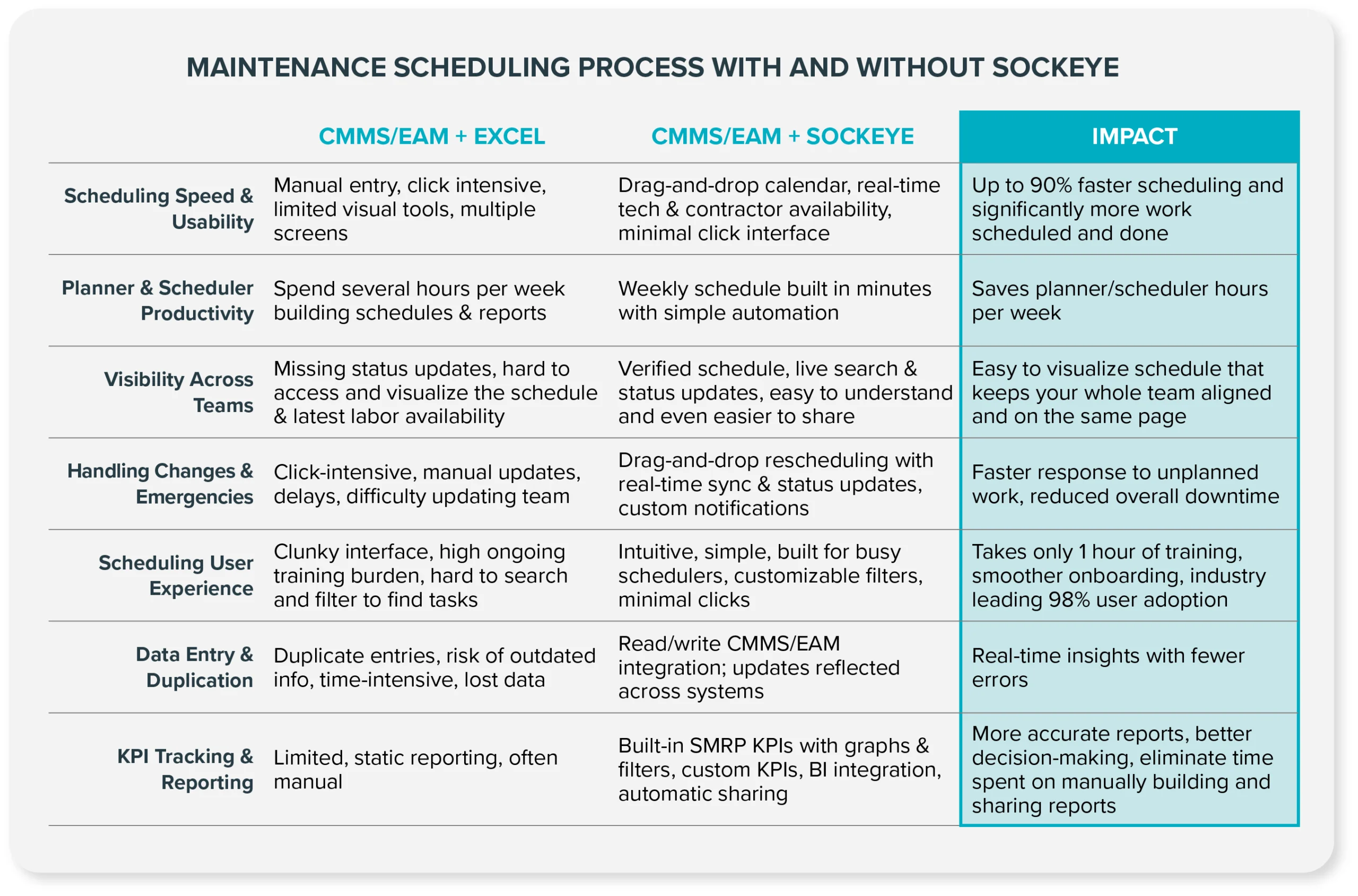
CMMS + Excel vs. CMMS + Sockeye for pharma maintenance scheduling
A strong maintenance or asset management platform is essential for pharmaceutical production. You need a centralized way to manage work orders, asset data, maintenance history, PM plans, compliance records, and approvals.
The question is whether that same platform is good enough for efficient maintenance scheduling.
If not, you have two options — supplement your CMMS with Excel or with Sockeye.
Test Sockeye with a simple pilot project
We understand you do not have a lot of spare time to play around with different software solutions. Sockeye is designed for minimal effort setup. No IT resources are needed to get the pilot up and running — all we need is a copy of your schedule and 1 hour of your (scheduler’s) time.
The same goes for data protection. Sockeye comes with all of the security controls enterprise operations need, from Azure hosting, SSO options, and 2FA to IP restrictions, HTTPS/TLS, frequent backups, encryption, and daily vulnerability scanning.
Want to simplify maintenance scheduling for pharma without replacing your CMMS?
Book a demo with a Sockeye representative to see how a lightweight scheduling layer can help your team build, adjust, and report on maintenance schedules more easily.
