
As part of its broader ERP ecosystem, the SAP Plant Maintenance (SAP PM) module gives teams a centralized way to manage notifications, work orders, preventive maintenance plans, asset records, scheduling activities, and maintenance history.
The platform can support complex maintenance environments. However, it is not always easy to use from a scheduling perspective. Planners and schedulers need to navigate multiple screens, manually balance labor capacity, and rely on spreadsheets to keep schedules aligned with real-world conditions.
This article provides a quick overview of how maintenance planning and scheduling works in SAP PM, including common workflows, types of maintenance supported, and potential challenges. It also explores how solutions like Sockeye integrate with SAP to deliver a faster, more intuitive scheduling experience.
How maintenance planning works in SAP PM
Maintenance planning in SAP PM is designed to help organizations identify, prepare, prioritize, and organize maintenance work before execution begins. The goal is to ensure technicians have the right instructions, labor, materials, tools, and timing required to complete maintenance work efficiently and safely.
Typical SAP planning and scheduling workflow
While work order planning and scheduling workflows vary between companies, SAP guides users to follow a similar sequence from issue identification to work completion:
- Maintenance issue identified: A problem, inspection finding, operator observation, or preventive maintenance trigger initiates the maintenance process.
- Notification creation: A maintenance notification is created in SAP PM to document the issue, capture equipment details, describe the problem, and begin the maintenance workflow.
- Work order generation: A maintenance work order is created based on the notification or maintenance plan. The work order becomes the primary record used to plan, schedule, execute, and track maintenance work.
- Planning activities performed: Maintenance planners define job steps, required tools, safety procedures, estimated labor hours, and any necessary permits or documentation.
- Materials and labor reviewed: Planners verify material availability, reserve spare parts, and review labor capacity to ensure the work can be completed as scheduled.
- Work approved and released: Supervisors review the work order and formally release it for scheduling and execution.
- Work scheduled: Schedulers assign the work to specific dates, crews, or technicians based on labor availability, maintenance priorities, and production constraints.
- Work execution: Maintenance crews perform the work according to the schedule and record actual labor hours, findings, material usage, and completion notes inside SAP PM.
- Completion and history capture: Once the work is finished, the order is technically completed and stored as part of the equipment maintenance history for reporting, compliance, and future planning purposes.
For a more in-depth look, check out our step-by-step guide for creating work orders in SAP PM.
Types of maintenance supported
As is the case with all maintenance platforms, SAP PM supports both planned and reactive maintenance work:
- Preventive maintenance: Used for recurring maintenance activities performed before failures occur, such as inspections, lubrication, servicing, and component replacements. In SAP PM, this is typically managed through maintenance plans, task lists, and automatically generated work orders.
- Corrective maintenance: Used to repair equipment after a fault, breakdown, or defect is identified. Corrective work in SAP PM usually starts with a maintenance notification that leads to a work order for planning, scheduling, execution, and cost tracking.
- Predictive and condition-based maintenance: Used when maintenance is triggered by equipment condition or performance indicators, such as vibration readings, temperature monitoring, or inspection measurements. SAP PM can support this through measurement points, counters, and integrations with monitoring systems.
- Shutdown and turnaround maintenance: Used for large planned maintenance events where production areas or facilities are temporarily shut down for major maintenance work. SAP PM supports coordination of large work backlogs, labor planning, materials, contractors, and scheduling activities during these events.
One important thing to note is that predictive maintenance capabilities often require integrations with additional SAP products, IoT platforms, or third-party solutions rather than relying on standard SAP PM functionality alone.
Types of maintenance plans in SAP PM
SAP uses maintenance plans to automate recurring maintenance activities. This helps cut down on manual work and improve equipment reliability by triggering maintenance work orders at predefined intervals or conditions.
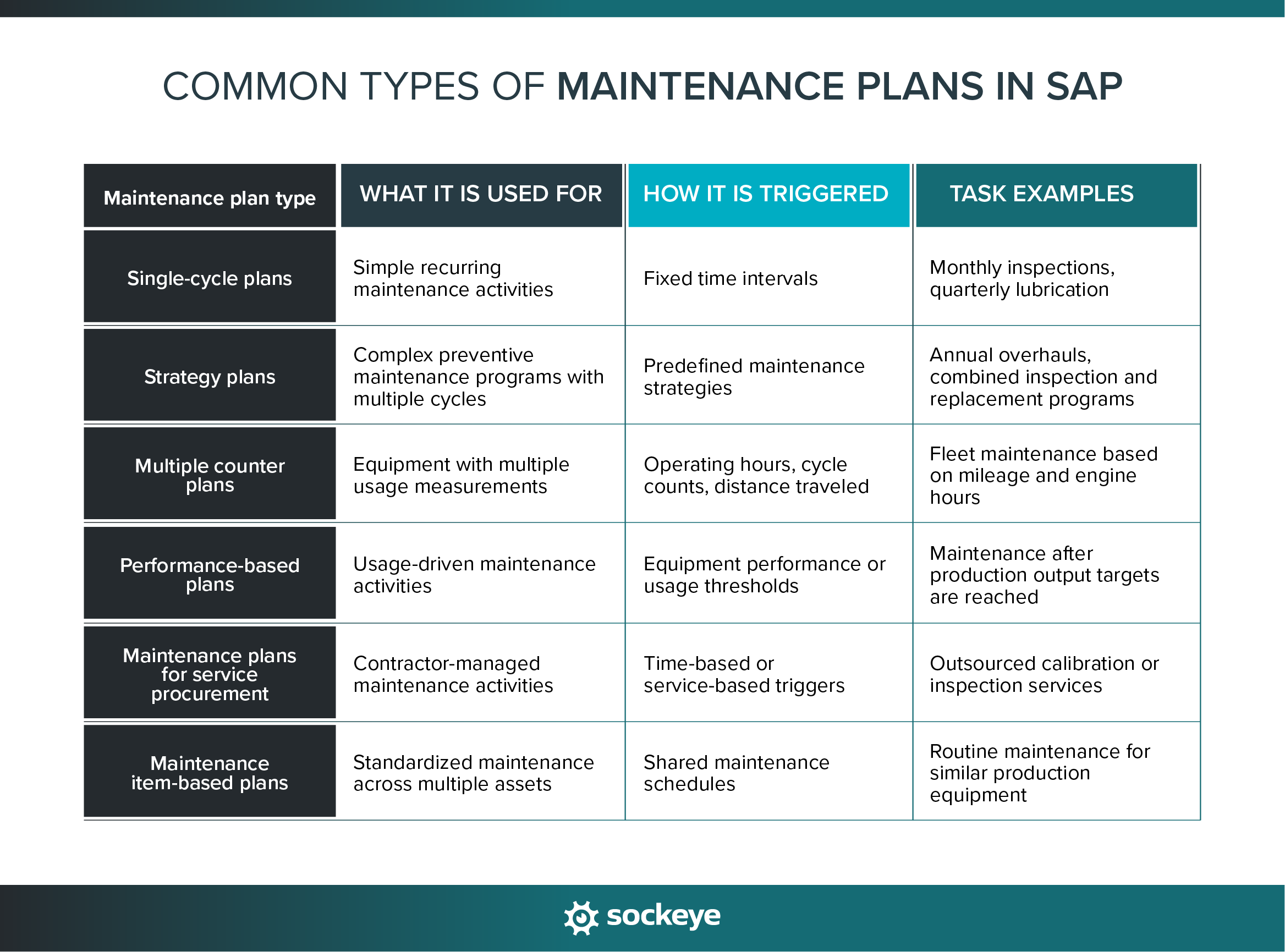
Below is a list of more popular types of maintenance plans inside SAP PM, each designed for different maintenance scenarios:
- Single-cycle plans: Used for simple recurring maintenance activities that follow a single schedule, such as monthly inspections or quarterly servicing.
- Strategy plans: Used for more complex preventive maintenance programs that combine multiple maintenance cycles and task packages into a single maintenance strategy.
- Multiple counter plans: Used when maintenance should be triggered based on multiple measurement counters, such as operating hours, production quantity, distance traveled (for fleets), or cycle counts.
- Performance-based plans: Used when maintenance activities are triggered by equipment usage or performance measurements instead of fixed calendar dates.
- Maintenance plans for service procurement: Used when external contractors or service providers perform maintenance work — and procurement processes need to be integrated into the maintenance workflow.
- Maintenance item-based plans: Used to manage multiple maintenance items under a single maintenance plan structure, helping standardize recurring maintenance activities across similar assets or locations.
How maintenance scheduling works in SAP PM
Maintenance scheduling in SAP PM is the process of assigning work to specific time periods, crews, and technicians.
SAP PM gives maintenance teams the tools to organize work, manage labor capacity, coordinate maintenance windows, and adjust schedules as priorities change. However, many organizations find the scheduling process in SAP quite rigid and time-consuming.
Scheduling capabilities within SAP PM
SAP PM includes several built-in scheduling capabilities that help planners and schedulers organize maintenance work and coordinate resources across maintenance teams:
- Basic order scheduling: Planners can assign planned start and finish dates to work orders based on maintenance priorities, labor availability, and operational requirements. This is typically done directly within maintenance orders using scheduling fields and order operations in SAP PM.
- Capacity planning concepts: Available labor capacity can be compared against planned work using work centers and capacity requirements to help identify overloaded teams or scheduling conflicts. SAP PM does this by linking work orders to work centers that contain available labor hours and capacity data.
- Work center scheduling: Maintenance work can be assigned to specific work centers that represent crews, departments, trades, or contractor groups responsible for completing the work. Schedulers assign operations within work orders to the appropriate work center based on skill requirements and resource availability.
- Maintenance windows: Work can be scheduled during planned downtime periods, shutdowns, or approved maintenance windows to minimize disruption to production operations. This is usually coordinated by aligning work order dates with production schedules and planned outage periods.
- Priority management: Work orders can be prioritized based on equipment criticality, safety risk, operational impact, or regulatory requirements to help schedulers determine what work should be completed first. Priority settings are typically configured within SAP PM and applied directly to notifications and work orders.
Keep in mind that SAP PM scheduling functionality is highly dependent on having accurate labor capacity data, properly configured work centers, and disciplined planning processes. Without it, schedules quickly become unreliable and difficult to maintain.
Common challenges with scheduling work in SAP PM
Due to complexity and how the system is organized, many organizations struggle with the day-to-day scheduling process in SAP PM. As maintenance operations grow more complex, schedulers often face limitations that make it difficult to build, adjust, and maintain efficient schedules.
Some of the most common challenges include:
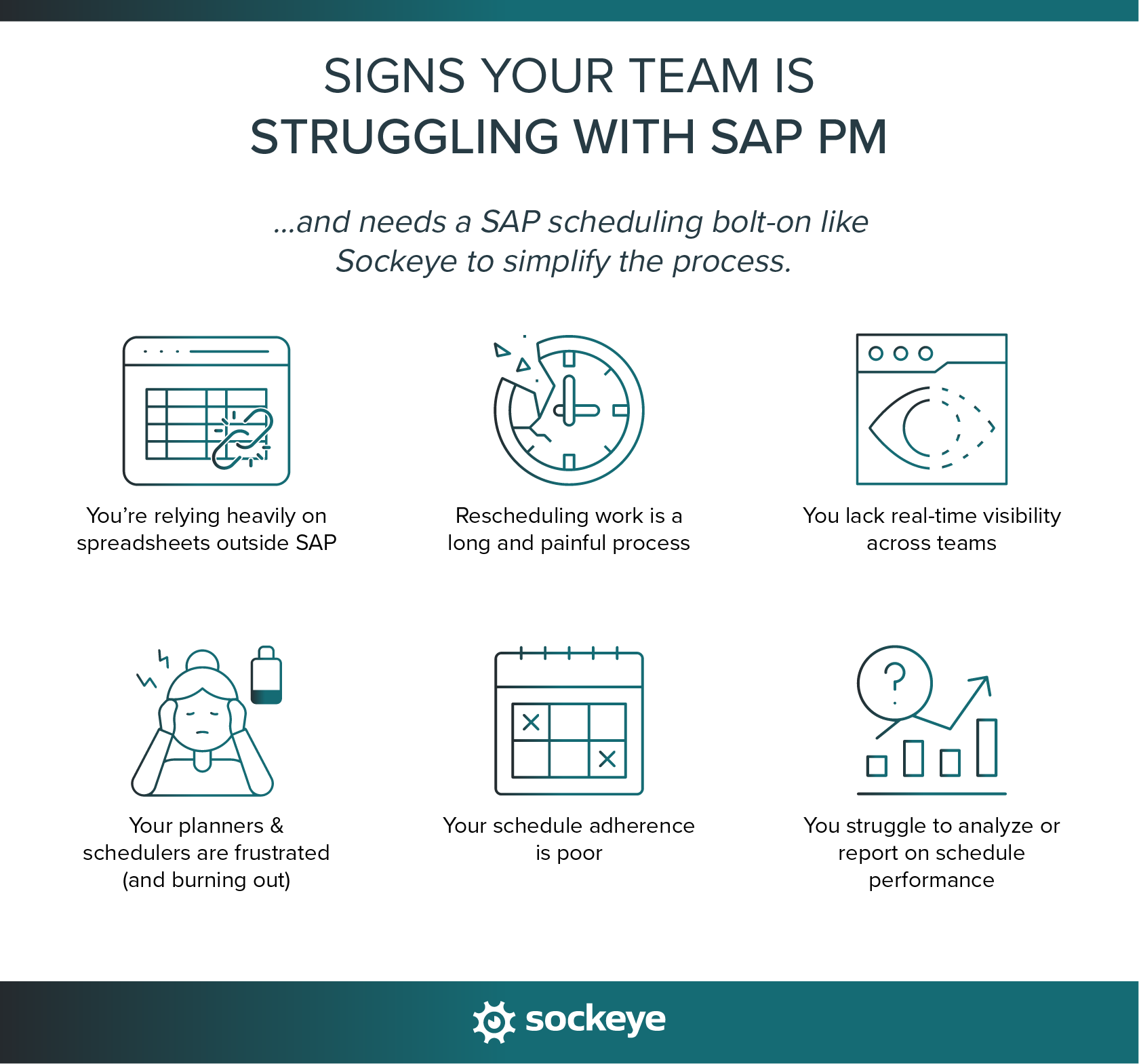
- Limited visual scheduling capabilities: SAP PM does not provide a highly visual scheduling experience out of the box. Many schedulers struggle to quickly understand crew workloads, schedule conflicts, labor utilization, or backlog distribution across teams.
- Scheduling work is slow and inefficient: Building and adjusting schedules requires navigating across multiple transactions, work orders, and planning views. Expect a lot of clicks and red tape.
- Difficulty keeping labor capacity up-to-date: Accurate scheduling depends on having reliable labor availability data, but maintaining work center capacities, shift schedules, vacations, contractor availability, and overtime information inside SAP PM can be difficult and time-consuming.
- Rescheduling is long and painful: When priorities change, updating schedules inside SAP PM often requires rechecking dependencies and manually adjusting multiple work orders and assignments. Something that should take 5 minutes often ends up wasting 20+ minutes of the scheduler’s time.
- Poor visibility across crews and work orders: Schedulers often struggle to get a centralized view of all planned work, crew availability, and schedule status across departments, trades, or maintenance teams.
- Poor schedule compliance: Because schedules are difficult to maintain and frequently change throughout the week, many organizations experience low schedule compliance and reduced confidence in the scheduling process itself.
All of these problems lead to maintenance teams exporting data into Excel spreadsheets or building manual scheduling trackers outside SAP. This creates duplicate work, inconsistent data, and version control issues.
If you want a deeper look at these challenges, Sockeye covers them in more detail in our overview of common SAP PM scheduling challenges.
Extending SAP PM Planning and Scheduling with Sockeye
Sockeye is a lightweight SAP scheduling bolt-on that makes maintenance scheduling faster, simpler, and more visual — without replacing SAP itself. Instead of working across multiple SAP screens and spreadsheets, Sockeye gives schedulers a centralized, real-time view of work orders, labor availability, and schedules in one place. The interface is intentionally simple and easy to learn, and most schedulers become comfortable using it after a single one-hour training session.
Here is how Sockeye helps extend SAP PM scheduling capabilities:
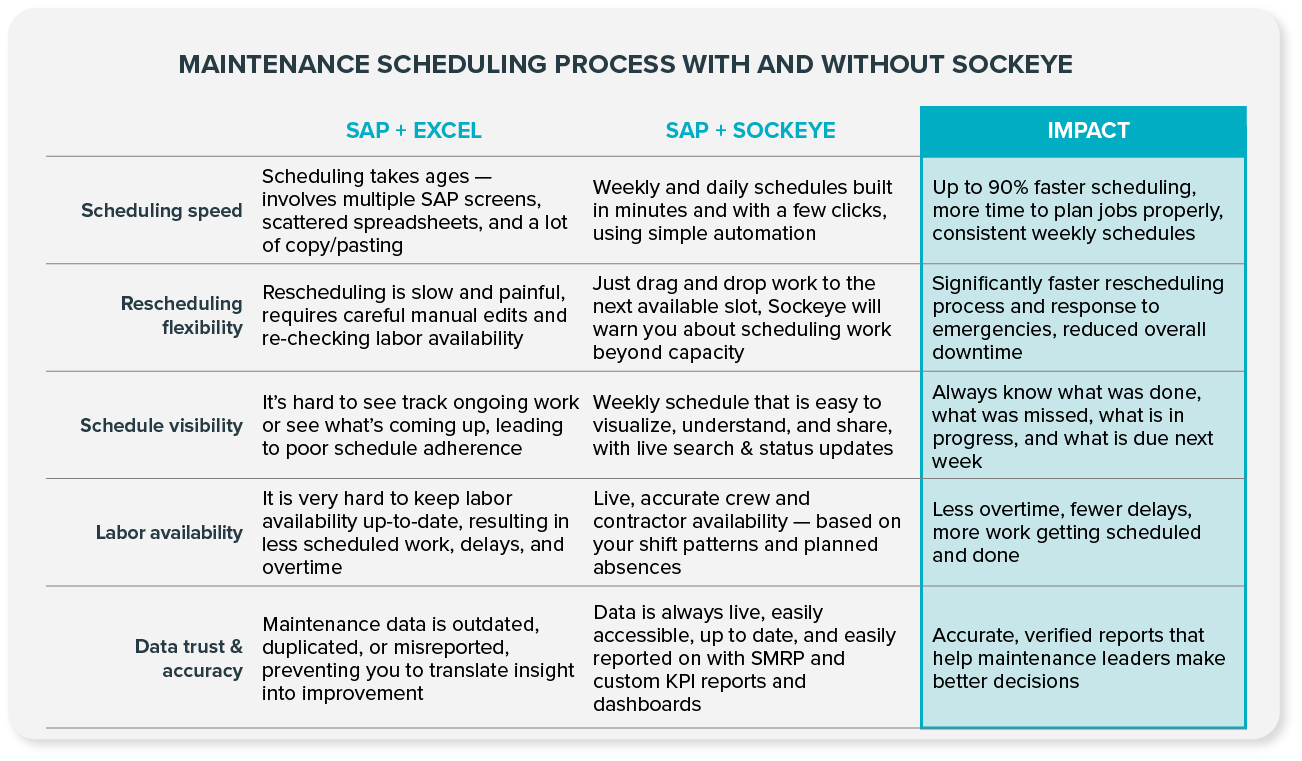
- Direct integration with SAP: Works on top of your existing SAP PM setup. You get automatic syncing and no duplicate data. Changes made in SAP are visible in Sockeye, and vice versa.
- Scheduling automation: Let Sockeye match selected work with available labor — you just need to review and polish the schedule. This reduces manual scheduling effort and leaves more room for proper job planning.
- Drag-and-drop rescheduling: Schedulers can move jobs between days, shifts, crews, or technicians using simple drag-and-drop interactions instead of manually updating multiple SAP transactions.
- Labor availability dashboard: Sockeye provides one simple view through which you can review and manually update labor availability and maintain accurate capacity data across teams, trades, and contractors.
- Visualize labor utilization: Schedulers can view real-time utilization for crews and contractors, including visual indicators when a technician becomes overbooked. This helps create more balanced schedules and reduce avoidable overtime.
If you are interested in evaluating Sockeye, we can set up a free pilot project that allows your team to validate user adoption and confirm the scheduling workflow. This can be done with minimal IT support. Learn more by talking with a Sockeye representative.
