
Most plants already have maintenance schedules. The problem is — they don’t follow them.
Instead of executing planned work, teams fall into constant firefighting. Backlog grows, urgent jobs take over, and priorities shift daily. In that kind of environment, people quickly lose trust in the schedule.
In contrast, a good maintenance schedule is:
- Realistic: It reflects actual labor capacity and constraints.
- Executable: Work is ready and properly planned.
- Followed: The team sticks to it most of the time.
This article provides practical tips, tools, and frameworks on how to improve maintenance scheduling at your facility and consistently create balanced schedules.
Why maintenance schedules fail to deliver
Maintenance plans and schedules don’t fail because of a lack of effort — they fail because of structural issues in how scheduling is done.
Teams spend hours building schedules, but the output is often unrealistic, constantly changing, or simply ignored once the week starts.
Here are the most common reasons why:
- Planning vs scheduling overlap: There is no clear separation of roles. Instead of focusing on preparing quality jobs, your planners/schedulers spend most of their time on creating and updating the schedule itself.
- Poor quality backlog: Work orders are missing scope, priority, labor estimates, or required materials. Garbage in → garbage schedule.
- Constant priority changes from operations: There is no prioritization hierarchy. Everything on the plant floor becomes “urgent,” making it impossible to stick to any plan.
- No visibility into technician availability: Schedules are built without a realistic view of who is actually available, leading to overloaded crews or idle time.
- Lack of schedule ownership: No one is truly accountable for executing the schedule. As a result, it is treated as a suggestion rather than a commitment.
- Weak coordination with operations: Equipment is not available for planned maintenance, causing delays, cancellations, and rework.
- Ineffective use of scheduling tools: Spreadsheets quickly become hard to manage, while legacy CMMS/EAM systems often make scheduling slow, rigid, and overly complex.
If any of these sound familiar, the good news is — this is all fixable with the right structure and discipline.
Build the foundation before you start “optimizing schedules”
Before trying to improve maintenance scheduling, you need to fix what feeds it.
A strong schedule depends on two things: quality inputs (well-prepared and prioritized work) and clear structure (roles and process).
If those aren’t in place, no scheduling method or tool will fix the problem.
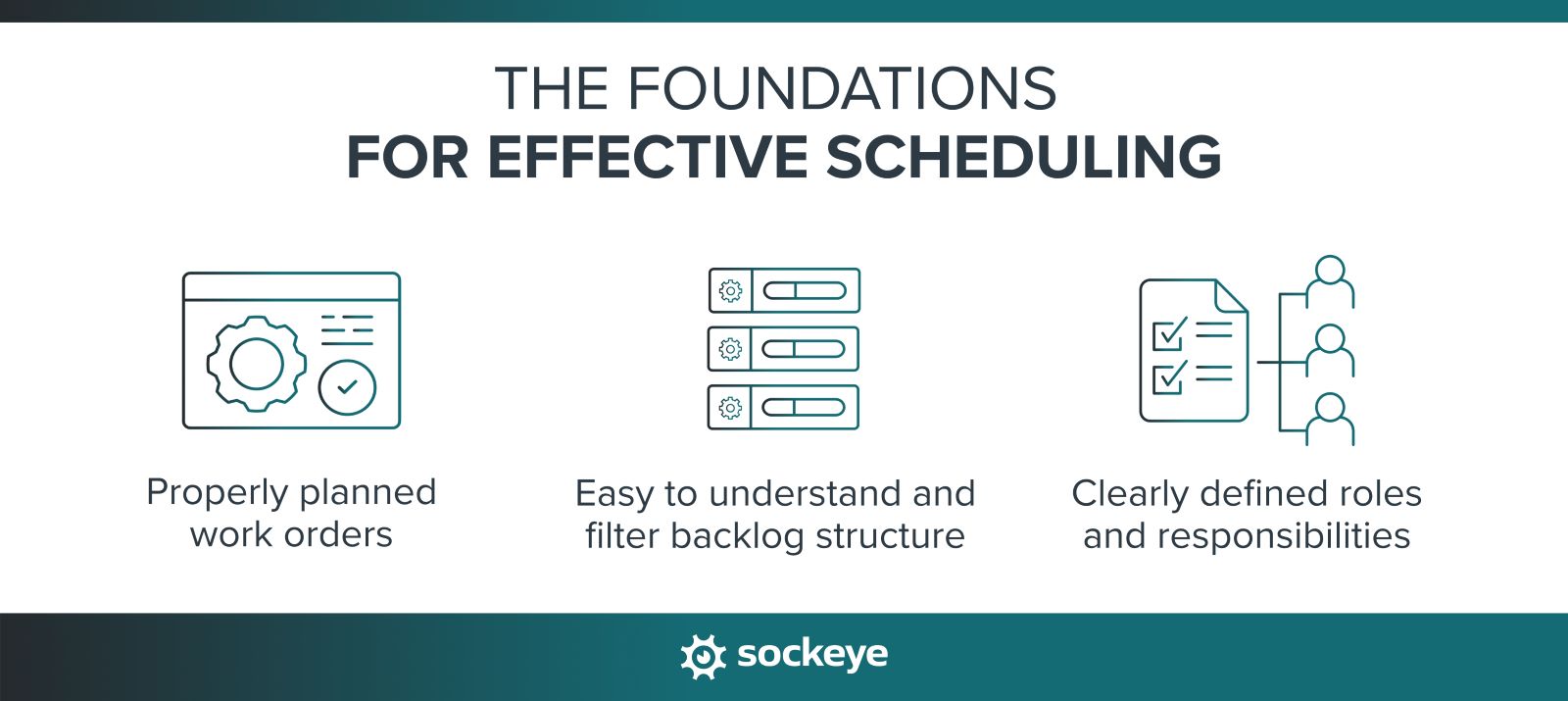
Ensure work is properly planned
A job should meet a minimum standard before it ever reaches the schedule:
- Clear scope: The technician knows exactly what needs to be done — no guesswork in the field.
- Labor estimate: There is a realistic estimate of how long the job will take.
- Materials identified and available: Parts, tools, and permits will be ready when the job starts.
Maintenance planning and maintenance scheduling are deeply intertwined. But everyone can follow a simple rule: Don’t schedule what isn’t ready.
Create an easy-to-understand backlog structure
Want to make a scheduler’s life a living hell? Give them a messy, poorly described, unprioritized, and constantly shifting backlog.
So strive for the opposite:
- Set clear priority levels: Define your prioritization levels (like low, medium, high, urgent) — and stick to them. Not every asset is critical, and not every task can be urgent. People who submit service requests should also be aware of that scale.
- Group work logically: Try to organize jobs by area, asset, or craft. It will be easier to bundle and sequence work during scheduling.
- Keep it clean and current: Regularly review and remove duplicate, outdated, or low-value work orders.
- Define what “ready to schedule” means: Every work order should include key information like a clear description, exact location, asset ID, required craft or number of people, estimated hours, and any constraints. This creates consistency and removes guesswork during scheduling.
Many tools, Sockeye included (screenshot below), allow you to define the exact fields you see when going through the backlog.
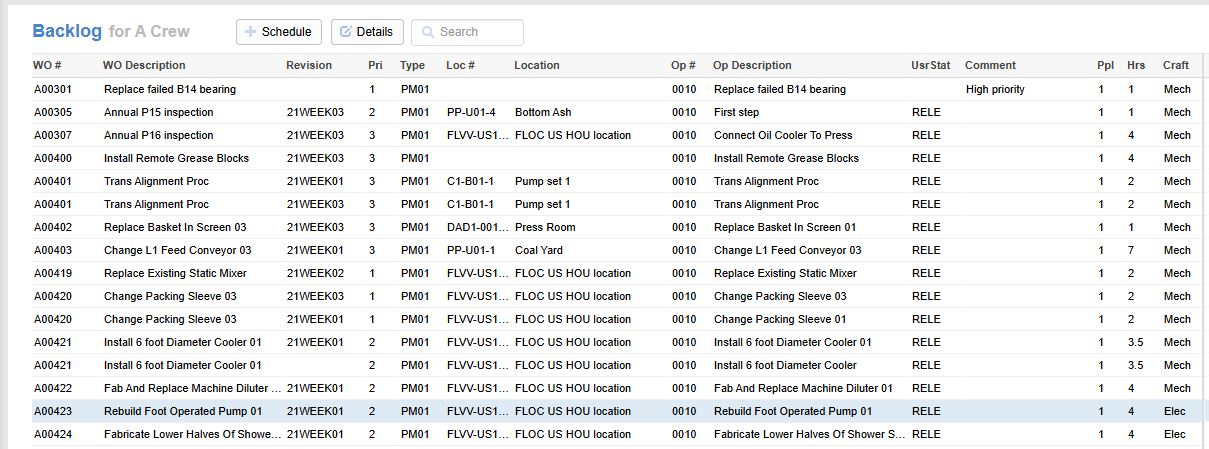
With a structured backlog and clear prioritization, scheduling becomes faster, more accurate, and far less stressful.
Define roles clearly
As your team of schedulers, supervisors, and technicians grows, it becomes increasingly important to ensure accountability. That requires understanding who is responsible for what.
Start with a clear separation of roles. For example:
- Planner = defines the job: Prepares the work order with scope, labor estimates, materials, permits, and all required details so it is ready to be scheduled.
- Scheduler = decides when: Selects and assigns work based on priorities, capacity, and constraints. Focuses on building a realistic, balanced schedule.
- Supervisor = executes the plan: Ensures the schedule is followed, removes obstacles during execution, and provides feedback on job progress and quality.
- Technician = completes the work: Executes the job as planned, reports issues, and provides feedback to improve future planning and scheduling.
Moving beyond roles, the best way to ensure accountability is to use some type of maintenance scheduling software. The alternative requires a constant battle with version control in Excel, finger-pointing, and digging through email or Microsoft Teams threads.
Tips and tools for efficient maintenance scheduling
Some teams overcomplicate scheduling, while others stay too informal. Remember that the goal is not to build a perfect schedule — it’s to build a repeatable process that works week after week.
The following advice focuses on practical ways to improve how schedules are created, adjusted, and executed on the plant floor.
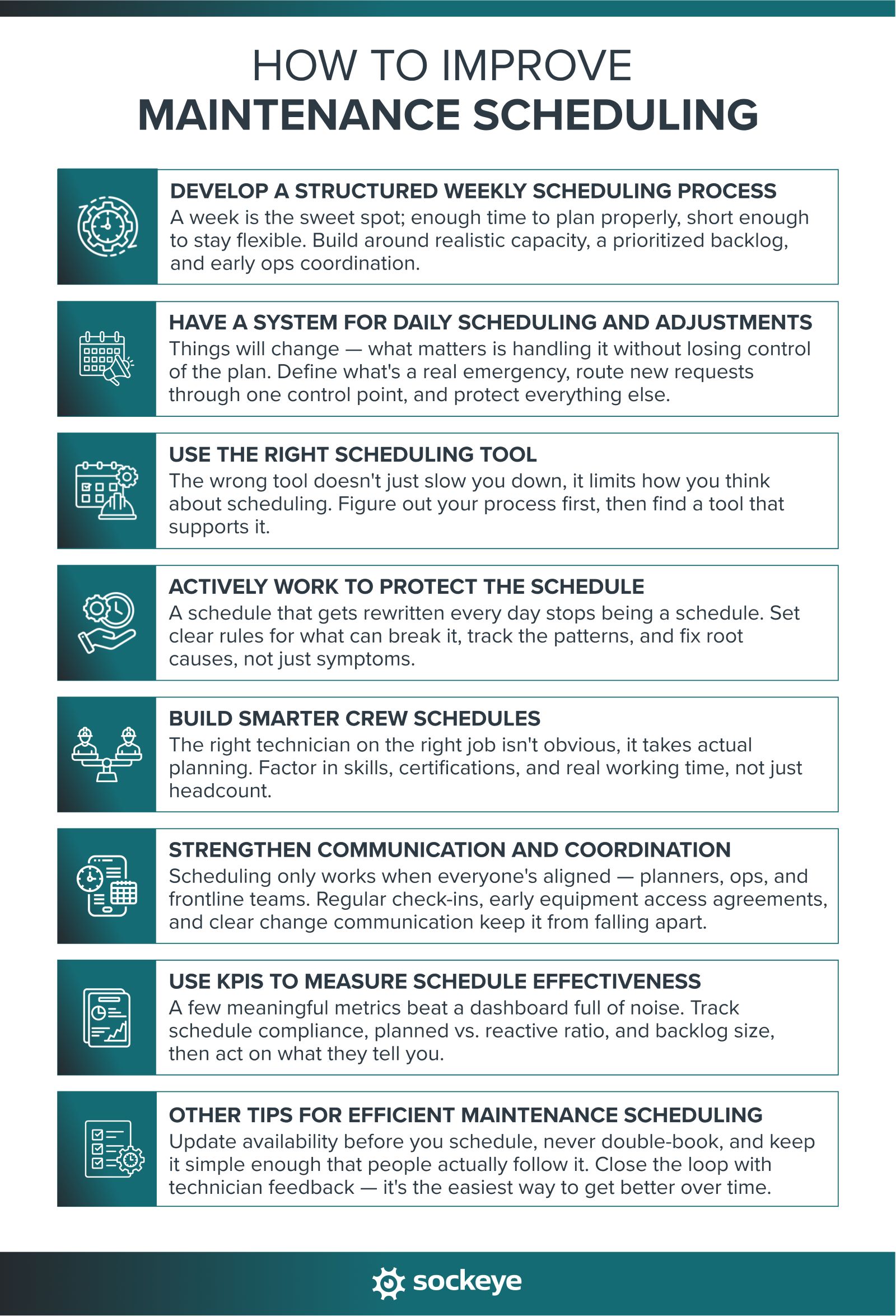
1. Develop a structured weekly scheduling process
A weekly scheduling cycle is the most common and effective approach for a reason. Scheduling only a day or two ahead doesn’t give enough time to properly coordinate with operations, secure materials, or balance workloads. On the other hand, scheduling several weeks or a full month in detail is unrealistic — priorities change, new work emerges, and too much of that plan will never be executed as intended.
A week is the right balance. It provides enough visibility to plan properly, while still being flexible enough to adapt to real-world changes.
A good weekly schedule doesn’t happen by chance. For the efficient teams that we work with, the weekly scheduling process looks something like this:
- Start with available labor capacity: Use realistic capacity — not theoretical 100%. Account for meetings, breaks, and known interruptions so you don’t overcommit your team. Plus, before you start scheduling, check that available labor is up to date and shows who is on vacation, training, sick, etc.
- Select the right work: Pull from a prioritized backlog and balance different types of work — preventive maintenance, corrective tasks, and small improvements — based on internal goals and guidelines.
- Load the schedule properly: If you’re not highly reactive, target close to 100% capacity. To paraphrase Doc Palmer, the more work you schedule, the more work gets done.
- Coordinate with operations early: Confirm equipment availability and resolve conflicts before the week starts — not 30 minutes before a supervisor needs to start shutdown and LOTO procedure.
- Publish and communicate the schedule: Make it clear and visible — who is doing what, where, and when. Use a scheduling tool that shows a live schedule, accessible to everyone who has the link to the schedule.
- Track work execution: Make sure techs and supervisors keep work order statuses up to date. It also helps to have a system or a tool for tracking why work gets delayed, so you can eliminate those causes and improve schedule compliance.
When this process is followed consistently, schedules become more stable and easier to execute. This also makes them more reliable, which, over time, builds trust in the schedule.
2. Have a system for daily scheduling and adjustments
One of the things that makes high-performing maintenance teams “high-performing” is their ability to manage changes without losing control of the plan.
That requires keeping everyone on the same page. Some teams achieve it by running short daily scheduling meetings: 10 to 20 minutes to review what was completed yesterday, what didn’t get done, and what needs to happen today.
Just as important is having a clear way to handle new work without destroying the schedule:
- Define what qualifies as “urgent”: Set clear criteria for true emergencies (e.g., safety risk, production stoppage).
- Route new work through a control point: New requests should go through a planner, scheduler, or supervisor — not directly to technicians. This prevents chaos and duplicate work.
- Protect the core schedule: Only insert new work if it meets the urgency criteria or if there is available capacity.
Finally, be realistic about where you are now. Look at how much planned vs reactive work you are doing today, then set a realistic target (e.g., 70/30 planned vs. reactive). Focus on increasing planned work month by month while maintaining control of daily execution.
3. Use the right scheduling tool
The tool you use can either support your process — or actually slow the scheduling down.
Most teams use one of these setups to schedule and track maintenance work:
- CMMS/EAM + a dedicated scheduling add-on (like Sockeye)
- Spreadsheets
- CMMS or EAM software
- CMMS/EAM + Excel
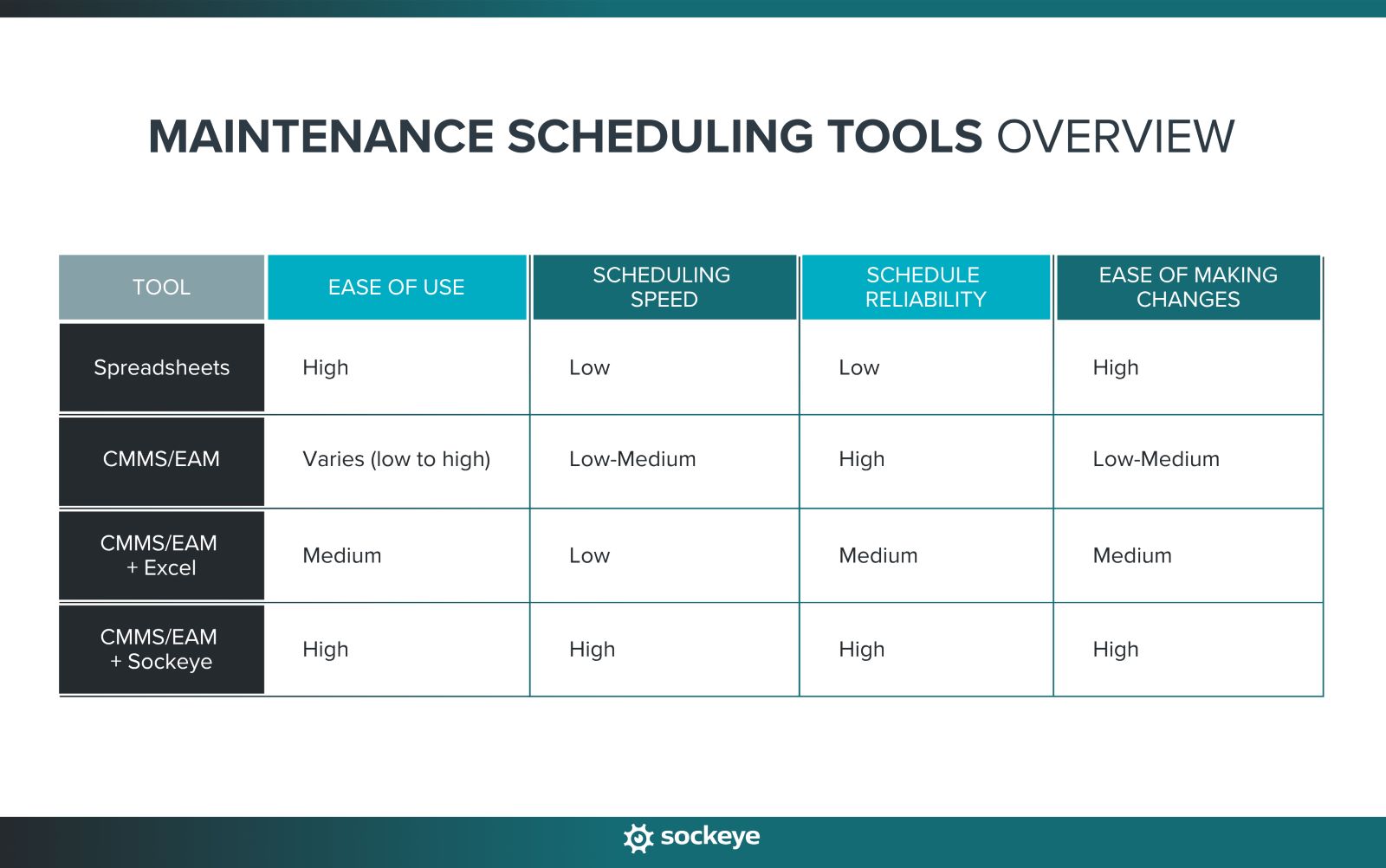
Here’s how to think about what works best:
- Spreadsheets: Best for small teams (1–2 technicians) where coordination is simple, and speed matters more than structure.
- CMMS/EAM: This covers everything from legacy CMMS solutions to modern lightweight maintenance tools to big enterprise asset management platforms. The features, speed, and ease of scheduling vary wildly between providers.
- CMMS/EAM + Excel: A common workaround for legacy CMMS and enterprise solutions — think SAP EAM, JDE, IBM Maximo, Infor, FMX, and similar. Teams export tasks and build schedules in Excel for more flexibility. Happens when building and maintaining the scheduled inside existing software is too complex or time-consuming.
- CMMS/EAM + Sockeye: Solves the problem for the teams mentioned in the point above. Sockeye integrates with your CMMS software to simplify the scheduling process — meaning scheduling is done in Sockeye, but the schedule syncs with your existing solution, so no data is lost.
Too many teams let system limitations dictate how they schedule. Instead, define a process that works on the floor, then use tools that support it.
4. Actively work to protect the schedule
A schedule that is constantly revamped quickly loses credibility. Teams stop trusting it, and you’re back to reactive work.
Here are a few simple steps you can take to help protect the schedule:
- Define what can (and cannot) break it: A safety risk or production stoppage is a real emergency. Most other requests can wait. Be disciplined about the difference.
- Create a clear escalation process: Define who has the authority to approve schedule changes and what justification is required. Not everyone should be able to interrupt the plan.
- Track schedule breakers: Identify patterns — are the same assets failing? Are the same departments constantly interrupting? Are specific teams or a technician underperforming (meaning, you often need to send someone else to address the same issue again, a day or two later)? Use this data to address root causes, not just symptoms.
5. Build smarter crew schedules
If the schedule doesn’t reflect real-world constraints like skills, travel time, and setup requirements, delays will pile up and start breaking the schedule.
Make sure to:
- Match the right work to the right technician: Consider skills, certifications, and experience when assigning jobs. Not every technician can (or should) do every task.
- Account for real working time: Include travel time, setup time, permit-to-work requirements, and coordination delays — not just wrench time.
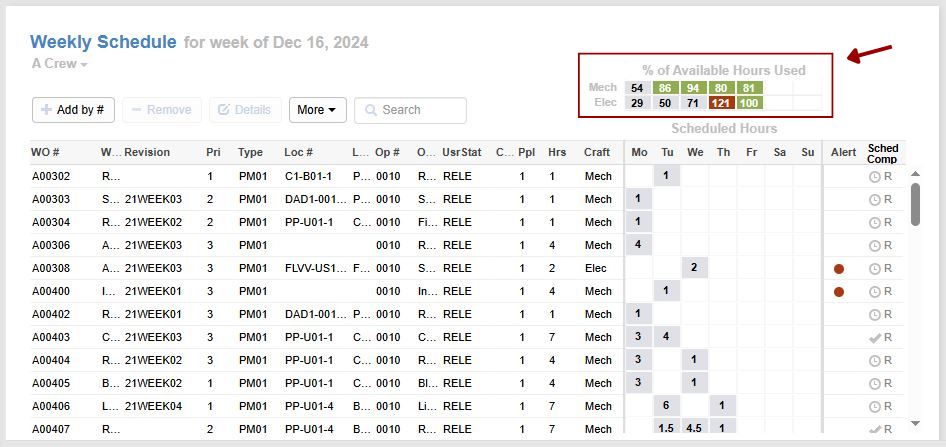
- Level workload between teams: Even if total crew capacity looks fine, poor distribution can leave some teams or technicians overloaded while others are underutilized. Leverage tools like Sockeye that track labor availability and show labor utilization in real-time, as you are assigning work (shown in the upper right corner in the screenshot below).
6. Strengthen communication and coordination
While you can lock the scheduler in a room and ask them to churn out schedules non-stop, that can never work long-term. Work order planning and scheduling cannot be done in isolation — it’s ultimately a coordination process between planners, schedulers, reliability/maintenance engineers, operations/production, and the frontline teams.
To keep everyone on the same page:
- Run an effective weekly scheduling meeting: Bring together the scheduler, supervisors, and operations. Review the proposed schedule, confirm priorities, and resolve conflicts before the week starts.
- Align with operations early: Make sure equipment access, shutdowns, and production constraints are agreed in advance.
- Bridge the gap between system and field: Use whatever it takes — printed schedules, mobile apps, or digital displays — to make the plan visible and accessible.
- Communicate changes clearly: When adjustments are needed, make sure everyone affected knows exactly what changed, and what the new priorities and timeline are.
7. Use KPIs to measure schedule effectiveness
If you’re not tracking the basic KPIs, how do you know if your schedule is working?
But don’t go overboard. Keep it simple and focus on a few meaningful metrics:
- Schedule compliance: Percentage of scheduled work that was completed as planned.
- Planned vs. unplanned work ratio: How much of your work is proactive vs. reactive.
- MTBF (Mean Time Between Failures): Tells you if an asset is breaking more often or less often.
- Wrench time: How much time technicians spend doing actual work.
- Backlog size (in weeks): How much ready-to-schedule work you have. This depends on the industry, but industry benchmarks suggest that a manageable backlog should represent two to three weeks of work.
Don’t just track these metrics so you can show them in a report. Act on them.
For example, if your backlog grows too large, it’s a sign that work is not being completed fast enough → review capacity, priorities, and potential bottlenecks. Vice versa, if the backlog gets too small, you will not have enough prepared work → strengthen planning to ensure a steady flow of ready jobs.
8. Other tips for efficient maintenance scheduling
To wrap this up, here are a few additional tips to improve your maintenance scheduling process:
- Update technician availability before scheduling: Vacations, training, and absences should be accounted for upfront — not discovered after the schedule is built.
- Avoid assigning technicians to multiple jobs at once: Double-booking creates confusion and guarantees delays. One person = one job at a time.
- Keep the schedule simple and readable: If it’s too complex (or lacks information), people won’t follow it. Focus on clarity — who, what, where, and when.
- Review schedule compliance weekly: Avoid daily micromanagement. Look at trends weekly and focus on improving the process, not blaming individuals.
- Close the loop with technician feedback: After jobs are completed, gather input on estimates, scope, and issues. This improves future planning and scheduling accuracy.
Once the core process is in place, these small habits and adjustments can make a big difference in how well your schedule holds up.
For a deeper dive, read our in-depth guide to maintenance scheduling that covers industry best practices.
The need for maintenance scheduling optimization
Maintenance scheduling optimization is the process of building and continuously adjusting a maintenance schedule so your team completes the greatest amount of the highest-value work with the available labor, skills, equipment access, and other resources.
In other words, maintenance scheduling optimization aims to ensure the best achievable allocation of your available resources given your priorities and constraints.
Three approaches to maintenance scheduling optimization
Maintenance teams can optimize their schedules manually, use rules and algorithms to automate parts of the scheduling process, or rely on more advanced AI-assisted scheduling tools.
| Approach | How it works | Best suited for | Main limitation |
|---|---|---|---|
| Manual optimization | A scheduler reviews priorities, labor availability, skills, production requirements, and other constraints and builds the schedule manually | Small teams and relatively simple maintenance requirements | Becomes increasingly time-consuming as the number of work orders, technicians, and scheduling constraints grows |
| Automation based on rules & algorithms optimization | Software applies predefined scheduling rules to assign and sequence work based on priority, labor capacity, technician skills, and availability | Mid-sized and large teams with repeatable scheduling processes and larger workloads | Results depend on accurate data and properly configured scheduling rules |
| AI-powered optimization | Software automatically generates or recommends schedules using optimization algorithms, historical data, and even AI models | Complex, high-volume maintenance environments with frequently changing constraints and reliable data | Higher cost; requires reliable data; still needs human oversight |
If you are looking for work order scheduling software, know most CMMS software falls in the second category, and that the levels of scheduling automation vary wildly.
AI-assisted scheduling is a relatively new thing. There aren’t that many vendors who support it, and many that do still have it in the form of scheduling tips like: “Hey, you could save some time if these two tasks are performed on the same day.”
For the time being, the safest option is to focus on automation capabilities that support the scheduler — rather than trying to replace their experience and judgment.
Maintenance scheduling optimization is a continuous process
On a busy plant floor, there isn’t such a thing as an optimized maintenance schedule. There is always one breakdown, sick leave, or production schedule change around the corner to ruin you perfect schedule.
That doesn’t mean that you can’t get better at it over time. After all, maintenance scheduling optimization is an ongoing cycle:
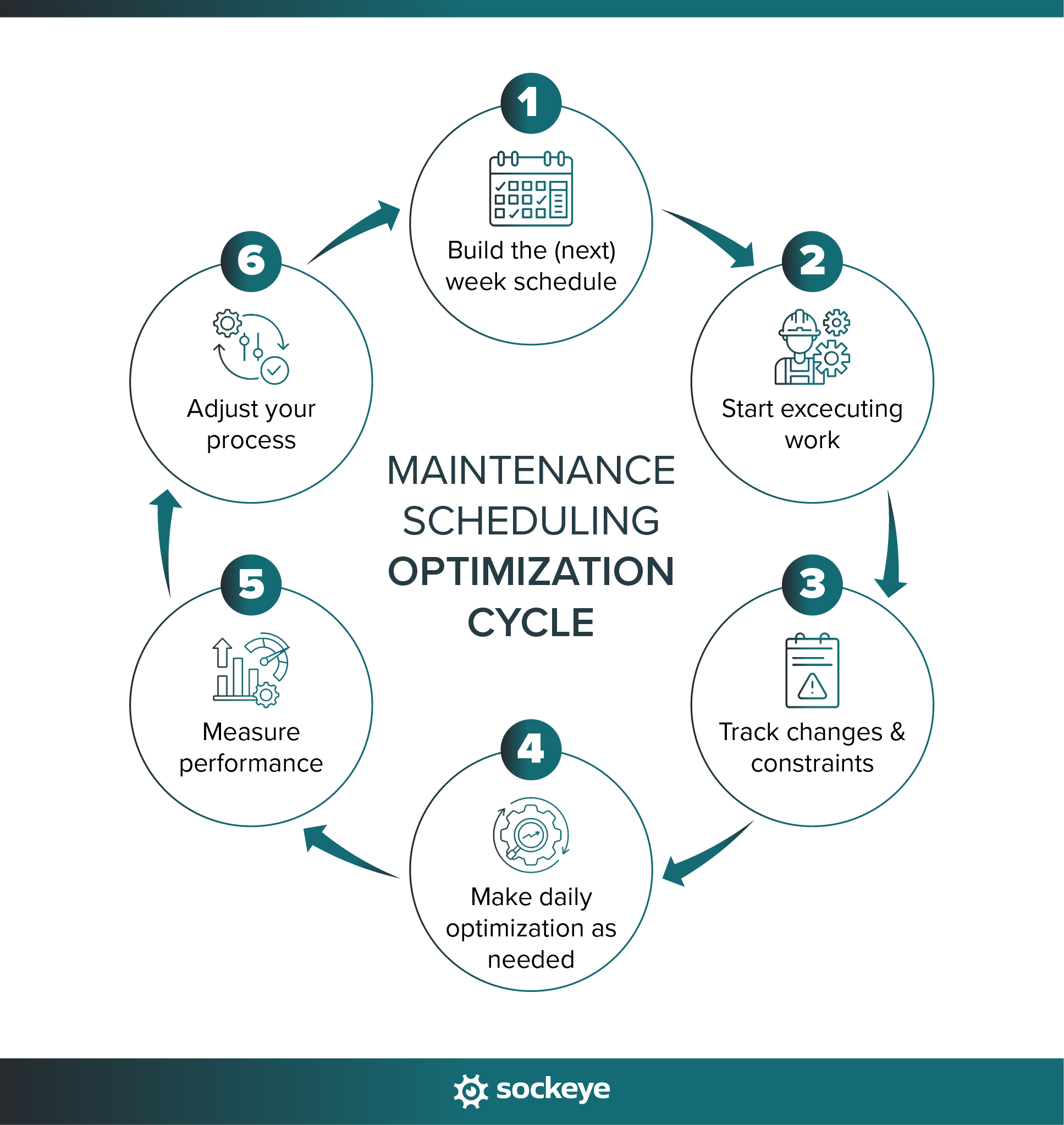
By tracking schedule performance, you will become incrementally better at prioritizing work, setting more effective automation rules, estimating job requirements, and recognizing how different constraints impact the balance and achievability of your schedule.
As the number of technicians, work orders, shifts, skills, and scheduling constraints increases, doing this manually becomes impossible. That’s where maintenance software comes in — it can take over many of the repetitive calculations and matching tasks, giving schedulers more time to focus on planning, exceptions, coordination, and continuous improvement.
Improve maintenance scheduling with Sockeye
The heavy lifting should be reserved for maintenance planning and coordination — scheduling should be fast and straightforward.
This is where tools like Sockeye come in.
Sockeye is a maintenance scheduling add-on that works alongside your existing CMMS/EAM system. Instead of replacing your system, it enhances it — making scheduling faster, clearer, and much easier to manage on a busy plant floor.
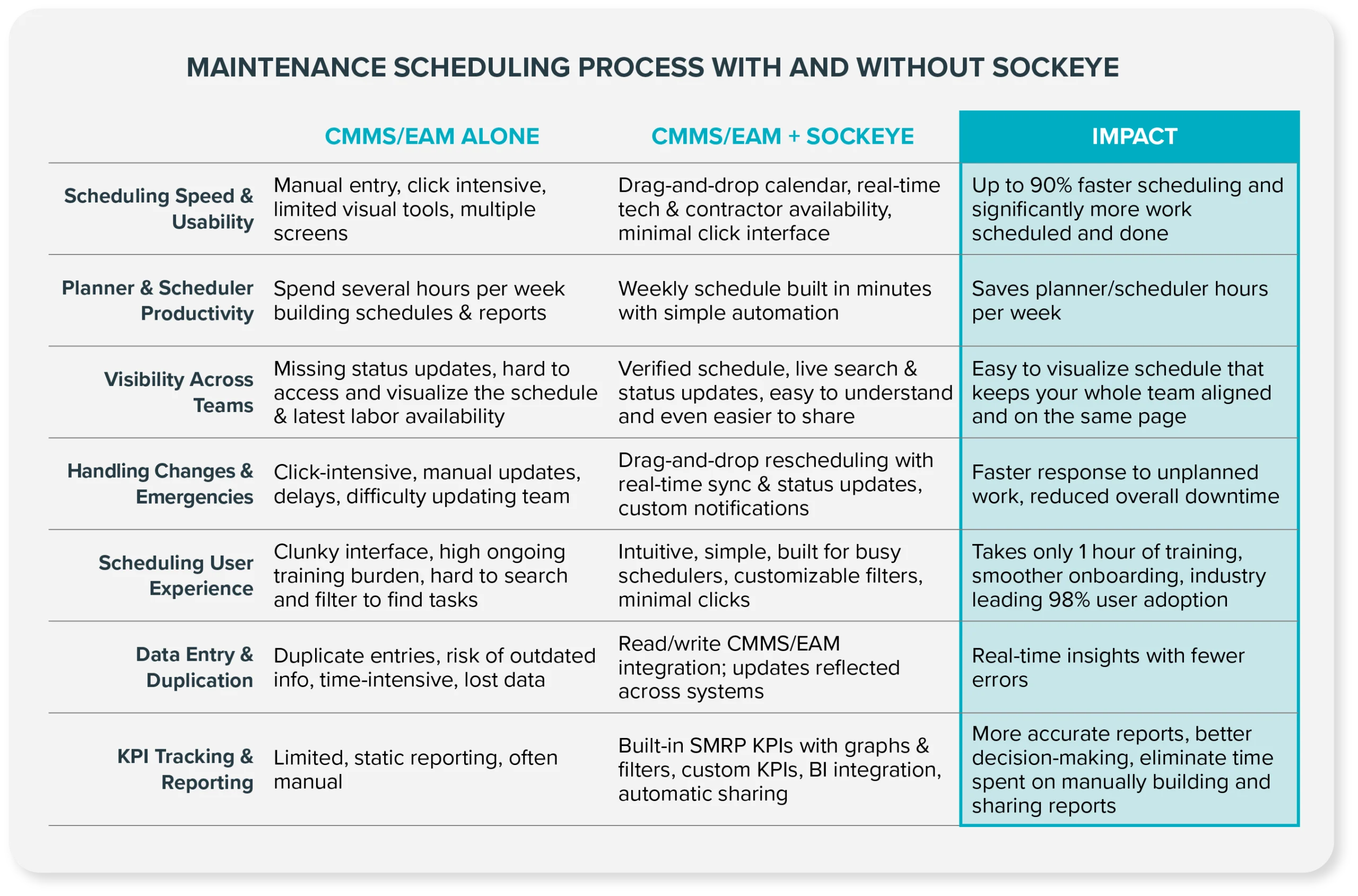
Here’s how Sockeye simplifies scheduling:
- Built for how scheduling actually happens: We looked at how experienced schedulers approach scheduling in a real-world environment with real-world constraints — and designed Sockeye to follow that workflow.
- Easy to use → high adoption: Schedulers can pick up and start using Sockeye after a single one-hour training session. It’s that easy to use, and the main driver of our industry leading 98% adoption rate.
- Powerful scheduling automation: Just select work orders and click “Schedule”. Our automation will match those work orders with qualified available labor. You simply need to review, polish, and publish the schedule.
- Labor availability dashboard: Get a clear, real-time view of who is available and when in a single dashboard that you can edit manually to keep up-to-date.
- Labor utilization tracking: Track the percentage of available hours for crews and contractors in real-time, as you add or remove work. Plus, you get a visual indicator when a technician is overbooked. This helps balance workloads across teams.
- Fast and flexible schedule changes: Make adjustments in seconds with our simple drag-and-drop editor without breaking the entire plan.
- Keeps everyone aligned: Easily share the schedule with anyone on your team who needs access to it.
- Built-in KPI tracking and reporting: Use built-in or custom KPIs to monitor schedule performance in a split-pane view and generate reports automatically. Alternatively, forward all data to your BI software for deeper analysis.
When the process is solid and the tool fits the way your team works, scheduling becomes easier to manage, more consistent, and far more effective.
Jump on a quick exploratory call with our team to see how Sockeye can make life easier for your scheduling team.
