
Maintenance scheduling might not be the most exciting part of your week — but it’s definitely one of the most important. It ensures your team is focused, your equipment runs smoothly, and your budget stays in check.
The challenge? Manually building schedules takes a lot of time. If you want to scale efficiently, automated maintenance scheduling isn’t optional — it’s essential.
In this article, we’ll explore common pitfalls with traditional solutions and discuss what to look for when evaluating your options. After that, we will show you how to use Sockeye’s automation capabilities to create optimized daily and weekly maintenance schedules in two clicks — regardless of the CMMS or EAM you’re using.
How maintenance scheduling automation works in a standard CMMS
Before we go forward, it’s important to distinguish between three levels of automation: basic PM automation, scheduling assistance, and schedule optimization.
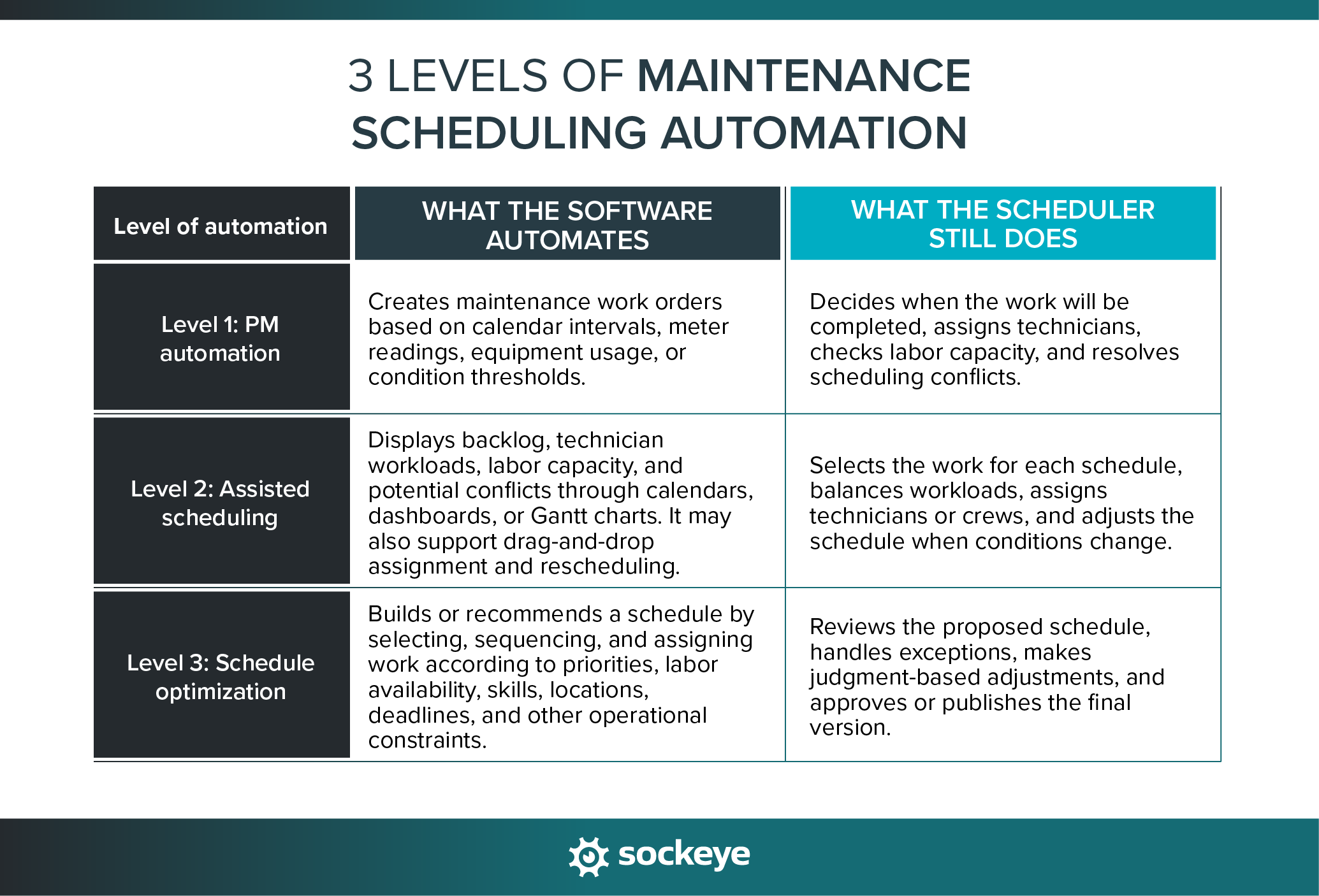
Many companies still rely on SAP, Oracle JDE, Infor, and other legacy solutions for maintenance scheduling. Some of those traditional systems offer only basic automation, such as scheduling recurring tasks based on frequency (daily, weekly, monthly).
The truth is, you can achieve the same level of automation using Excel — and plenty of maintenance teams do exactly that (despite the disadvantages).
Modern CMMS solutions have taken automation a step further. Platforms like Fiix, Limble, MaintainX, or Tractian offer more advanced options, including condition-based maintenance triggers, automatic notifications, and sometimes even integrations with predictive analytics software.
While these features might sound impressive, they often come at a cost of complexity that slows down your workflow rather than streamlining it. It’s easy to get lost in feature creep, where your maintenance scheduling becomes unnecessarily complicated, overshadowing the initial goals: simplicity and efficiency.
Maintenance scheduling automation should simplify your process, not complicate it. Unfortunately, even modern CMMS platforms can miss the mark by focusing too much on features and too little on practicality.
What to look for in automated maintenance scheduling software
The right automated maintenance scheduling software should reduce the manual effort required to build balanced maintenance schedules. The best fit will depend on your maintenance strategy, workforce structure, existing technology, and operational complexity.
When comparing solutions, consider how well each one supports the following areas:
| Factor | What to evaluate | Why it matters |
|---|---|---|
| Scheduling capabilities | Support for preventive, corrective, condition-based, and meter-based maintenance; recurring schedules; priorities; dependencies; unique requirements | The software needs to support the types of maintenance work your organization performs — not just recurring calendar tasks. |
| Resource and capacity planning | Ability to automate schedules and level workloads based on required skills and labor hours (for both in-house tech and contractors) | A schedule is only achievable when the necessary people and resources are available. Resource leveling lets you do more while reducing overtime. |
| Ease of use | Clear daily and weekly schedule views, intuitive controls, filtering, useful search bar, bulk actions, and straightforward workflows | Software that is difficult to learn or maintain may push schedulers and supervisors back toward spreadsheets and manual processes. |
| Simple rescheduling | Drag-and-drop rescheduling between technicians or crews; conflict and overtime warnings | Rescheduling one or two tasks should not break your schedule and require you to start from scratch — it’s a huge time waster. |
| Communication and accessibility | Shared schedule visibility with adjustable permissions, notifications, mobile access, clear process for publishing schedule changes | Planners, schedulers, supervisors, and technicians all need access to consistent, up-to-date scheduling information. |
| Reporting and performance measurement | Tracking for schedule compliance, labor utilization, backlog, planned versus unplanned work, and other relevant scheduling KPIs | Performance data helps teams identify scheduling problems and improve their planning process over time. |
| Implementation and total cost | Configuration requirements, deployment time, uploading existing data, training, support, licensing, and internal IT demands | The purchase price alone does not reflect the effort or cost required to implement and sustain a solution. |
Based on publicly documented capabilities, IFS Cloud and IBM Maximo have the strongest advanced maintenance scheduling automation. Among lighter CMMS products, Fiix and Tractian provide good capacity visibility but remain more planner-directed. MaintainX and Limble are strongest at rule-based PM automation, rather than automatically building a labor-balanced weekly schedule.
Whichever solutions you choose, if you are not satisfied with their scheduling interface, automation workflow, or labor availability and utilization data, remember that Sockeye offers a simple fix — it can integrate with any maintenance software to simplify and automate the scheduling process.
Work order scheduling automation hinges on accurate labor availability data
Most maintenance scheduling solutions, even those offering advanced automation, miss a crucial factor: data on labor availability.
While it’s great to have a system that schedules your tasks automatically, schedules often fall apart — or are grossly inefficient — because they don’t account for the current availability and utilization of your technicians and contractors.
If a system assigns work without knowing who is on sick leave or taking a training course, you end up with last-minute shuffling, delays, or tasks not getting done at all.
Sockeye, our maintenance scheduler system, solves this by directly incorporating labor availability into your maintenance schedules. It pulls real-time availability data straight from your workforce management/HR software, so your schedules always reflect who’s available and who isn’t. If you are not using one, we can set up availability patterns based on your typical work schedule — so only exceptions (sick days, vacations, etc.) need to be updated manually.
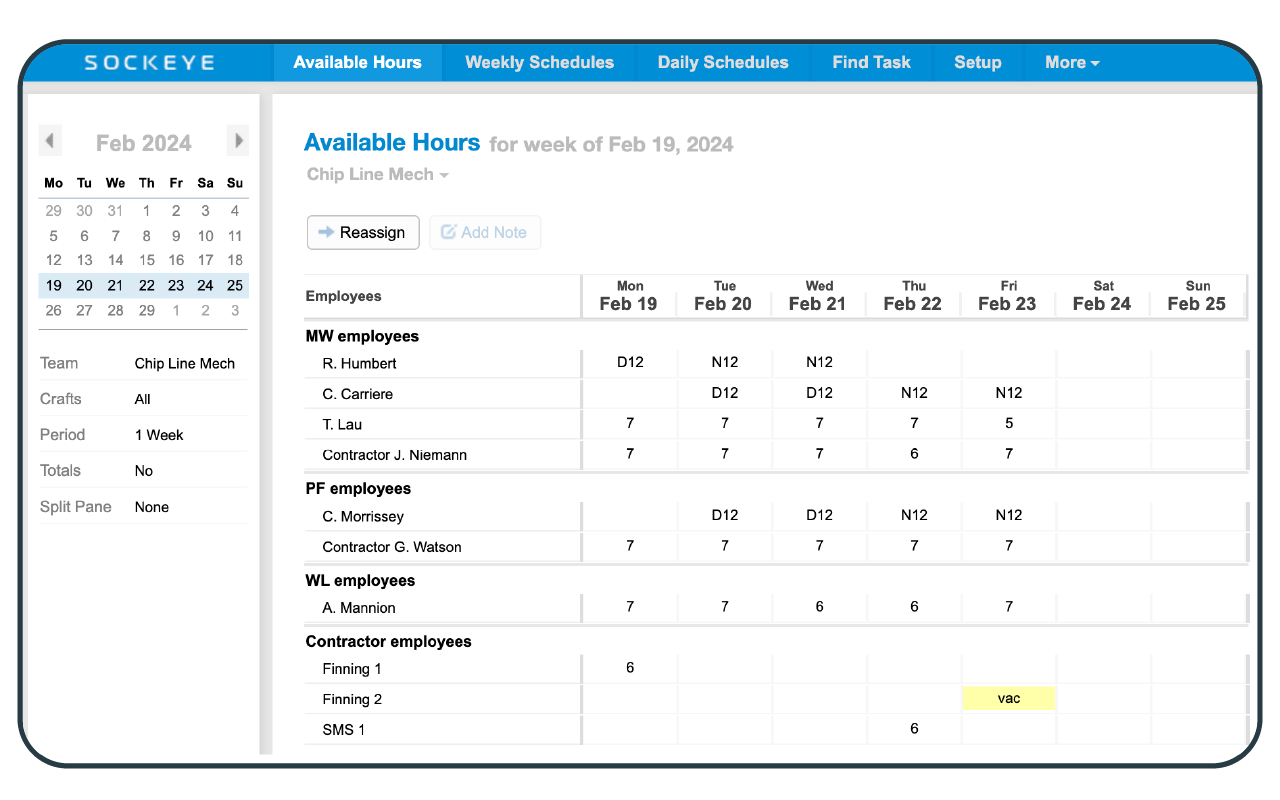
Crew availability hours tab in Sockeye
Let’s see how this comes together to help you automate the creation of weekly maintenance schedules.
Building a weekly maintenance schedule in Sockeye with two clicks
Sockeye is a simple but powerful CMMS bolt-on for automated maintenance scheduling. Simply connect your CMMS to Sockeye and use our intuitive interface and automation to schedule PMs and WOs. It is perfect for teams that are not satisfied with the scheduling functionality of their existing CMMS or EAM software.
Before you start, the Sockeye team works with you to prepare your environment — help set up users, labor availability, shift patterns, and integrations with your CMMS and HR software.
We do all of the heavy lifting — your IT team will think we are trying to steal their job.
You can try Sockeye for free. The only thing we need from you is a copy of your schedule and one hour of your time.
Here’s how maintenance scheduling typically works for companies that use Sockeye.
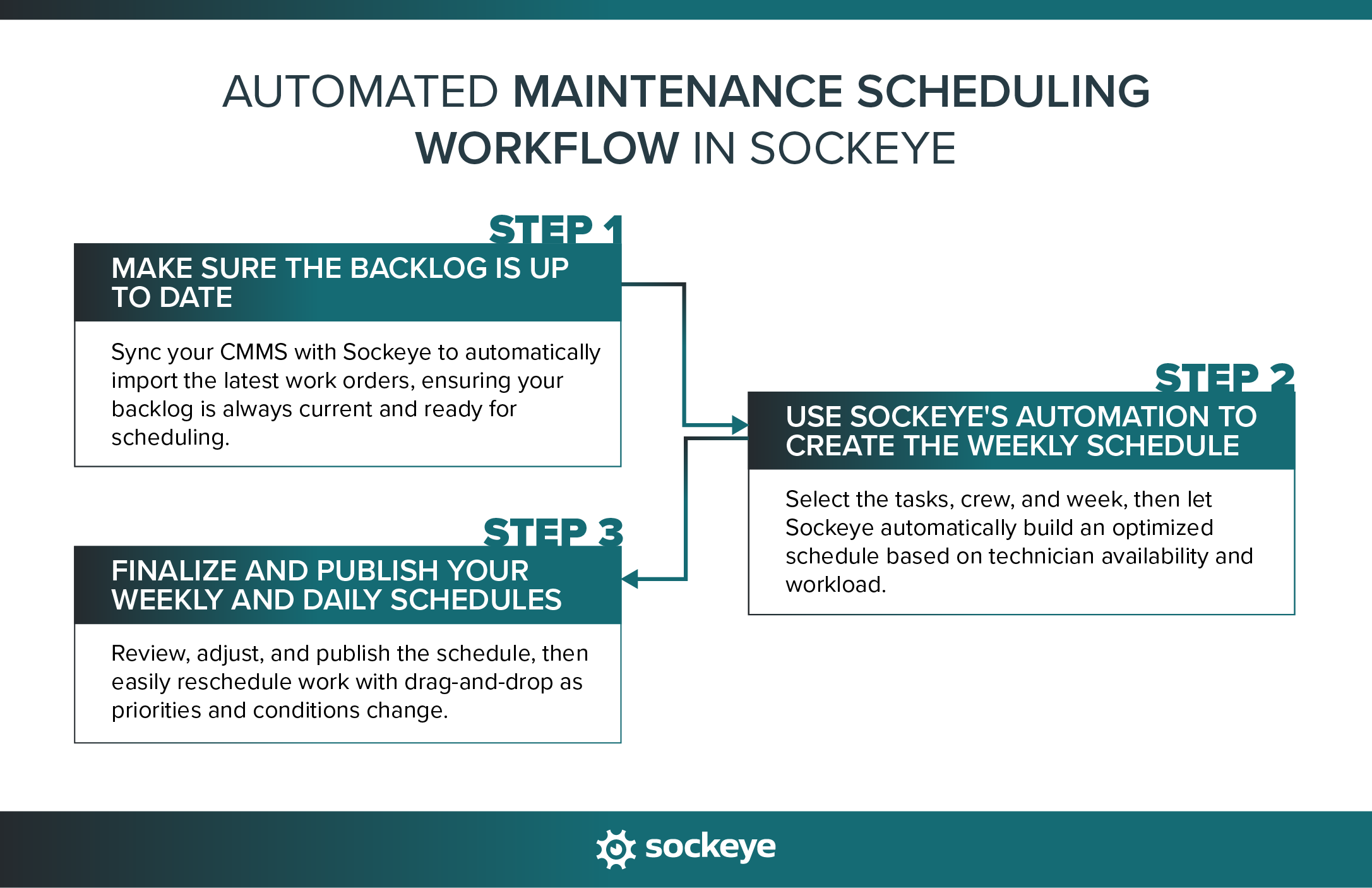
Step #1: Make sure the backlog is up to date
Before you can leverage Sockeye’s automation, you need a list of work orders ready to be scheduled. Usually, this is done by pulling that list from your existing CMMS software.
Don’t worry, this is not done manually. Sockeye integrates with your CMMS/EAM — you only need to click the “↻ Refresh” button to automatically update your Backlog in Sockeye with the list of newly available work.
Step #2: Use Sockeye’s automation to create the weekly schedule
Once you have a list of tasks that are ready to be scheduled, this is where the magic happens. First, you will want to select the week of the month and the team you are scheduling for (A Crew in the example below). If you have a big backlog, you can use the search box to quickly find specific tasks you want to schedule. Then, just select those tasks and click the “+Schedule” button.
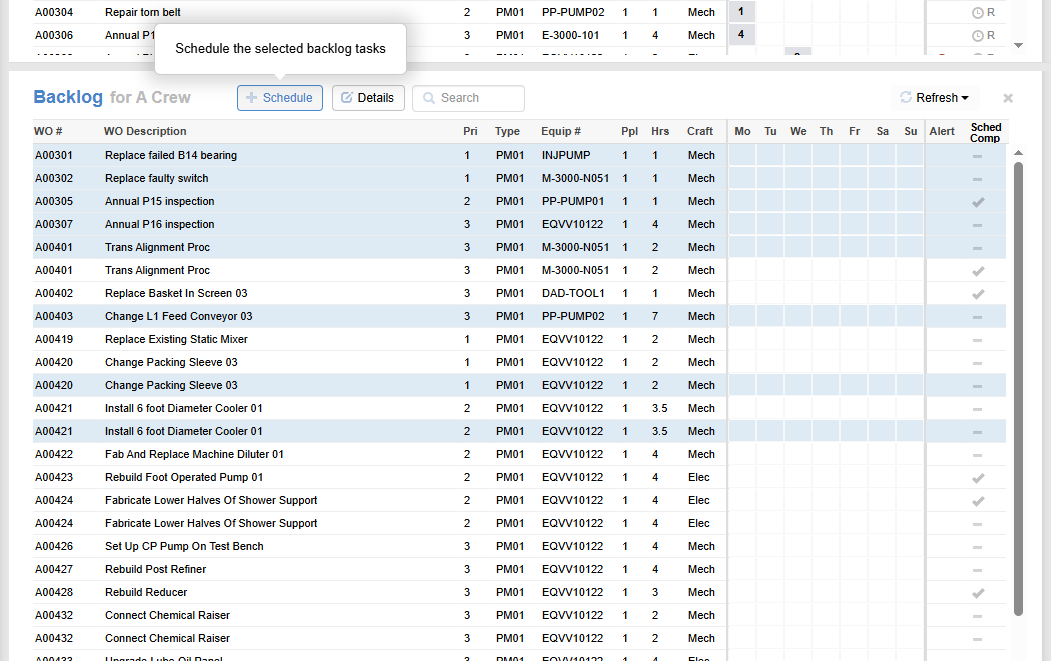
Sockeye will check which team members and contractors are available and automatically build your weekly maintenance schedule.
Alternatively, you can schedule a specific work order on a particular day by simply clicking on the corresponding box under that day of the week. Here’s how that works:
Step #3: Finalize and publish your weekly and daily schedules
After Sockeye builds your schedule, schedulers and supervisors can review it to identify any conflicts or opportunities for efficiencies.
There might be adjustments you want to make to account for equipment availability, optimize downtime (perform all work on a piece of equipment in one go to avoid multiple outages throughout the week), make adjustments for specific technician knowledge or experience, and similar.
When you’re finished, you can deploy the schedule so the whole team can see and use it.
Now, maintenance planners and schedulers would have a much easier time if this were the end of the story. Unfortunately, operational realities — like unexpected equipment breakdowns, missing parts, sick days, and production schedule changes — are always ready to hit hard and mess up your schedule.
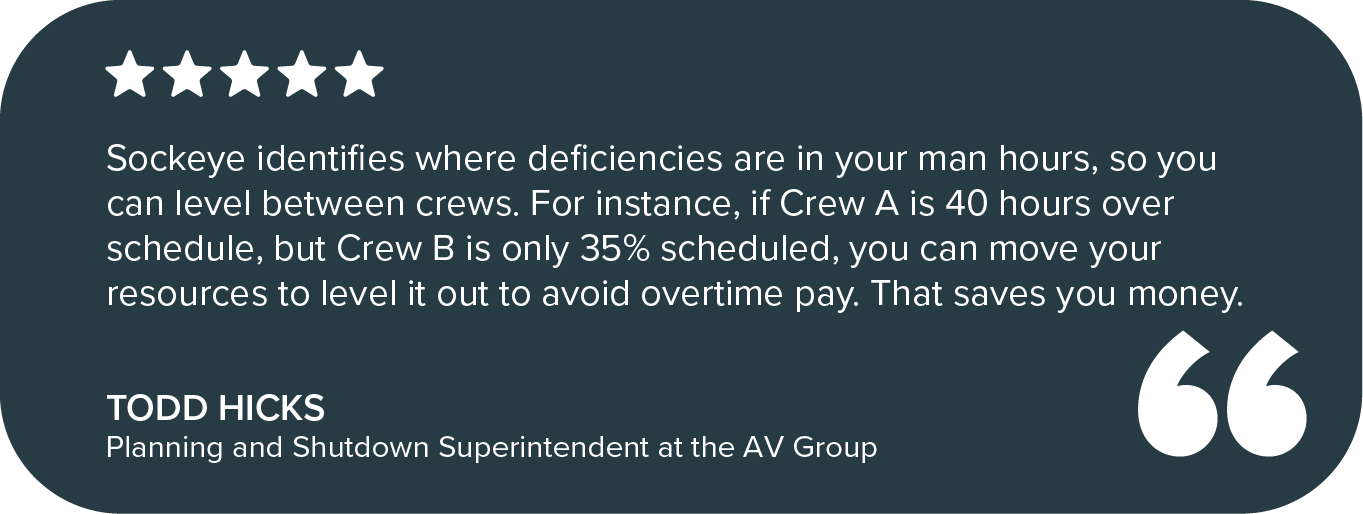
When that happens, you want a tool like Sockeye that simplifies moving work between different crews and dates. You can reschedule work by simply dragging and dropping work orders around. You can also use this functionality to quickly level work between crews.
Here’s a quick tutorial that shows this in action:
It’s that simple!
Automate maintenance scheduling with Sockeye
If you’re still switching between your CMMS and Excel spreadsheets to schedule work, it’s time to stop. Teams that use Sockeye’s automated maintenance scheduling software reduce scheduling-related admin work by up to 90%. What took them days can be done in hours; what took them hours can be done in minutes.
Sounds to good to be true? See how the AV Group used Sockeye to turn a 5-day scheduling process into a 1-hour task.
Let’s show you how easy it is to set up and use Sockeye:
- Book a call with our specialist to help us understand your specific needs.
- After that, we can set you up with a demo account. This requires no investment or IT resources — just an hour or two from your scheduler.
- If you like what you see, we will connect Sockeye with your existing CMMS and get you up and running in no time.
Just imagine: Two weeks from now, you would no longer need to fly blind through hours of disjointed scheduling, missing data, and constant complaints. Take Sockeye for a spin and see why we boast an incredible 98% retention rate.
