
As organizations grow, maintenance becomes more complex. More assets. More compliance requirements. More reporting needs. More work orders to (re)schedule. That’s when spreadsheets stop working — and the conversation shifts to software.
For many enterprises running SAP, the SAP PM module seems like the obvious answer. But standalone CMMS platforms have evolved significantly, offering flexibility and faster deployment that can be very appealing. The decision isn’t just about features — it’s about scalability, integration, cost, and long-term strategy.
In this guide, we’ll unpack what SAP PM really offers, how it compares to a standard CMMS, and how to choose the right solution for your plant.
What is SAP CMMS?
When people say “SAP CMMS” or “SAP CMMS module,” they are almost always referring to the SAP Plant Maintenance (SAP PM).
SAP Plant Maintenance is SAP’s dedicated maintenance management module. It is designed to help organizations plan, execute, and document maintenance activities across physical assets such as equipment, machinery, production lines, facilities, and infrastructure.
SAP PM covers:
- Work order management
- Preventive maintenance planning
- Breakdown maintenance
- Equipment and functional location tracking
- Maintenance history documentation
- Spare parts and materials integration (via SAP MM)
- Cost tracking and budgeting
- Compliance documentation and reporting
One of SAP PM’s biggest strengths is that it operates natively inside the SAP ERP ecosystem. That means maintenance activities are directly connected to finance, procurement, inventory, and HR data — without needing external integrations.
Historically, SAP PM was the technical module responsible for maintenance management within SAP ERP. Over time, SAP Enterprise Asset Management (SAP EAM) was introduced to extend SAP PM functionality.
In simple terms:
- SAP PM = The module that handles day-to-day maintenance execution.
- SAP EAM = A broader asset management framework that may include SAP PM plus advanced analytics, mobility, predictive maintenance, and asset performance management capabilities (especially in newer SAP environments like S/4HANA).
You can think of SAP PM as the operational engine, while SAP EAM helps organizations manage the entire lifecycle of physical assets.
Standard CMMS vs SAP PM: Head-to-head comparison
CMMS platforms come in many forms. Some are lightweight tools focused mainly on asset tracking, preventive maintenance scheduling, and basic work order management. Others are much more robust and include advanced analytics, inventory management, procurement, asset performance management, and other features typically found in Enterprise Asset Management (EAM) systems.
For this comparison, we’ll focus on an average CMMS solution — one that sits somewhere in the middle. It offers spare parts inventory management and predictive maintenance, but doesn’t try to replicate the full complexity of an EAM system.
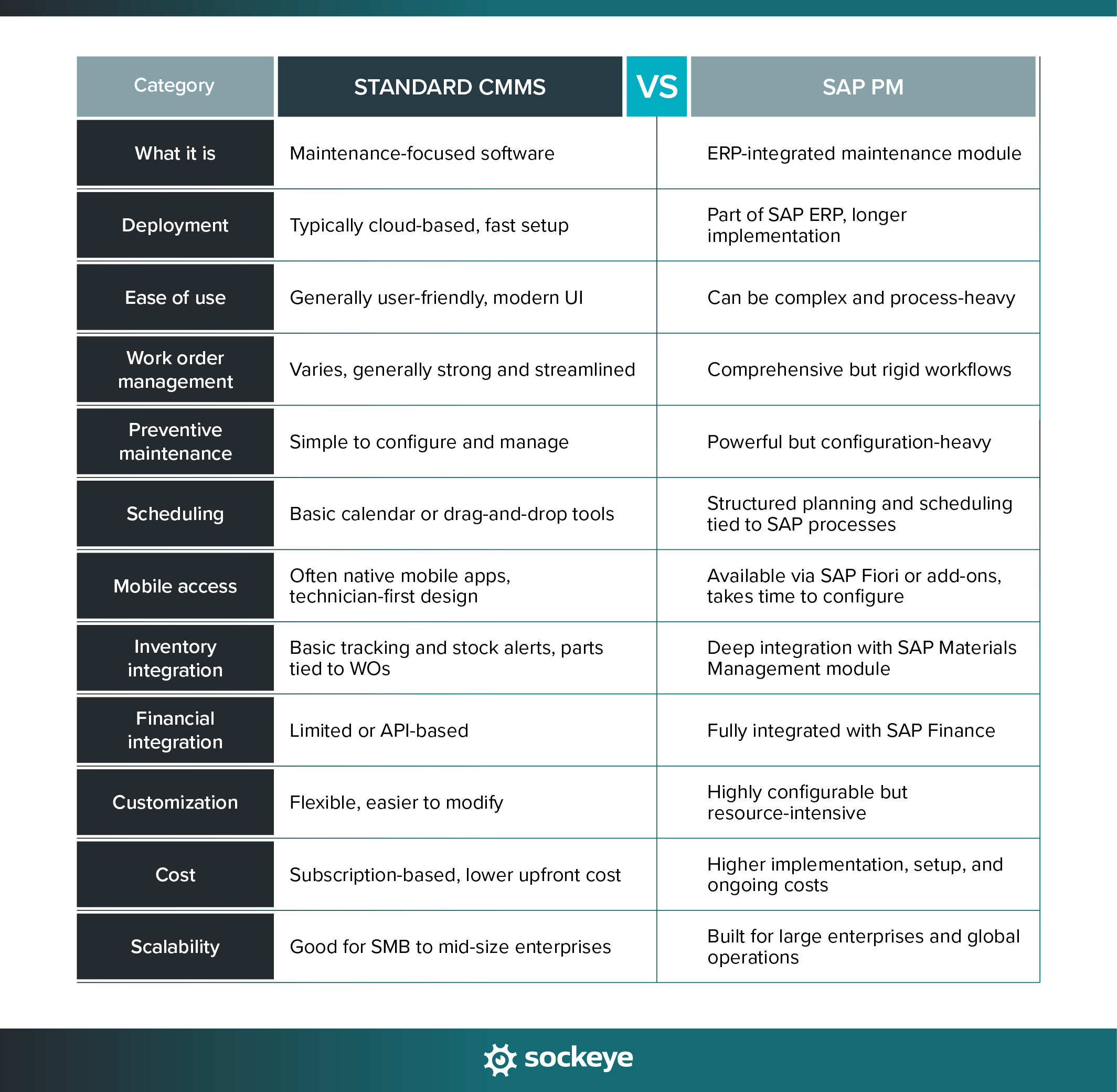
What SAP PM covers
SAP PM is built to operate within the SAP ERP environment. Maintenance activities are tightly connected to procurement, finance, materials management, and controlling. This means every work order can trigger cost postings, material reservations, and purchasing workflows automatically.
However, that deep integration also means processes are more structured and often require cross-department coordination. SAP PM works best in environments where maintenance must align closely with financial reporting, compliance, and corporate governance.
Key SAP PM features:
- Work order management: Create, approve, plan, and technically complete work orders with detailed cost tracking and documentation.
- Preventive maintenance plans: Time-based, counter-based, or condition-based plans that automatically generate work orders.
- Equipment & functional locations: Hierarchical asset structure that enables detailed tracking of asset history and performance.
- Notification management: Structured system for logging breakdowns, requests, and technical findings before converting them into work orders.
- Materials integration (SAP MM): Direct link between maintenance work orders and spare parts inventory.
- Cost control & settlement: Integration with SAP Finance to allocate maintenance costs to cost centers, assets, or projects.
- Reporting & compliance documentation: Standard SAP reports with the ability to build custom reporting through SAP analytics tools.
What SAP PM does better than the average CMMS:
- Deep ERP and financial integration.
- Enterprise-grade compliance and audit trails.
- Strong cost tracking and budget control.
- Global standardization across multiple plants.
- Complex asset hierarchies and governance controls.
What a typical CMMS covers
Modern CMMS solutions are designed with maintenance techs as their primary users. The focus is on ease of use, faster work execution, and minimal administrative overhead. Many CMMS platforms are cloud-based, making deployment quicker and requiring less IT involvement.
Unlike SAP PM, a CMMS usually operates independently from ERP systems — though many offer API integrations. This separation often makes them more flexible and easier to adapt to how maintenance teams actually work.
Key CMMS features:
- Work order management: Simple creation, assignment, tracking, and completion of work orders with technician-friendly interfaces.
- Preventive maintenance scheduling: Easy-to-configure recurring tasks based on time usage, or equipment condition triggers.
- Asset management: Asset registry with maintenance history and performance tracking.
- Mobile access: Technicians can communicate with each other and access asset history, checklists, SOPs, and manuals while out in the field. More importantly, they can create and close work orders directly from their mobile device.
- Parts inventory management: Track spare parts usage and stock levels. Tie parts to WOs for real-time stock updates.
- Reporting dashboards: Build custom reports or visual dashboards for KPIs such as downtime, schedule compliance, MTBF, work order backlog, and costs.
What a good CMMS does better than SAP PM:
- Faster implementation and setup.
- Lower total cost of ownership.
- A more intuitive user experience that reduces training needs and increases technician adoption.
- More flexible scheduling tools.
- Less administrative complexity.
Which solution should you choose?
As is always the case when it comes to software comparisons, there’s no universal winner. The right choice depends on your organization’s size, complexity, and strategic goals.
Consider using SAP PM (or SAP EAM) when:
- You already run SAP ERP across the enterprise.
- Financial integration and cost control are top priorities.
- Compliance, audit trails, and governance are critical.
- Maintenance needs to align tightly with procurement and finance.
- You have internal SAP expertise and IT resources.
Use a mobile-first CMMS when:
- You want faster deployment and quicker ROI.
- Ease of use and technician adoption are key priorities.
- You do not require deep ERP-level financial integration.
- Your maintenance team operates semi-independently.
- Budget constraints make SAP expansion unrealistic.
Using Sockeye to cover for SAP PM inefficiencies
One of the most common frustrations we hear from SAP PM users isn’t the lack of features — it’s how rigid and time-consuming maintenance scheduling can be inside SAP.
Creating weekly or daily schedules often requires manual copying and pasting, constant cross-checking of availability, and dozens of clicks and screens just to create or reschedule a simple work order. That process slows your team down, causes frustrations, and eats into valuable planning time.
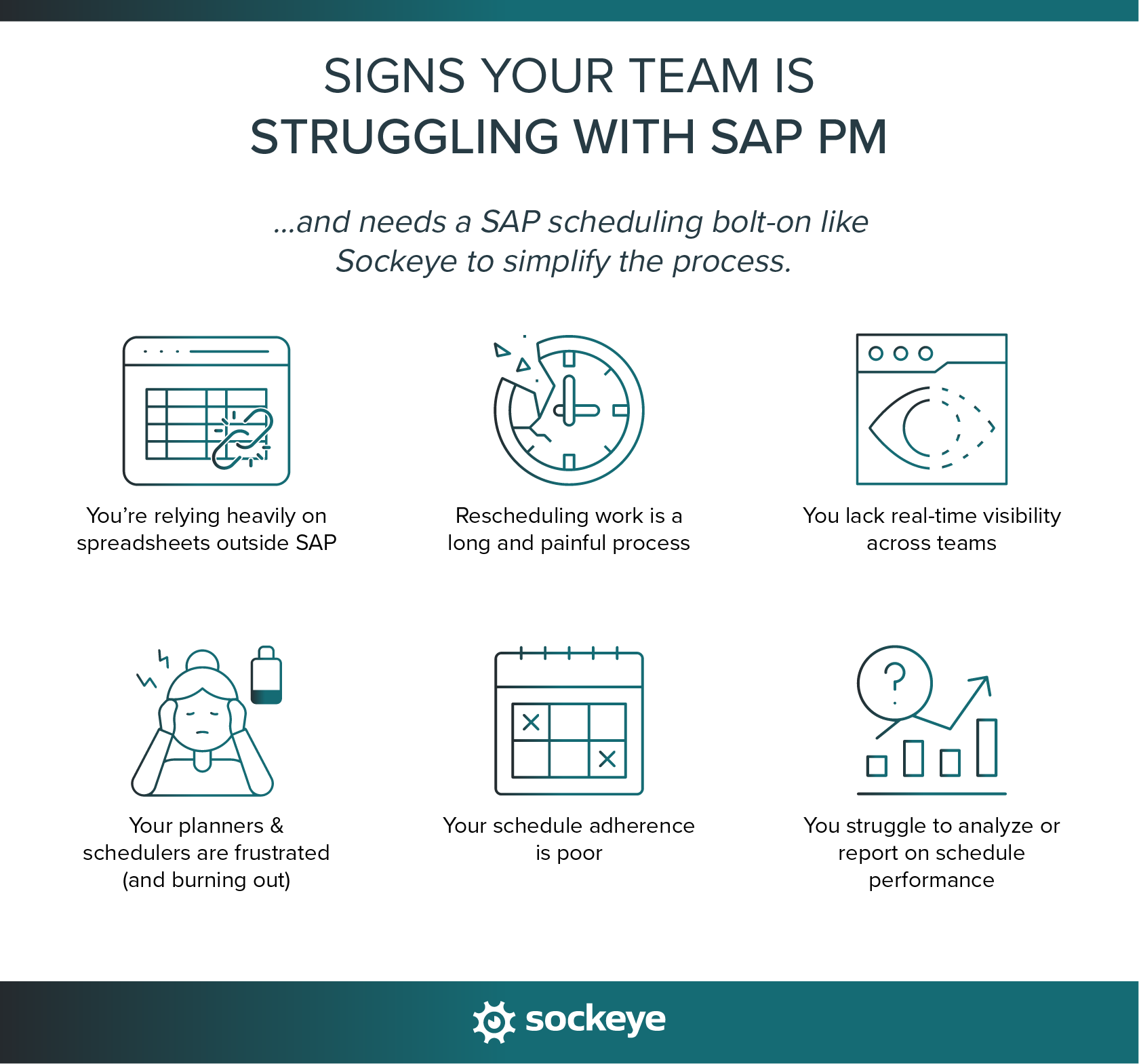
It’s a big issue. However, the answer isn’t to switch to a new ERP or to ditch the SAP PM module for a CMMS or Excel. Smart organizations are turning to a specialized SAP scheduling add-on called Sockeye.
What is Sockeye, and how does it integrate with SAP PM?
Sockeye is a maintenance scheduling and reporting bolt-on that connects directly with SAP using using the API or has a non integrated version which uses Excel as the data connector.
The integration links Sockeye to your SAP maintenance data so you can build reliable schedules without jumping in and out of SAP or juggling spreadsheets.
Unlike SAP’s native process, which can be rigid and manual, Sockeye’s automation takes ready-to-schedule work orders and assigns them to available technicians and contractors. It builds daily and weekly schedules with minimal clicks and lets you adjust them on the fly when priorities change.
Plus, because it can read from and write updates back into SAP, your SAP PM data stays current and aligned with the schedules you create in Sockeye (and vice versa).
How Sockeye solves SAP’s scheduling problem
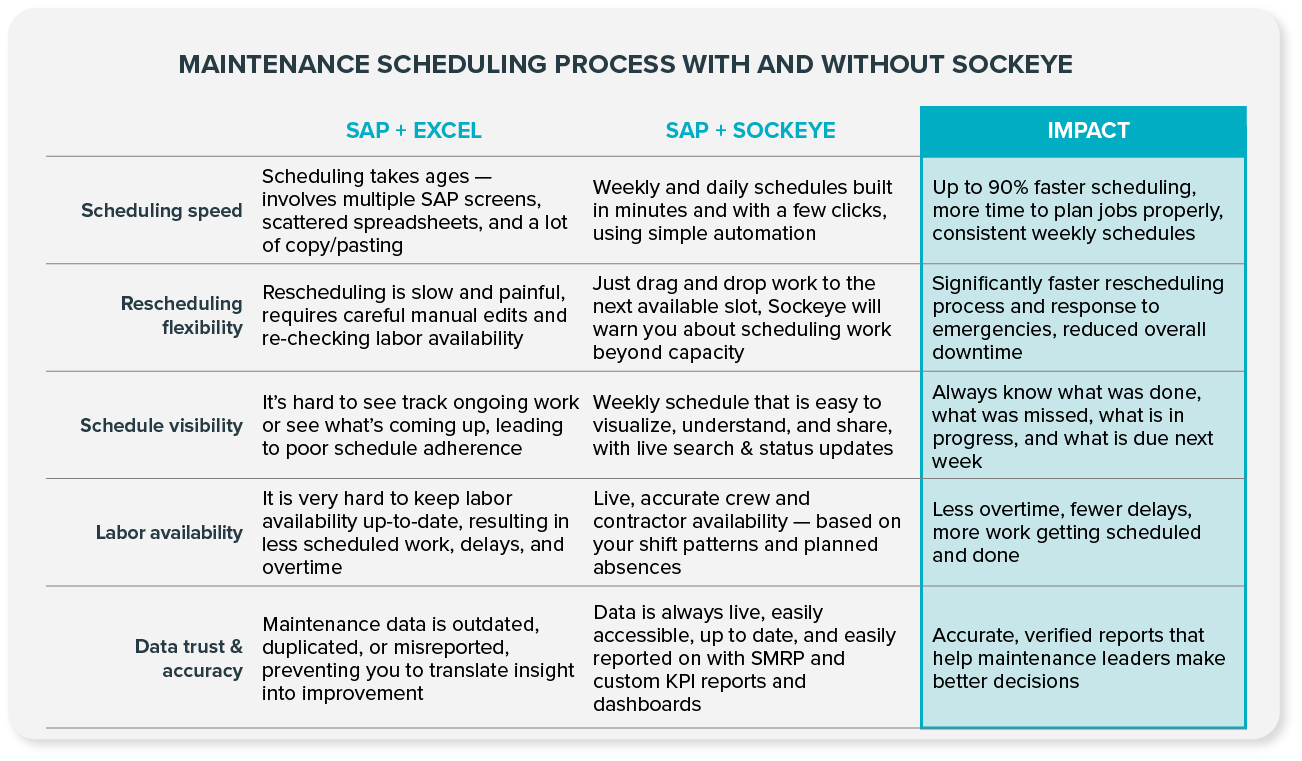
Here’s how Sockeye tackles the scheduling headaches SAP PM users often experience:
- Faster schedule creation: Automatically assigns available labor to work orders, eliminating manual assignments and hours spent in spreadsheets.
- Real-time labor visibility: Dashboards show available hours based on actual shift patterns and absences (which you can manually update), so you’re scheduling against realistic capacity.
- Live, visual schedules: Daily and weekly schedules are easy to view, share, and update, keeping planners, technicians, and managers aligned.
- Flexible adjustments: Need to respond to emergency work or unexpected absences? Rescheduling takes a couple of clicks or a quick drag-and-drop.
- Reliable KPI reporting: Automatically generated SMRP and custom KPI reports help you track schedule compliance, labor utilization, backlog trends, and more. All data can be forwarded to your BI software for deeper analysis.
The end result? Maintenance teams can spend less time wrestling SAP PM’s scheduling tools and spreadsheets, and more time focusing on planning work that improves asset uptime and reliability.
Take Cargill, a global leader in food, agriculture, financial, and industrial products and services, as an example. They used Sockeye to streamline preventive maintenance scheduling, eliminating up to 90% of manual data entry and improving workforce utilization. This lead to higher uptime, greater scheduling visibility, and a scalable model now expanding globally across Cargill operations.
“We already have Cargill Meats Europe evaluating Sockeye. It is pretty exciting. As compared to any other tool that I know or any other method for maintenance scheduling, I give Sockeye a 10 out of 10. We are looking at Sockeye as an enterprise solution for maintenance scheduling globally.”
Mike Williams, Maintenance Information and Process Lead
Sounds too good to be true? Schedule a quick product demo to see why Sockeye boasts an industry-leading 98% adoption rate!
FAQ
SAP is an ERP (Enterprise Resource Planning) system. It connects core business functions such as finance, procurement, inventory, maintenance, asset management, HR, and operations into one integrated platform.
No, CMMS and SAP are not the same. A CMMS (Computerized Maintenance Management System) is purpose-built software focused specifically on maintenance management. SAP, on the other hand, is a much broader ERP platform that includes maintenance functionality through its SAP PM module.
SAP does not offer a product officially labeled as a “CMMS.” When people refer to “SAP CMMS,” they are usually talking about the SAP Plant Maintenance (PM) module, which delivers maintenance management capabilities similar to a CMMS.
Yes, many organizations integrate a CMMS with SAP. In this setup, the CMMS handles day-to-day maintenance execution and technician workflows, while SAP manages finance, procurement, and inventory. Integration typically happens through APIs or middleware to synchronize work orders, materials, and cost data.
However, integration adds complexity and cost, and the CMMS subscriptions can be quite expensive as well for large teams. That’s why many companies are turning to SAP bolt-ons like Sockeye.
Sockeye uses two primary types of integration:
- API-based integration: Sockeye uses API-based integration to adapt to every enterprise’s unique needs, providing customized read/write configurations with SAP. This means that any last-minute changes made in your SAP are reflected in Sockeye — and vice versa.
- File-based integration: Sockeye uses an Excel template to port data between the CMMS and Sockeye — simply export your CMMS data into Sockeye’s Excel template and click ‘refresh’ to update your data. The implementation requires minimal effort and no IT resources or custom coding.
Yes. Sockeye can integrate with virtually any CMMS or EAM system. If your current maintenance software complicates scheduling, you can connect it to Sockeye and schedule PMs and WOs through our simple interface instead.
