
Most maintenance teams track whether work orders (WOs) are completed on time. Metrics like schedule compliance are commonly found in dashboards and monthly reports.
But far fewer teams consistently track why work gets delayed.
When a job slips, it usually gets rescheduled, and everyone moves on. Over time, those small delays add up — impacting backlog, overtime, equipment reliability, and even production targets.
Without structured data on delay reasons, planners and reliability leaders are left guessing. Was it missing parts? Poor job planning? Access issues?
A structured process for tracking causes of work order delays turns those guesses into actionable insight. It helps you identify patterns, fix root causes, and steadily improve planning accuracy and asset reliability.
Let’s quickly review why maintenance work gets delayed, how work order delay reason codes work, and what planners and reliability managers can do with this information.
Common reasons for delaying maintenance work
Maintenance teams operate in a dynamic environment. Production priorities shift. Parts don’t arrive. Technicians get pulled into emergencies. Without understanding the operational challenges behind those disruptions, it’s hard to improve planning accuracy.
Here are some of the most common reasons work orders get delayed, in no particular order:
- Missing parts or materials: The job is planned and scheduled, but required tools, materials, and/or spare parts are not in stock, not kitted, or not delivered on time.
- Equipment not available: Asset is not released by operations when scheduled. Preventive maintenance is frequently pushed out in high-demand production environments.
- Higher-priority emergency work: Breakdowns or urgent corrective tasks override planned jobs, increasing backlog and reducing schedule compliance.
- Incomplete job planning: The scope is unclear, instructions are missing, required tools were not identified, or permits were not arranged in advance.
- Labor shortage or skill gap: Not enough available technicians, or the correct skill set was not scheduled for the job.
- Safety or permit issues: Required permits, lockout/tagout steps, or safety reviews were not completed before the scheduled date.
- Contractor delays: External vendors are unavailable or fail to execute as planned.
- Weather or environmental conditions: Outdoor work or remote sites may be affected by poor weather or site conditions.
These causes can and should be translated into structured work order delay reason codes inside your CMMS or EAM system.
For example:
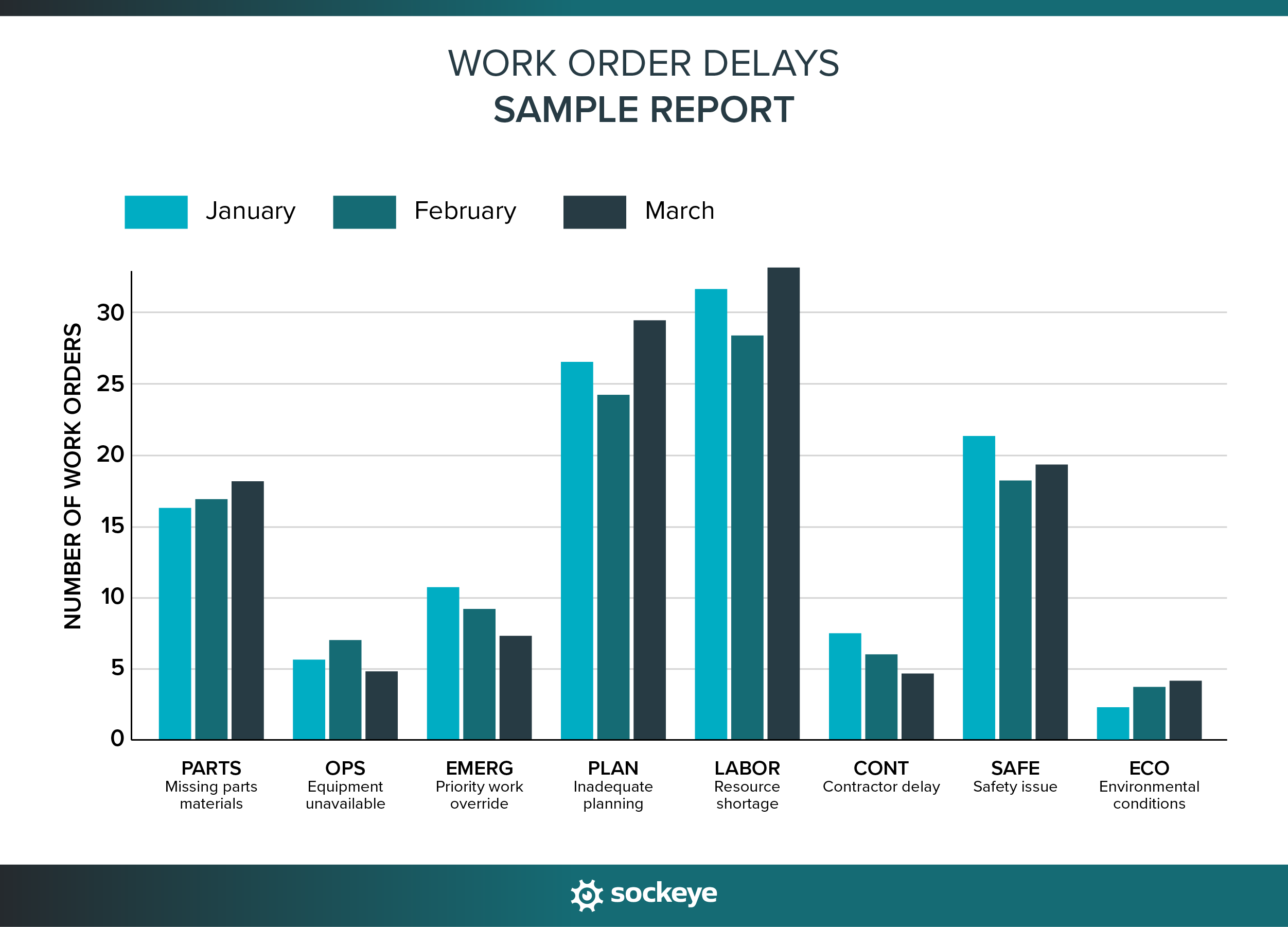
- PARTS – Missing parts materials
- OPS – Production unavailable
- EMERG – Emergency priority override
- PLAN – Inadequate planning
- LABOR – Resource shortage
- CONT – Contractor delay
- SAFE – Safety/permit issue
- ECO – Environmental conditions
The goal isn’t to create dozens of vague categories. Define a short, clear list of standardized codes that reflect your most common delay drivers so trends become visible over time.
Tracking delays through work order delay reason codes
Work order delay reason codes are standardized labels used to document why a scheduled job was not completed as planned.
There is no universal industry-wide standard for delay codes. Unlike failure codes (which sometimes follow defined taxonomies), delay reason codes are typically defined internally by a maintenance planner or supervisor in coordination with a reliability engineer or manager.
In a typical CMMS or EAM system, delay reason tracking usually fits into the workflow like this:
- A weekly schedule is created and approved.
- Technicians attempt to execute assigned work.
- If a job cannot be completed as scheduled, the work order is flagged as delayed or rescheduled.
- The technician, supervisor, or planner selects a predefined delay reason code.
- The work order is executed with some delay or rescheduled.
This way, the reason for the delay becomes part of the work order history and can be included in reports.
Where do delay codes live in a CMMS or EAM? Well, that depends on the software. Some solutions do not have a defined place for tracking them, forcing teams to use comments, spreadsheets, or other workarounds.
Those that do offer this functionality have it implemented in one of these ways:
- A required dropdown field when changing status from “Scheduled” to “Deferred”.
- A custom attribute configured by the administrator that can only be updated/submitted by personnel with the right permission level.
- Part of a structured rescheduling workflow.
Sidenote: Large, multi-site teams will often have a CMMS/EAM administrator who will configure the codes for them inside the system.
When tracked properly, you end up with a weekly or monthly report that can look something like this:
How work order delay tracking works inside Sockeye
Sockeye is a lightweight maintenance scheduling and reporting tool that bolts onto your CMMS through a read/write API or Excel-based integration. It’s designed for teams that want to continue using their existing CMMS or EAM, but need a simpler, faster, and more flexible way to create and track daily and weekly schedules.
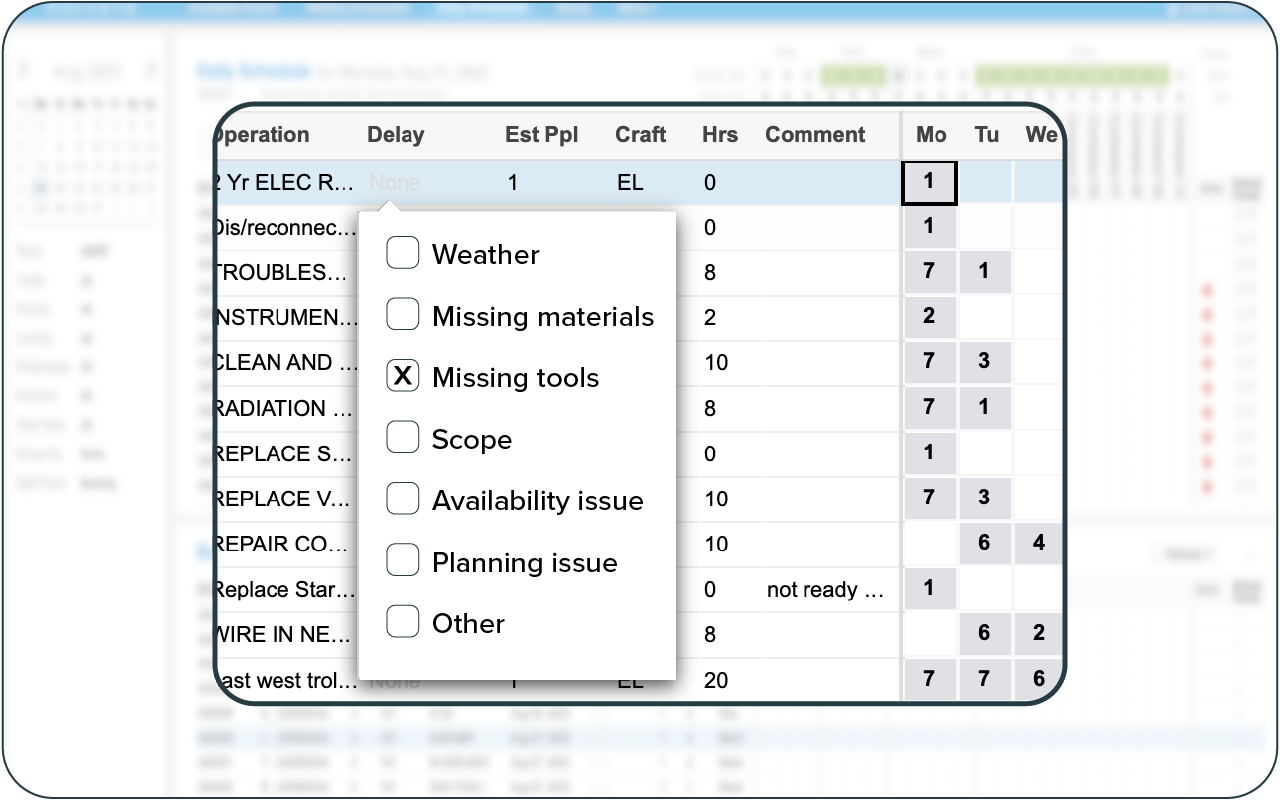
One of the features Sockeye offers is a straightforward way to track why work orders were not completed as scheduled. It’s embedded into the scheduling workflow and works like this:
- For each delayed job, a technician or a scheduler can select a Delay Reason Code from a pre-populated dropdown list to ensure consistency.
- Delay codes can be defined and updated within the setup menu to reflect site-specific needs and terminology.
- Users can also add a short comment to the Work Order alongside the selected delay reason to provide additional context or explanation.
- At any time, Sockeye users can generate a report showing the weekly schedule, grouped by delay codes.
- Delay codes can be automatically included in weekly schedule reports.
Reports are available in Excel and PDF format. Sockeye can also forward all this data to your BI platform for deeper insights. This way, you can analyze delay trends without maintaining separate spreadsheets or manual logs.
QUICK CASE STUDY: We had a client find (and save) 120 hours of wasted time per month. Using our simple delay tracking feature, they identified two major problems: missing parts and technicians avoiding working on specific assets (thinking someone else is better suited). This allowed them to make the necessary corrections.
How planners can use work order delay reasons
Tracking delay reasons is only valuable if planners use the information to improve future job plans and schedules. When combined with technician feedback and field comments, delay codes provide a practical feedback loop for better job preparation and coordination.
Over time, planners can identify repeat issues and adjust their planning process accordingly.
Here are a few examples of common delay reasons and what a planner can do to improve:
- Missing parts → Improve spare parts forecasting, verify parts availability before scheduling, or introduce job kitting before the weekly schedule is finalized.
- Incomplete planning → Review job plans for clarity, create SOPs and checklists, confirm required tools, and ensure permits are arranged in advance.
- Labor shortage → Adjust crew loading, validate estimated labor hours, or coordinate earlier with supervisors on workforce availability.
- Asset not available → Improve coordination with operations during schedule freeze meetings and confirm equipment access before locking the weekly schedule.
The key for planners is to look for patterns, not isolated events. One delayed job may not mean much. But if 30% of delayed work is caused by missing parts, that clearly signals a process weakness.
How reliability managers can use work order delay causes
Reliability managers look at delay data from a broader, strategic perspective.
Work order delay reasons can reveal systemic weaknesses that affect asset reliability, maintenance strategy, and overall plant performance. When reviewed regularly — monthly or quarterly — delay trends provide insight into whether the organization is truly operating in a planned and proactive mode.
Here are several ways reliability managers can use delay reason data:
- Identify chronic reactive behavior: If a large percentage of planned and scheduled work is consistently displaced by emergency work, it may indicate gaps in preventive maintenance, poor asset strategies, or recurring failure modes that need root cause analysis.
- Assess planning maturity: High rates of delays due to incomplete planning or missing parts suggest that the planning process itself needs strengthening — whether through better job plans, improved bill of materials accuracy, or tighter scheduling discipline.
- Evaluate operations–maintenance alignment: Frequent “production not available” delays may highlight communication issues or a lack of shared performance goals between departments.
- Spot reliability risks early: Repeated deferral of preventive maintenance tasks can increase the risk of future failures. Delay data helps identify which assets are being repeatedly pushed out.
- Support data-driven improvements: Instead of relying on anecdotal complaints, reliability managers can use structured delay data to justify process changes, staffing adjustments, system improvements, or changes in maintenance strategy.
Ultimately, delay tracking transforms missed work from a vague performance issue into measurable input for reliability improvement.
Simplify job delay tracking with Sockeye
Knowing why work gets delayed is just as important as knowing that it was delayed. When delay reasons are tracked consistently, they reveal planning gaps, coordination issues, and reliability risks that would otherwise stay hidden.
For delay tracking to be effective, two things must happen:
- Make delay tracking an integral part of the work order process: Delay reasons must be captured at the moment work is reviewed or rescheduled — not days later in a separate spreadsheet. The vast majority of delayed jobs should have a reason noted, and everyone should apply the same criteria when selecting codes.
- Make it easy for technicians and supervisors: If documenting delay reasons requires extra paperwork or multiple steps and screens, compliance will drop. The process should take only a couple of clicks, with a clear dropdown list and the option to add a short comment when needed.
Sockeye accounts for both of these. Delay reasons become embedded in the workflow, standardized across teams, and automatically included in reports.
If you want clearer insight into why work orders go past their due date — and a super simple way to create balanced maintenance schedules — we invite you to book a personalized demo with our team to learn more.
