
Enterprise environments rely on a patchwork of systems — CMMS software, ERP platforms, SCADA networks, accounting tools, IoT sensors, workforce systems, and more. If these tools can’t talk to each other, that’s a problem.
Without seamless data flow, maintenance and admin teams spend hours re-entering data, chasing information, and stitching together reports that should already exist. Work slows down, asset insights stay trapped in silos, and digital transformation initiatives stall before they have a chance to deliver real value.
As Industry 4.0 becomes the expected standard, leaders are being pushed to unify their systems and streamline how asset data moves across the enterprise. Usually, the key role in that process belongs to your CMMS or EAM software.
This guide breaks down the core integrations every enterprise CMMS should support — and the integration methods that enable them.
Why integrations matter for enterprise maintenance operations
Large organizations can’t afford to have teams that operate in isolation. A CMMS, as your central hub for asset management, becomes exponentially more valuable when it can pull and push data from and to other systems.
The benefits of an integrated maintenance system include:
- Unlocking real-time asset intelligence: Live data from machines, sensors, and production systems automatically triggers pre-defined maintenance workflows.
- Eliminating data silos across the organization: Information moves freely between Operations, Finance, IT, Production, and Maintenance.
- Increasing workforce efficiency: Maintenance leaders and technicians spend less time entering data and more time doing productive work.
- Improving compliance and auditability: Automatic data capture and sharing create reliable records for audits, reporting, and regulatory requirements.
- Supporting enterprise-scale standardization: Uniform processes become easier to enforce across plants, regions, and business units.
- Boosting the overall ROI of your CMMS investment: Integrations maximize system value by connecting the CMMS to the tools that run the business and expanding its capabilities.
CMMS integrations to look for
A modern CMMS should fit smoothly into your existing technology ecosystem — not force your team into workarounds. The right integrations let maintenance teams automate maintenance scheduling and data capture, reduce manual steps, and create a unified view of asset health.
Below are the essential integration categories enterprises should evaluate when selecting or upgrading a CMMS.

1. ERP systems
ERP platforms are the financial and operational backbone of the enterprise. Integrating them with your CMMS ensures maintenance activities stay aligned with budgeting, procurement, inventory, and corporate reporting. When the two systems sync, organizations eliminate double entry and gain a unified view of costs and asset performance.
What this integration enables:
- Real-time sync of inventory, spare parts, and procurement data.
- Automatic updates to asset records and depreciation details.
- Accurate tracking of maintenance costs against budgets or cost centers.
- Streamlined purchase requisitions and approvals.
- Stronger financial forecasting and reporting through consistent, shared data.
Examples of commonly integrated ERP systems: SAP S/4HANA, Oracle Fusion Cloud ERP, Microsoft Dynamics 365, Infor CloudSuite, IFS Cloud.
2. SCADA & PLC Systems
Supervisory Control and Data Acquisition (SCADA) systems and Programmable Logic Controllers (PLCs) are the heartbeat of industrial operations. Integrating them with your CMMS allows maintenance teams to act on real-time machine data instead of relying on manual checks or delayed reports.
What this integration enables:
- Automated work order creation based on machine conditions or alarms.
- Real-time visibility into equipment status, performance, and faults.
- Predictive and condition-based maintenance triggers.
- Faster root-cause analysis with direct access to production data.
- Reduced unplanned downtime through early anomaly detection.
Examples of solutions commonly integrated: AVEVA (Wonderware), Siemens SIMATIC, Rockwell Automation FactoryTalk, Ignition by Inductive Automation, GE Digital iFIX.
3. Maintenance scheduling tools
Many CMMS platforms excel at asset and parts management. However, when it comes to work order scheduling, they often make things more rigid and complicated than they need to be.
Dedicated scheduling bolt-ons with two-way (read/write) integrations fill that gap by providing a more flexible, visual way to assign and track work. You get the best of both worlds: asset and maintenance data stay centralized, and effortless scheduling.
What this integration enables:
- Maintenance scheduling automation based on real-time labor availability.
- Visual, drag-and-drop (re)scheduling that updates the CMMS in real time.
- Ability to edit and keep the labor availability data up to date, ensuring you have adequate resources to execute the schedule.
- Optimized labor allocation and utilization across technicians, contractors, shifts, and sites.
- Better forecasting of staffing needs based on upcoming maintenance demand.
- Reduced maintenance overtime and scheduling conflicts.
- Simplified, more accurate tracking of schedule effectiveness and scheduling-related KPIs.
Examples of commonly integrated scheduling tools: Sockeye (for industrial and facility teams), Skedulo (for field teams).
4. Accounting and finance tools
Maintenance activities have a direct impact on budgets, cost centers, and long-term capital planning. When a CMMS is disconnected from accounting and finance systems, teams end up juggling spreadsheets, re-entering data, and reconciling numbers at month-end. Integrating these systems creates a unified financial picture of maintenance operations and reduces administrative overhead.
What this integration enables:
- Automatic flow of maintenance costs into the general ledger.
- Accurate tracking of labor, parts, and vendor expenses.
- Streamlined purchase orders, approvals, and invoicing.
- Better visibility into asset lifecycle costs and depreciation.
- Faster, cleaner month-end close with fewer manual adjustments.
Commonly integrated finance systems include: SAP S/4HANA Finance, QuickBooks Enterprise, Oracle NetSuite, Microsoft Dynamics 365 Finance, Sage Intacct.
5. Business Intelligence & Analytics
Even the best CMMS can only take reporting so far on its own. Enterprise teams often need deeper analysis, cross-department insights, and custom dashboards that combine maintenance data with production, financial, or supply chain metrics. Integrating your CMMS with BI and analytics platforms allows leaders to move from reactive reporting to proactive, data-driven decision-making.
What this integration enables:
- Centralized dashboards combining CMMS data with enterprise KPIs.
- Advanced analytics, forecasting, and trend identification.
- Executive-level reporting without manual data exports.
- More accurate planning for budgets, labor needs, and equipment lifecycle strategies.
- Granular, real-time visibility into performance across sites or business units.
Examples of commonly integrated BI tools: Power BI, Tableau, Qlik Sense, Domo.
6. Manufacturing Execution Systems (MES) & Production Systems
MES and production systems control how products move through the plant — tracking batches, monitoring throughput, and capturing critical process data.
When your CMMS integrates with MES, maintenance teams gain direct visibility into how equipment performance affects production. This alignment reduces friction between operations and maintenance and helps both groups plan work with minimal disruption.
What this integration enables:
- Synchronization of production schedules with maintenance plans.
- Automatic work orders based on production events, quality issues, or downtime.
- Better coordination with operations to prevent clashes between maintenance and throughput targets.
- Insight into how maintenance activities impact cycle times, scrap rates, and OEE.
- A unified view of asset performance across maintenance and production data.
Examples of commonly integrated MES and production systems: Siemens Opcenter, Rockwell FactoryTalk ProductionCentre, AVEVA MES, GE Digital Plant Applications, Epicor MES.
7. HR and Workforce Management tools
Maintenance productivity depends heavily on the people doing the work — yet many CMMS platforms operate without accurate, up-to-date workforce data.
Integrating HR and workforce management tools ensures technician profiles, certifications, availability, and labor hours stay aligned across systems. This makes it easier to assign the right work to the right people and maintain compliance across sites.
What this integration enables:
- Automatic syncing of employee records, roles, and training certifications.
- Real-time visibility into technician availability and shift schedules.
- More accurate labor cost tracking and payroll alignment.
- Improved compliance by ensuring only qualified technicians are assigned to regulated tasks.
- Streamlined onboarding and workforce planning across locations.
Examples of commonly integrated HR and workforce systems: Workday, UKG (Ultimate Kronos Group), SAP SuccessFactors, ADP Workforce Now, BambooHR.
8. Other integrations
Every enterprise has unique processes, industry requirements, and data flows. Beyond the major system categories, many organizations need additional CMMS integrations to support specialized use cases, improve visibility, eliminate manual data handling, and digitize processes your CMMS doesn’t already cover.
These connections help tailor the CMMS to your operational environment rather than forcing teams to work around system limitations.
Examples of such integrations and use cases include:
- Telematics platforms: Bring in GPS data, engine hours, fuel usage, and vehicle diagnostics for mobile assets and fleets.
- Vendor and procurement management systems: Streamline purchasing, automate vendor updates, and ensure parts availability aligns with maintenance demand.
- Project management tools: Connect long-term capital projects, shutdowns/turnarounds, and cross-functional initiatives with maintenance tasks and timelines.
- Building Management Systems (BMS): Sync HVAC, lighting, environmental controls, and building automation data for smarter facility maintenance.
- Inventory management solutions: Improve visibility into spare parts across multiple warehouses, prevent stockouts, and synchronize min/max levels with maintenance workflows.
More robust CMMS and EAM solutions will often include modules for managing inventory and vendors, but it’s not a given. If your CMMS can’t handle such workflows, you will want to make sure it can talk to a solution that does.
Types of CMMS integration methods
Depending on your IT environment, data governance requirements, and the systems you’re connecting to, you might be interested in a specific integration method. Understanding these options helps enterprises choose a CMMS that fits smoothly into their architecture without costly custom development.
Common integration methods include:
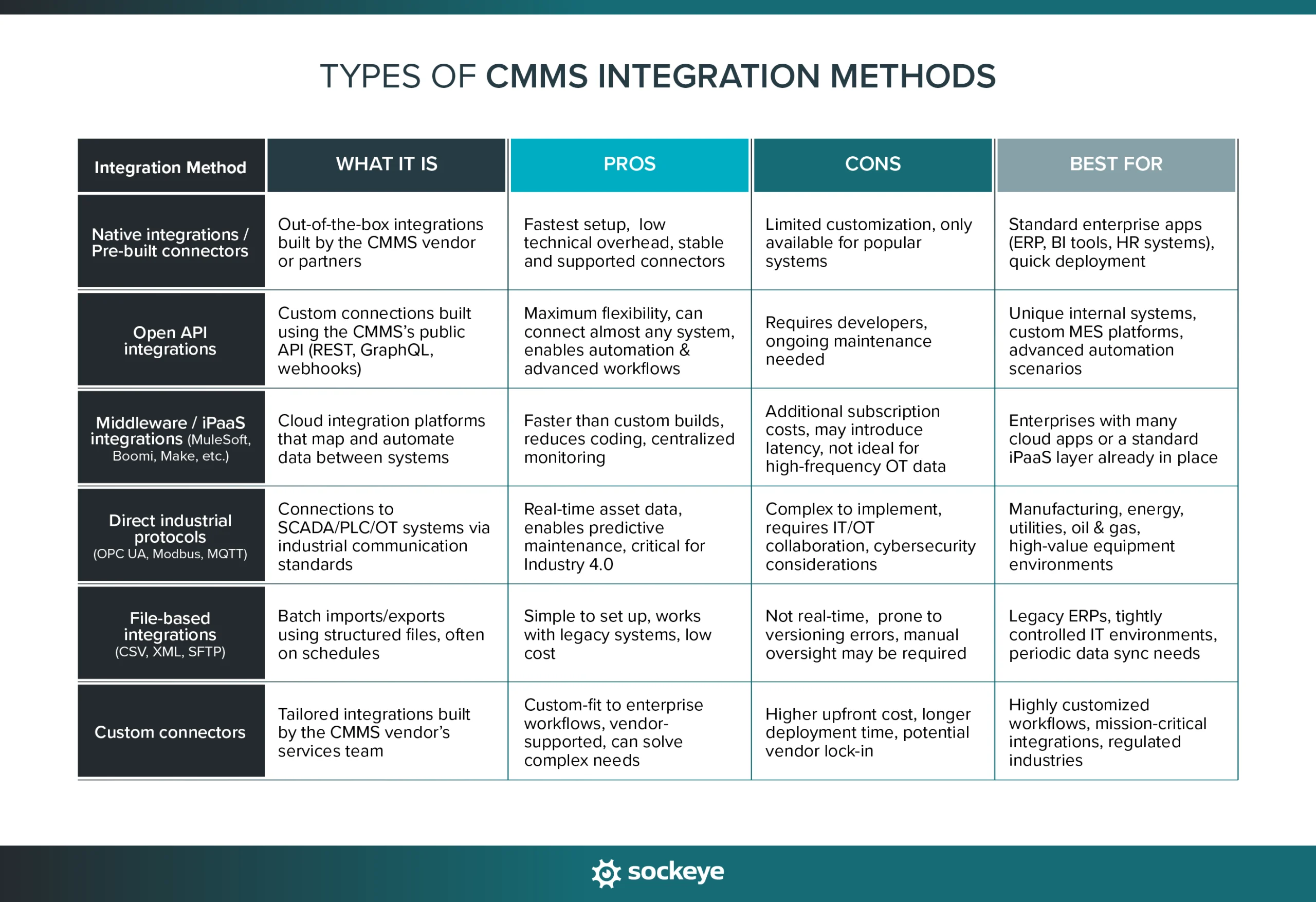
- Native integrations / Pre-built connectors: Out-of-the-box connectors built and supported by the CMMS vendor. Fast to deploy and ideal for common systems like ERP, HR, or analytics tools.
- Open API integrations: Flexible, developer-friendly endpoints that allow two systems to communicate in real time. Best for custom workflows, internal applications, or modern SaaS tools.
- File-based integrations (CSV, XML, SFTP): Scheduled imports and/or exports used for batch updates, system migrations, or environments with strict data controls.
- Middleware / iPaaS platforms: Tools like MuleSoft, Boomi, or Zapier that sit between systems to orchestrate data flows and ensure proper data formats.
- Direct industrial protocol integrations: OPC UA, Modbus, Ethernet/IP, and other industrial protocols that allow CMMS platforms to pull data directly from machines, sensors, or PLCs.
- Custom connectors: Purpose-built integrations for proprietary or legacy systems when no standard connector or API exists.
Sidenote: Nowadays, most cloud-based CMMS vendors offer an open/public REST API. Here at Sockeye, we often leverage that to build two-way integrations with different maintenance software. We can also set up read-only/file-based integrations for those with tight security controls, ensuring you can use Sockeye in tandem with virtually any CMMS or EAM solution.
Before we wrap up, here is a quick comparison table of different integration methods.
Integrations are the engine of CMMS value
A CMMS doesn’t create value just by storing work orders — its value increases by becoming the system every other platform can rely on. When data flows freely between maintenance, operations, finance, and IT, teams make better decisions, reduce manual work, and operate with far more confidence.
Strong integrations turn the CMMS into a true hub for asset intelligence and a foundation for long-term digital transformation.
